
Table of Contents
What you will create:
You will create a repeatable process for asking guests to leave honest Google reviews after their stay. The system will include a review link, a message template, a suitable time to send the request, and a simple way to track results.
In this practice, you will:
- Check whether your accommodation business is eligible for a Google Business Profile.
- Create a direct Google review link or QR code.
- Choose when and how to ask guests for reviews.
- Prepare a neutral review request and make it part of your guest communication.
- Track review activity and improve the process over time.
What prevents guests from sharing their feedback?
Reviews help potential guests compare accommodation options before booking. A hotel with recent, detailed reviews may give travelers more confidence than a similar property with very few reviews or feedback that has not been updated for years.
However, many accommodation operators collect reviews inconsistently. They may ask a guest in person when they remember, send an occasional message, or rely on guests to find the business on Google themselves. As a result, even satisfied guests may leave without sharing their experience.
For example, a small hotel receives positive comments from guests at checkout, but its Google profile gains only a few reviews each month. Staff thank guests for their feedback but do not have a standard way to invite them to share it online.
The solution is to make review requests a normal part of the guest journey. You do not need to pressure guests or send repeated reminders. You need a clear process that makes leaving an honest review easy.
Important: This practice applies to accommodation businesses eligible for a Google Business Profile. Individual holiday homes and apartments are not automatically eligible. Check Google’s Business Profile eligibility guidelines before proceeding.
Why review requests may often fail
A review process often fails because it depends on memory rather than a consistent routine. Common causes include:
- No clear moment to ask: Staff are unsure whether to request a review at checkout, in a follow-up email, or later.
- Too much effort for the guest: Guests must search for the business and find the review form themselves.
- Inconsistent communication: Some guests receive a request while others do not.
- Unclear responsibility: Nobody is responsible for sending requests or checking the results.
- Fear of negative feedback: Operators hesitate to ask for reviews because they cannot control what guests will write.
A good system addresses these problems without trying to control the rating. Google allows businesses to request genuine reviews, but prohibits incentives, pressure, and selectively soliciting positive reviews.
Building your Google review process
Step 1. Confirm your Google Business Profile is ready
Before requesting reviews, make sure your business has an eligible, accessible profile.
Check that:
- You can access and manage the correct Business Profile.
- The business name and contact details are accurate.
- The address or service information is correct for your business type.
- The profile represents the accommodation business rather than an ineligible individual rental.
If you manage an eligible hotel, make sure guests can identify the right property when they open the profile. If your business has multiple locations, verify that each review request points to the correct location.
If your individual vacation rental is not eligible for its own profile, do not create one just to collect Google reviews. Instead, encourage feedback on the booking platform where guests reserved their stay, and follow that platform’s review rules.
Step 2. Create a direct review link
The easier it is to reach the review form, the fewer steps guests need to complete.
Google lets eligible businesses create a review link or QR code from their Business Profile. Follow the current instructions in Google’s guide to review links and QR codes.
The process is generally:
- Sign in to the Google account that manages your Business Profile.
- Open the correct Business Profile.
- Find the option to request or get more reviews.
- Copy the review link.
- If useful, generate and save the QR code provided by Google.
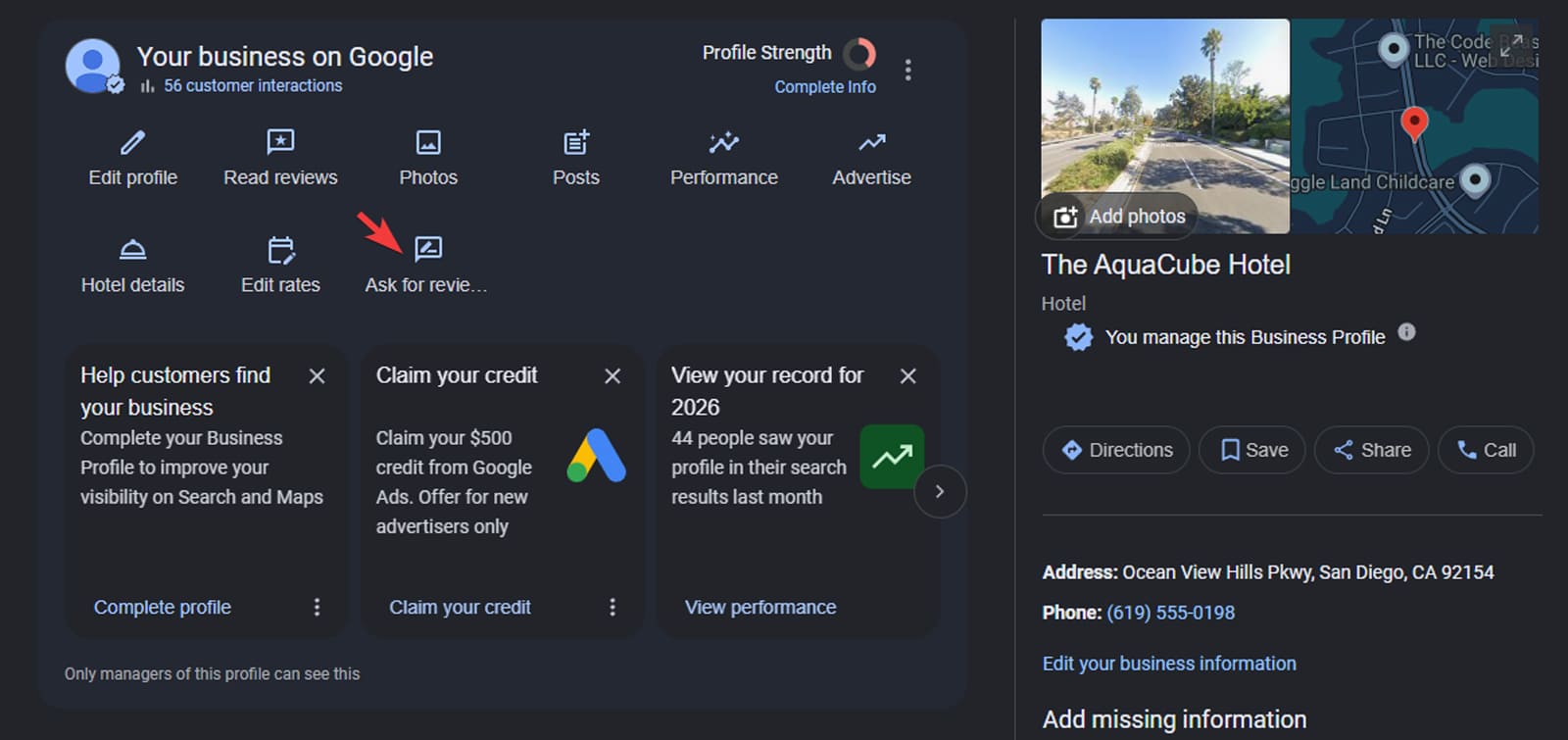
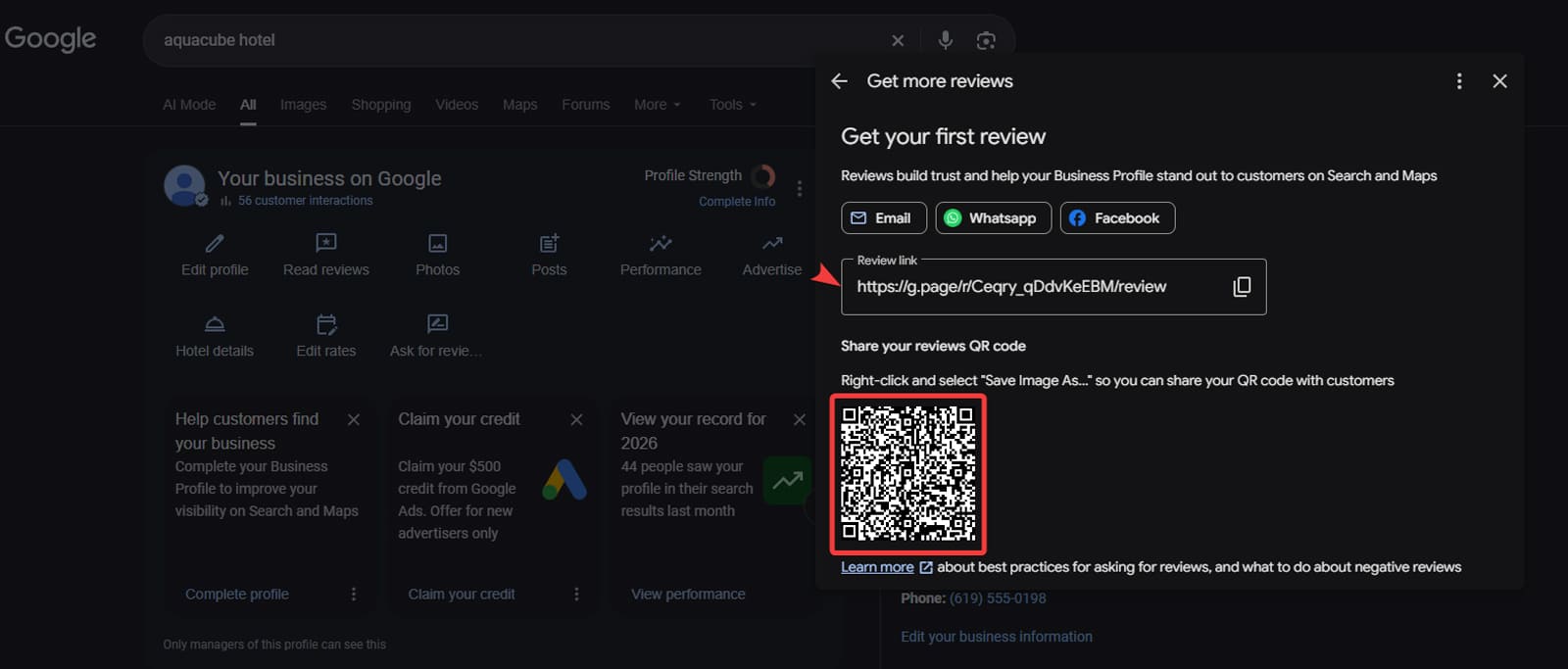
Google’s interface may change, so use the official guide if the labels differ.
Test the link before sharing it. Open it in a separate browser or on a phone and check that it leads to the correct business and review form. If it opens the wrong location or asks guests to find your property manually, fix the link before adding it to your messages.
Keep the link somewhere staff can easily access it, such as a shared communication template or guest-service document.
Step 3. Choose when to request a review
The best time depends on your accommodation and how you communicate with guests. The goal is to ask after the guest has had a genuine opportunity to experience the stay.
For many accommodation businesses, a short follow-up after checkout is a practical option. The guest has completed the stay, and the request does not interrupt their time at the property.
Consider these options:
| Moment | How it may work | What to consider |
|---|---|---|
| At checkout | Staff mention that guests can share their experience online | Keep it optional and avoid putting guests under pressure |
| After checkout | Send a short email or message with the review link | Choose a reasonable time and avoid excessive reminders |
| Thank-you message | Add the link to an existing post-stay message | Keep the request brief and relevant |
| Printed information or QR code | Place a QR code on a card or guest information sheet | Make sure it is easy to scan and does not pressure guests to review on the spot |
For example, a hotel may include a review link in its standard thank-you email sent the day after checkout. A vacation rental manager may send a brief post-stay message after confirming that the guest has checked out.
One of the easiest ways to send such links right after checkout is to use the MotoPress Hotel Booking plugin paired with its Notifier addon. It can be configured to automatically send email notifications with the built-in link. This allows your guest to leave a review without having to manually look for your property’s profile.
While Notifier add-on can be used to configure any kind of message, we recommend to start small and choose one main method first. It is easier to maintain and measure a simple, consistent process than several disconnected requests.
Step 4. Write a neutral review request
When writing the message, ensure it explains that feedback is welcome, make the next step clear, and leave the guest free to decide whether to respond.
Use this template as a starting point:
Subject: Thank you for staying with us
Hello [Guest Name],
Thank you for staying at [Property Name]. We hope you had a comfortable stay.
If you would like to share your experience, you can leave an honest review on Google using the link below:
[Google Review Link]Thank you for your time, and we hope to welcome you again.
Best regards,
[Property or Team Name]
Keep the message short and adapt the tone to your usual guest communication. You can also include the link in a post-stay WhatsApp message if that is an appropriate, established communication channel for your business.
Follow these rules when sending requests:
- Invite all eligible guests consistently, rather than asking only those you expect to leave positive reviews.
- Ask for an honest review; do not request a specific star rating or particular wording.
- Do not offer discounts, gifts, upgrades, or other benefits in exchange for a review.
- Do not pressure guests to write a review while they are still at the property.
- Respect communication preferences and applicable privacy requirements.
See Google’s review policies for the rules on genuine feedback, incentives, and review solicitation.
Step 5. Assign responsibility and record requests
A review system is easier to maintain when everyone knows their role. In a small hotel, the front desk manager may own the process. For a vacation rental portfolio, the person responsible for guest communication may handle it.
Create a simple tracking sheet with these columns:
| Field | Purpose |
|---|---|
| Checkout date | Helps you review activity over time |
| Property | Identifies which accommodation the request relates to |
| Request sent | Confirms whether the process was followed |
| Request method | Shows whether you used email, messaging, or another channel |
| Review received | Records a publicly visible review when you can identify it reliably |
| Follow-up needed | Flags process issues, not guests who have declined to respond |
Keep the record focused on operational tracking. Avoid storing unnecessary personal details, and do not pressure guests who have not left a review.
You do not need to know which individual guest wrote every review to assess whether the system is working. The overall number of requests sent and new reviews received can be enough for a small business to spot trends.
What to check after setting up review requests
Once the process is running, review it regularly – monthly is a reasonable starting point for many smaller accommodation businesses.
Track a few simple indicators:
| Indicator | What it tells you | What to do if results are weak |
|---|---|---|
| Requests sent | Whether the team is following the process | Check responsibilities and whether the request is part of the checkout workflow |
| New Google reviews | Whether review activity is changing over time | Check that the link works and requests are being sent consistently |
| Guest response to the message | Whether the message is clear and appropriate | Simplify the wording and make the request easier to understand |
| Common review themes | What guests repeatedly appreciate or complain about | Address recurring service or property issues |
You can calculate a basic review-request conversion rate if you can reliably compare requests sent with reviews received during a suitable period:
Review conversion rate = Reviews received ÷ Requests sent × 100
Treat this as an internal estimate, not a precise measure of individual guest behavior. Reviews may be posted later, and you may not be able to connect a particular review to a particular request.
Also, do not judge success only by the average rating. Review themes can reveal issues with cleanliness, check-in instructions, noise, or amenities that need attention.
Common mistakes hotel owners make
- Asking only guests who seem happy. This can become selective solicitation. Use a consistent process and invite honest feedback from guests regardless of whether you expect a positive review.
- Offering rewards for reviews. Discounts, gifts, or upgrades in exchange for reviews violate Google’s policy. Ask without offering an incentive.
- Sending too many reminders. Repeated messages can annoy guests. Start with one clear request and avoid unnecessary follow-ups.
- Using the wrong review link. A link to the general Google search page adds extra steps and may lead guests to the wrong business. Test the direct link before using it.
- Ignoring feedback after collecting it. A steady flow of reviews is not enough if recurring complaints remain unresolved. Review comments for patterns and make practical improvements.
- Expecting immediate ranking gains. More reviews do not guarantee a higher local position or more bookings. Google’s local results depend on several factors, including relevance, distance, and prominence.
The next steps to get more guest reviews
Start by confirming your profile eligibility, creating and testing the review link, and adding a short request to your normal post-stay communication. Assign responsibility for sending requests and checking new reviews, then review the process after a month.
Once the routine is stable, use guest feedback to improve the stay itself. A consistent request process makes it easier for guests to share genuine experiences; the quality of those experiences is what your business needs to keep improving.