
Table of Contents
What you will create:
You will create a simple competitor audit to compare your Google Maps listing with similar accommodation businesses nearby. The audit will help you identify missing information, weak points, and practical improvements to make your property more useful and appealing to potential guests.
In this practice, you will:
- Choose relevant competitors and compare their Google Maps listings.
- Check your business information, categories, amenities, photos, and reviews.
- Identify differences that may affect visibility and guest decisions.
- Prioritize improvements based on your findings.
- Track changes and review your local search performance.
How your Google listing compares with nearby properties
Your accommodation business may have a Google Maps listing, but that does not mean it is as complete or useful as competing listings. Potential guests might see nearby properties with more recent photos, clearer amenity information, more reviews, or better-maintained business details.
For example, you manage a small hotel with free parking, Wi-Fi, and family rooms. A nearby hotel offers similar amenities but displays them clearly, has current room photos, and receives regular guest reviews. When travelers compare the two listings, your property may look less informative, even if the actual guest experience is just as good.
A competitor audit helps you identify these gaps. Instead of making random changes, you can focus on improvements that help guests understand what you offer and make an informed booking decision.
Keep in mind that a better-looking listing does not guarantee a higher Maps position. According to Google, local results are mainly based on relevance, distance, and prominence. While your audit can help improve factors you control, it cannot eliminate the effect of distance or reveal Google’s exact ranking formula. Check Google’s local ranking guidance for more information.
Common issues revealed by competitor audits
Accommodation owners often manage their own listings without regularly checking what competing businesses show. As a result, several issues can go unnoticed:
- Outdated information: Your amenities, contact details, or website link may no longer reflect your current offering.
- Incomplete presentation: Competitors may have clearer photos or more complete information about their rooms and facilities.
- Limited review activity: Competitors may have accumulated more guest feedback or respond to reviews more consistently.
- Unclear positioning: Your listing may not communicate what makes your property suitable for its target guests.
- Unfair comparisons: You may compare your property with businesses in different locations, price ranges, or accommodation categories.
The goal is not to copy competitors. It is to understand what guests can see, identify genuine gaps, and improve your own listing where appropriate.
How to audit your Google Maps listing
Step 1. Choose the right competitors
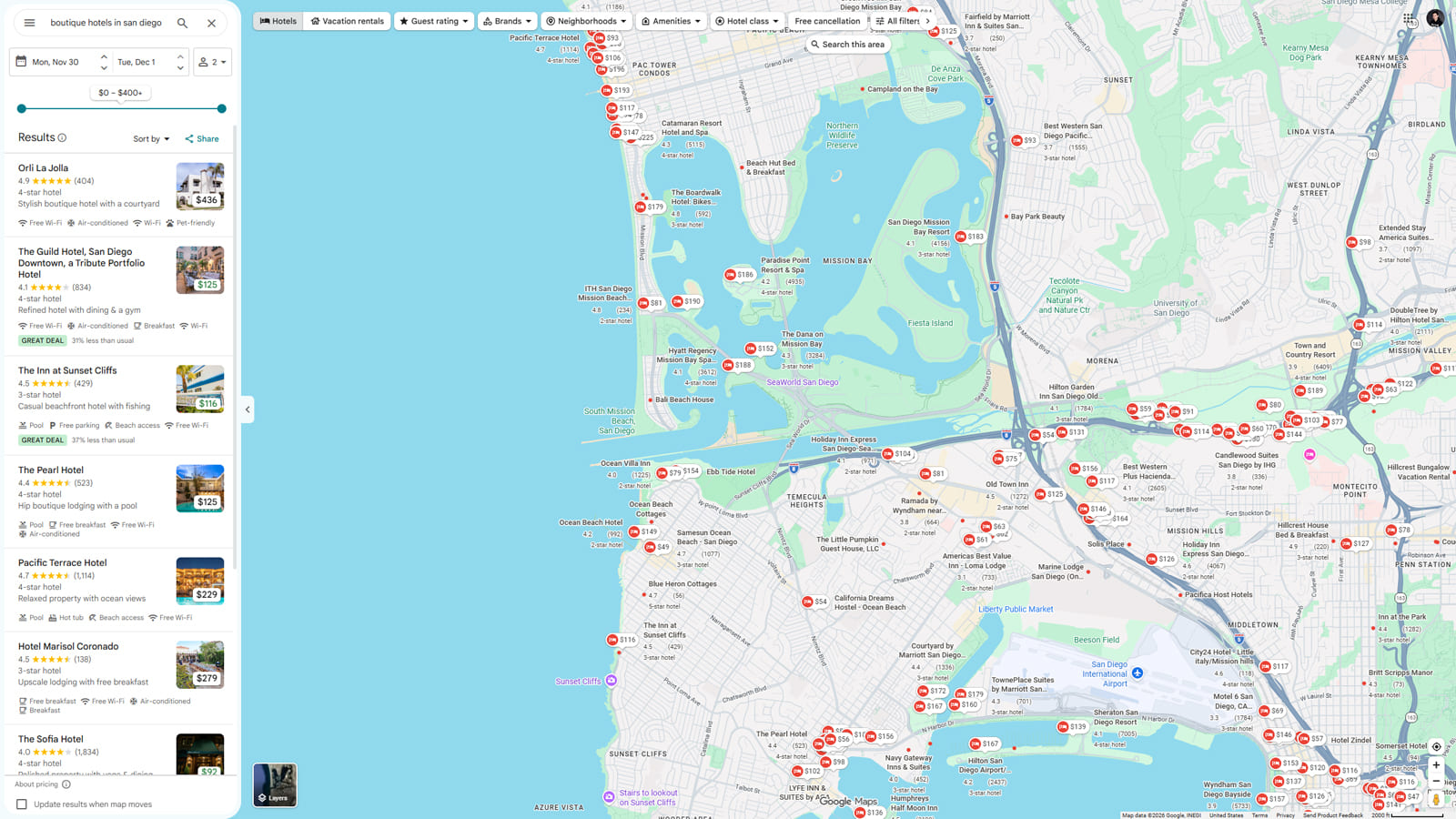 Start by identifying three to five accommodation businesses that compete with yours for similar guests.
- Open Google Maps in a browser or app.
- Search for the type of accommodation you operate and your location. For example, try “boutique hotel in San Diego,” “guest house near the city centre,” or “holiday apartments in Split.”
- Review the results and select three to five businesses that offer a similar type of stay.
- Open each listing and record its name and location in a spreadsheet.
Choose businesses that are relevant to your actual market. A small guest house should not use a large luxury resort as its only benchmark. Likewise, a city-centre hotel should prioritize comparable hotels serving travelers who want to stay in that area.
You can also search for a few specific guest needs, such as “hotel with parking” or “pet-friendly accommodation.” This can reveal which businesses appear when travelers look for a particular amenity.
Important: Google Maps results can vary depending on the searcher’s location, query, and other factors. Treat your search results as a useful snapshot, not a fixed ranking that every guest sees.
Step 2. Record your starting position
Before comparing individual listing details, establish a baseline for your own business.
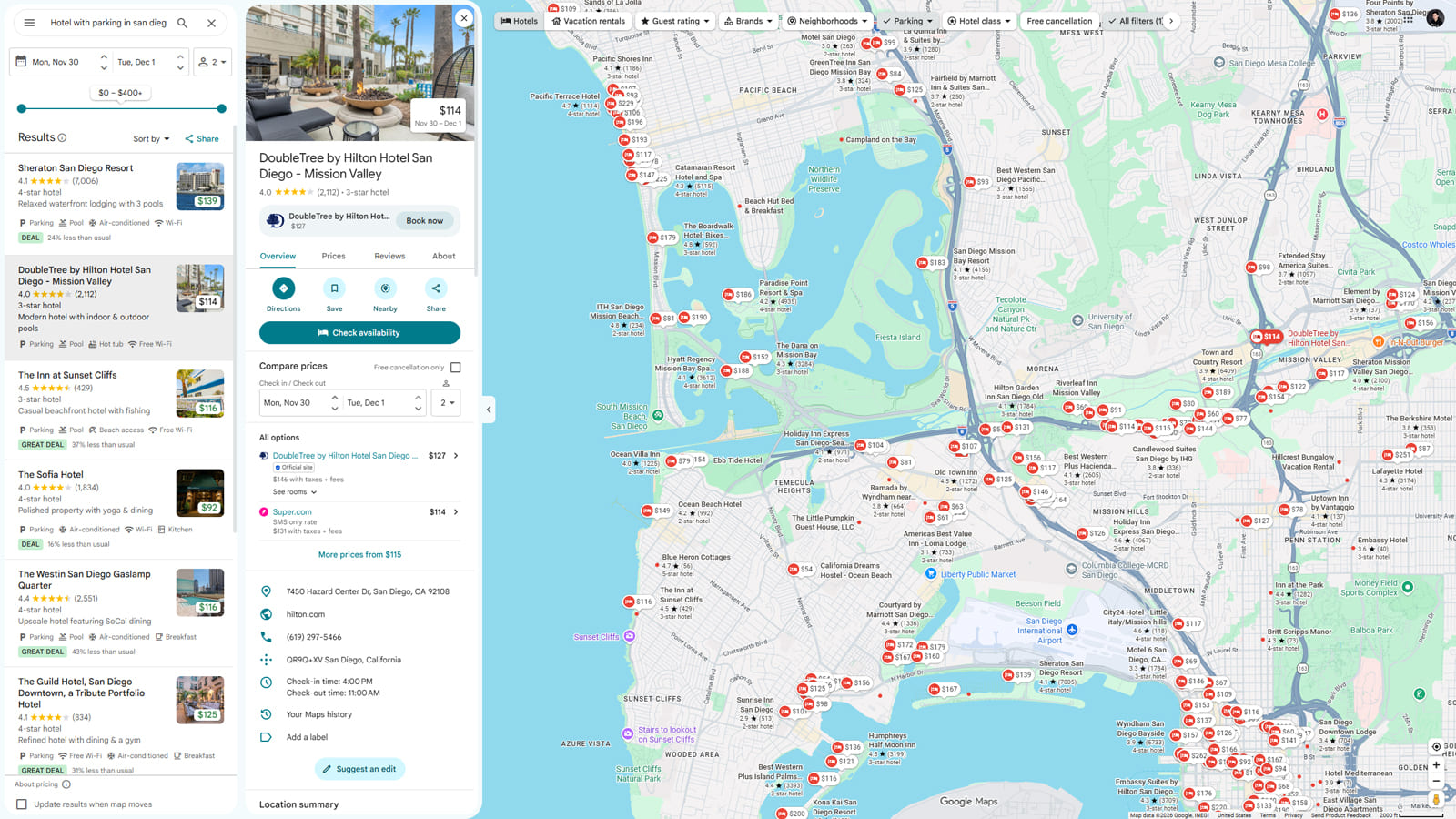 Search for your property using the same queries you used to find competitors. Record where your listing appears among the results, if it appears at all.
Use a table like this:
| Search query | Your position | Date checked | Notes |
|---|---|---|---|
| Boutique hotel in San Diego | 6th | Oct 28 | Several nearby hotels appear first |
| Hotel with parking in San Diego | Not visible in first results | Oct 28 | Check whether parking is listed |
| Family hotel in San Diego | 4th | Oct 28 | Relevant amenities may need review |
Make a copy of the Google Maps visibility tracker template
These entries are illustrative; record your actual findings. If your property does not appear in the visible results, write that down rather than assuming it has no Google Maps listing.
Repeat the same searches for your competitors. Keep the search location, wording, and conditions as consistent as possible.
Do not treat a single position as a definitive measure of performance. Search results may change by location and query, so compare patterns across several relevant searches and dates.
Step 3. Compare business information and categories
Next, check whether your listing provides accurate and complete information.
Open your own Google Business Profile and compare it with each competitor’s public listing. Use this table to organize your findings:
| What to check | Questions to ask | Possible action |
|---|---|---|
| Business name and category | Is the property correctly identified and categorized? | Correct inaccurate information and review category options |
| Address and contact details | Can guests find the property and contact you? | Update incorrect details |
| Website link | Does the link open the right page? | Test and correct the link |
| Amenities and attributes | Are relevant facilities clearly listed? | Add or correct available attributes |
| Booking information | Can guests find available booking options or relevant links? | Review the booking information available to your property |
| Description and other details | Does the information accurately explain the property? | Improve incomplete or outdated details where editable |
For hotels, review the Hotel details section in your verified profile. Google allows eligible hotel owners to edit supported amenities and attributes there. Some information, including hotel prices and booking links, comes from Google Hotel Ads and free booking links rather than ordinary editable profile fields. See Google’s hotel details guide.
Not every field is available to every accommodation type. If a competitor displays a feature that you cannot add, do not assume your listing is broken. Check the relevant eligibility rules and available settings first.
What to look for: Missing information that is both accurate for your property and useful to your intended guests. Do not add an amenity simply because a competitor offers it.
Step 4. Audit photos and visual presentation
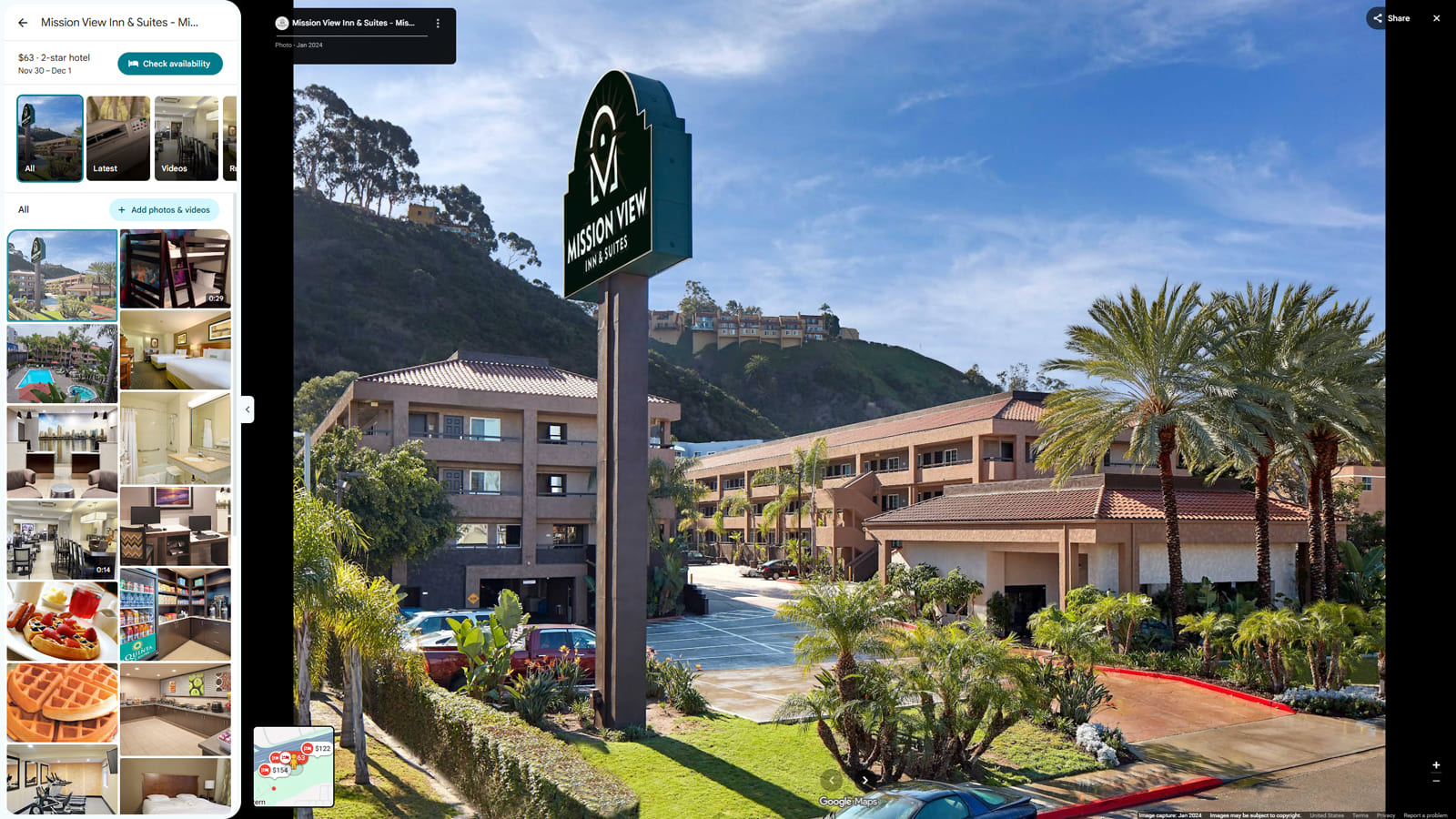 Photos help guests understand what a property looks like before they decide whether to book. Compare your visual presentation with that of your competitors.
Check:
- Exterior: Can guests recognize the building or entrance?
- Rooms: Are the main room types represented clearly?
- Shared spaces: Are relevant facilities, such as breakfast areas, pools, or lounges, shown?
- Amenities: Can guests see features that matter to your audience, such as parking, a workspace, or a garden?
- Accuracy: Do the photos reflect the property’s current condition?
Record how many useful, relevant photos each listing has, but do not treat photo count alone as a measure of quality. A smaller collection of clear, current images may be more helpful than a larger collection of repetitive or outdated ones.
For example, if competing hotels show their rooms, bathrooms, and breakfast areas while your listing has only exterior photos, updating your photo selection is a practical priority.
Use real images that represent the property accurately. Google’s photo guidelines explain its recommendations for business-specific photos.
Step 5. Compare reviews and guest feedback
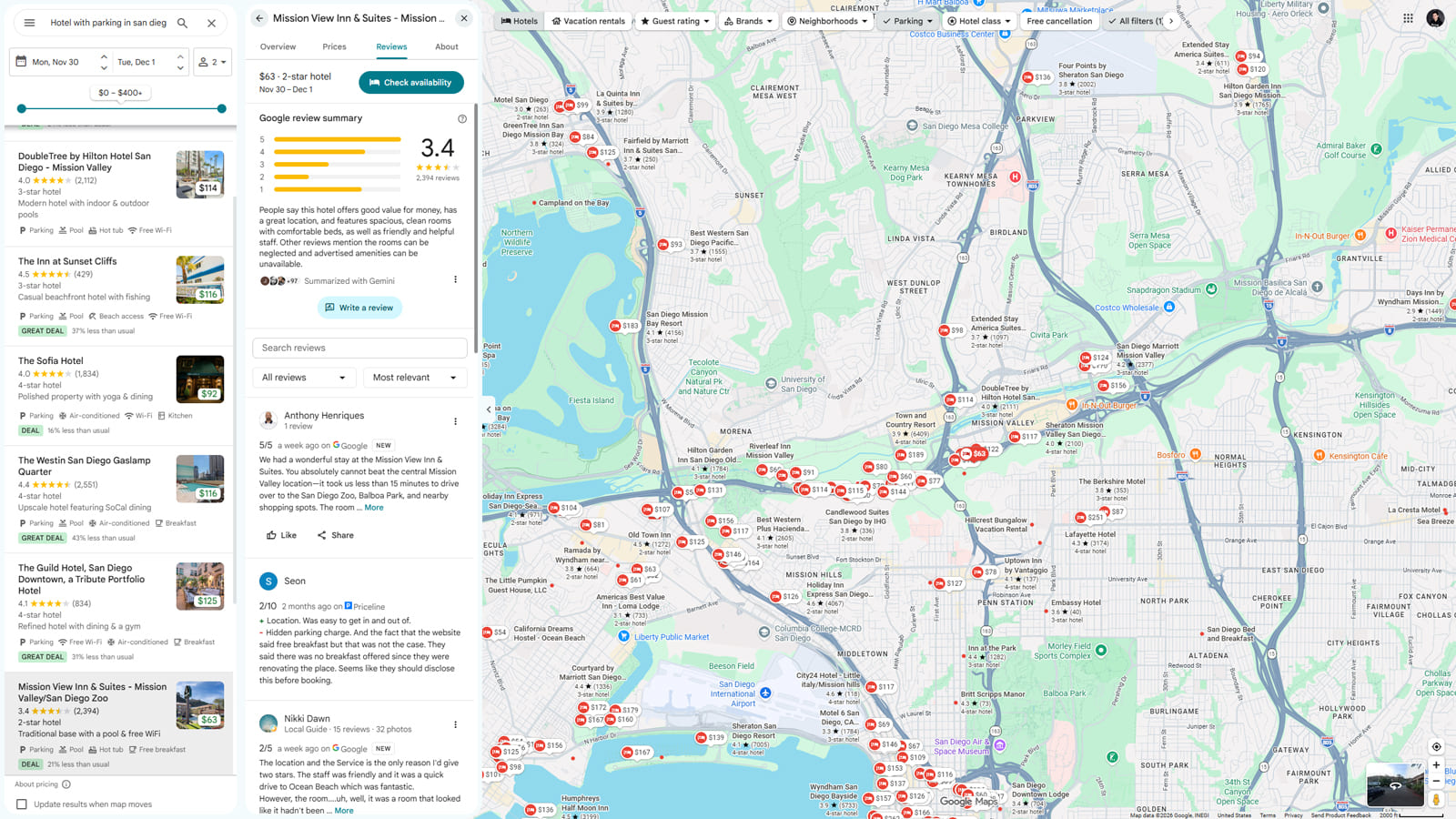 Reviews can help travelers assess whether a property matches their expectations. They also provide insight into the strengths and weaknesses guests mention most often.
Compare your listing with competitors using the following criteria:
| Review indicator | What to examine |
|---|---|
| Overall rating | How does your rating compare with similar properties? |
| Review count | How much guest feedback has each property accumulated? |
| Recency | Are reviews still appearing, or are most of them old? |
| Owner responses | Does the business respond to positive and negative feedback? |
| Repeated themes | Which aspects of the stay do guests mention most often? |
Do not focus only on the average star rating. Read a sample of recent reviews for each property and note recurring topics such as cleanliness, check-in, staff helpfulness, noise, location, or room comfort.
For instance, if guests repeatedly praise a competitor’s easy self-check-in, ask whether your own check-in process is clear and convenient. If your reviews mention confusing arrival instructions, that may be an opportunity to improve the guest experience.
Use review comparisons to identify service improvements, not to copy competitors’ wording or pressure guests to leave positive reviews. Respond professionally to feedback and invite genuine reviews consistently.
Step 6. Identify your main gaps and prioritize them
Once you have compared the listings, turn your observations into an action plan. Avoid trying to change everything at once.
Create a simple table with each finding, its importance, and the next action.
| Finding | Priority | Next action |
|---|---|---|
| Website link leads to an outdated page | High | Replace it with the correct page |
| Important amenities are missing from the listing | High | Check eligibility and update supported fields |
| Room photos are old | Medium | Add current, accurate room photos |
| Competitors have more recent reviews | Medium | Set up a consistent process for requesting honest reviews |
| Your listing has fewer photos of shared spaces | Low or medium | Add useful photos based on guest needs |
Set priorities according to accuracy, guest impact, and how easily you can address the issue. Incorrect contact details deserve immediate attention because they can prevent potential guests from reaching you. A minor difference in photo quantity may be less urgent.
Separate fixes from experiments. Correcting a broken website link is a clear fix. Adding more photos or improving your description may help guests make decisions, but the impact on visibility or bookings needs to be assessed over time.
What to monitor after updating your listing
After making your updates, confirm that the changes appear correctly and monitor whether they help your business.
| Check or metric | What it tells you | What to do |
|---|---|---|
| Profile information | Whether the details are accurate and displayed as expected | Correct any remaining errors |
| Photos and amenities | Whether guests can see the features you intended to highlight | Review missing or incorrect content |
| Search visibility | Whether your listing appears for relevant queries | Compare the same searches under similar conditions |
| Business Profile performance | How people discover and interact with your profile | Review available performance data in your profile |
| Website visits and bookings | Whether potential guests take further action | Compare trends with your previous baseline |
Google Business Profile performance can provide data on how people find and interact with your profile, although available metrics may vary. Use it alongside your website analytics and booking records rather than relying on Maps positions alone.
Allow time for patterns to emerge. A change in ranking may be caused by several factors, including search location and competition. An increase in profile interactions does not automatically mean more completed reservations.
If your listing remains difficult to find, check whether your business information is complete, whether your categories match your accommodation, and whether you are comparing yourself with genuinely relevant competitors. Review Google’s guidance on local ranking factors before making further changes.
Common audit mistakes
- Comparing yourself with unsuitable businesses. Choose competitors that serve similar guests and offer a comparable type of accommodation.
- Checking rankings only once. Search results vary, so record the date and repeat important searches before drawing conclusions.
- Copying competitor content. Use the audit to identify gaps, not to duplicate descriptions, photos, or other material.
- Adding inaccurate amenities or keywords. Only provide information that truthfully represents your business and follows Google’s guidelines.
- Focusing exclusively on star ratings. Read review content and look for recurring service issues that you can address.
- Expecting immediate ranking improvements. A completed profile audit does not guarantee a higher position or more bookings.
Turning your audit into action: Core steps
Turn your audit into a short improvement plan by correcting inaccurate information first, then updating amenities, photos, and other guest-facing details. Assign responsibility for each task and keep track of when changes are made to measure their impact.
Repeat the comparison every few months or after major property updates, using the same searches and performance indicators to track progress. Treat competitor listings as a reference rather than a template to copy. The goal is to make your own property accurate, informative, and appealing to the guests you want to attract.