
Table of Contents
What you’ll create: A small Google Search campaign that promotes one accommodation property to travelers actively searching for a place to stay.
In this practice, you will:
- Choose one property and define the travelers you want to reach.
- Select high-intent search queries that indicate a readiness to book accommodation.
- Create a standard Search campaign in the Google Ads dashboard.
- Configure campaign goals, targeting, bidding, budget, and networks.
- Create a responsive search advertisement with relevant headlines and descriptions.
- Choose the right landing page and add useful ad assets.
- Review, launch, and monitor your campaign to identify irrelevant searches and improve targeting.
Before you start: Complete the previous practice, Set up basic conversion tracking. You should already have a working Google Ads account, a tested conversion action for completed direct bookings, and a functioning booking website.
1. Choose one property and one high-intent search audience
For your first campaign, don’t try to promote every property, room type, and service your business offers. Focus on one accommodation offer and a clearly defined audience.
We’ll use this example throughout the tutorial:
Example property: Pine Ridge Cottage, Zakopane
- Two-bedroom private holiday cottage.
- Accommodates up to four guests.
- Private hot tub.
- Mountain views.
- Online availability search and direct booking.
- Target audience: travelers in the United Kingdom looking for a family cottage in Zakopane.
The property is fictional, but the scenario illustrates how to build a campaign for a real holiday rental, villa, apartment, guesthouse, or hotel.
What makes a search high-intent?
High-intent searches are queries that indicate someone is relatively close to making a purchasing or booking decision.
Compare these examples:
| Search query | Likely search intent |
|---|---|
| Things to do in Zakopane | General destination research. |
| Best time to visit Zakopane | Travel planning. |
| Family accommodation in Zakopane | Accommodation research and comparison. |
| Family cottage near Zakopane with hot tub | Specific accommodation search. |
| Book a cottage in Zakopane | Strong booking intention. |
| Cottage in Zakopane available in February | Specific availability and booking intention. |
Notice how the searches become more specific. Someone looking for a cottage with a particular facility or checking availability is generally closer to making a reservation than someone researching the destination.
This doesn’t guarantee that every specific searcher is ready to book. However, these queries give you a more relevant starting point for a small campaign.
Prepare your campaign focus
Before opening Google Ads, write down:
| Campaign element | Our example |
|---|---|
| Property | Pine Ridge Cottage |
| Accommodation type | Private two-bedroom cottage |
| Destination | Zakopane, Poland |
| Main selling points | Private hot tub, mountain views, sleeps four |
| Target country | United Kingdom |
| Advertisement language | English |
| Main conversion | Completed direct booking |
| Landing page | The dedicated cottage page on the property’s website |
For your own business, choose the country or countries where your potential guests live and the language they use to search. If you target several different language markets, consider creating separate campaigns with matching advertisements and landing pages.
2. Prepare your keywords
You should already have a shortlist of relevant search terms from the previous practice, Identify whether paid search is appropriate for your property.
Now narrow that list down to searches that indicate a specific accommodation need and a reasonable likelihood of booking.
For Pine Ridge Cottage, we could use:
| Keyword | Match type | Why include it? |
|---|---|---|
[family cottage zakopane] | Exact | Targets a specific family accommodation search. |
[cottage with hot tub zakopane] | Exact | Matches a specific facility offered by the property. |
"family cottage near zakopane" | Phrase | Captures variations of a relevant accommodation search. |
"cottage with hot tub near zakopane" | Phrase | Targets travelers looking for the property’s main feature. |
"book a cottage in zakopane" | Phrase | Indicates a more direct booking intention. |
"two bedroom cottage zakopane" | Phrase | Matches the property’s accommodation type and capacity. |
These are example keywords, not verified search-volume recommendations. Use Keyword Planner to check which phrases have actual demand in your target country and language. If a phrase has very little search volume, don’t force it into the campaign simply because it sounds relevant.
Understand keyword match types
Google Ads uses three main keyword match types:
- Exact match: Written with square brackets, such as
[cottage with hot tub zakopane]. It gives you relatively precise targeting, although Google can still match close variations and searches with the same meaning. - Phrase match: Written with quotation marks, such as
"cottage with hot tub near zakopane". It reaches searches that include the meaning of your keyword and its close variations, offering more flexibility than exact match. - Broad match: Written without quotation marks or brackets. It can match a wider range of related searches using additional contextual signals.
For this first, tightly controlled campaign, start with exact and phrase match keywords. Avoid broad match initially because you want to understand which specific searches attract visitors before expanding the reach.
An important detail: exact match does not mean that a search must contain precisely the same words in precisely the same order. Google can match close variants, including searches with similar meanings. Phrase match is also more flexible than its name might suggest.
Read Google’s explanation of keyword matching.
Prepare negative keywords
Negative keywords help prevent your advertisements from appearing for searches that are irrelevant to your offer.
For example, if you only provide short-term holiday accommodation, you probably don’t want to pay for clicks from people searching for long-term rentals, accommodation jobs, or free places to stay.
For our example, we could start with:
| Negative keyword | Reason |
|---|---|
jobs | Exclude employment searches. |
careers | Exclude accommodation-related job searches. |
"long term rental" | Exclude people looking for long-term accommodation. |
"monthly rental" | Exclude monthly rental searches if you don’t offer them. |
"free accommodation" | Exclude searches for free stays. |
camping | Exclude campsite searches if you don’t offer camping accommodation. |
Only add exclusions that genuinely don’t apply to your business. For example, don’t automatically exclude words such as “cheap” or “budget” if your property offers affordable accommodation.
Negative keyword matching also behaves differently from positive keyword matching. Negative keywords don’t automatically include all close variants, so review singulars, plurals, and related terms where necessary.
3. Create a new Search campaign in Google Ads
Now move to the actual campaign setup.
Open Google Ads and sign in to your account.
Step 1. Start a new campaign.
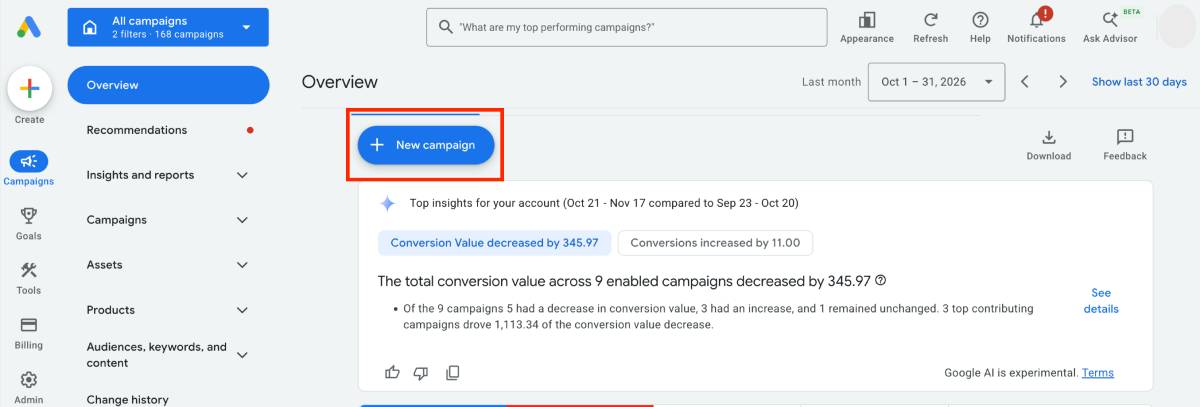
- Open the Campaigns section in the left-hand navigation.
- Click the blue + button.
- Select New campaign.
Step 2. Choose your campaign objective.
Google Ads offers several campaign objectives, including Sales, Leads, and Website traffic.
For our example, select:
Sales
This is appropriate because our main goal is to generate completed direct bookings.
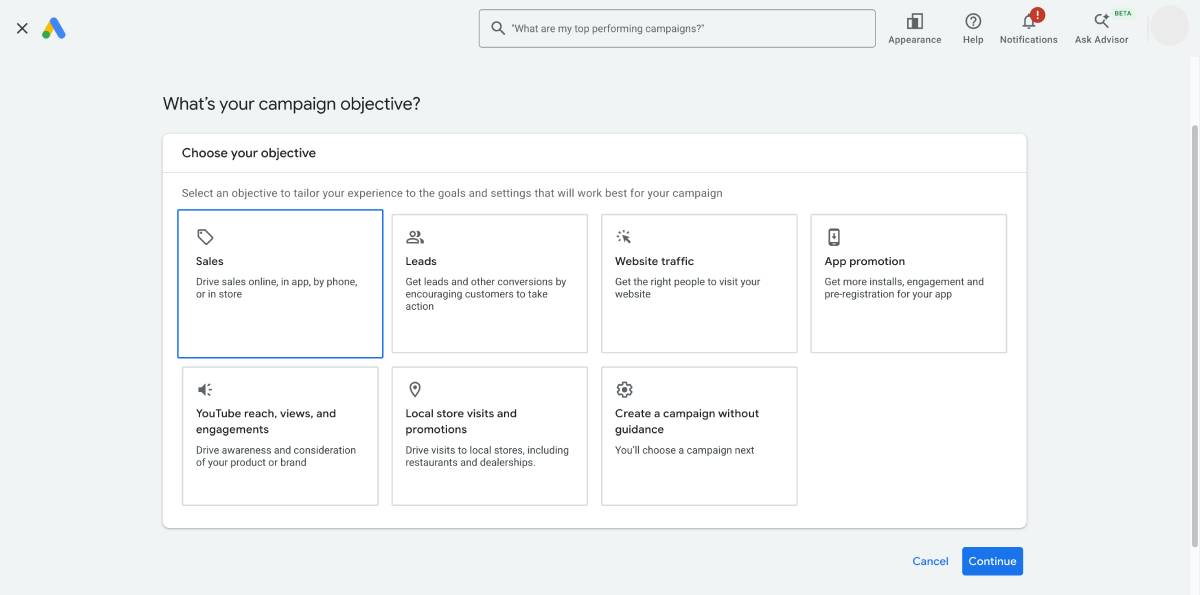
If you only collect booking requests that require manual confirmation, you may need to select Leads and measure those requests separately from confirmed reservations.
Step 3. Select the campaign type.
Choose:
Search
This creates a standard Search campaign that can show text advertisements to people searching on Google.
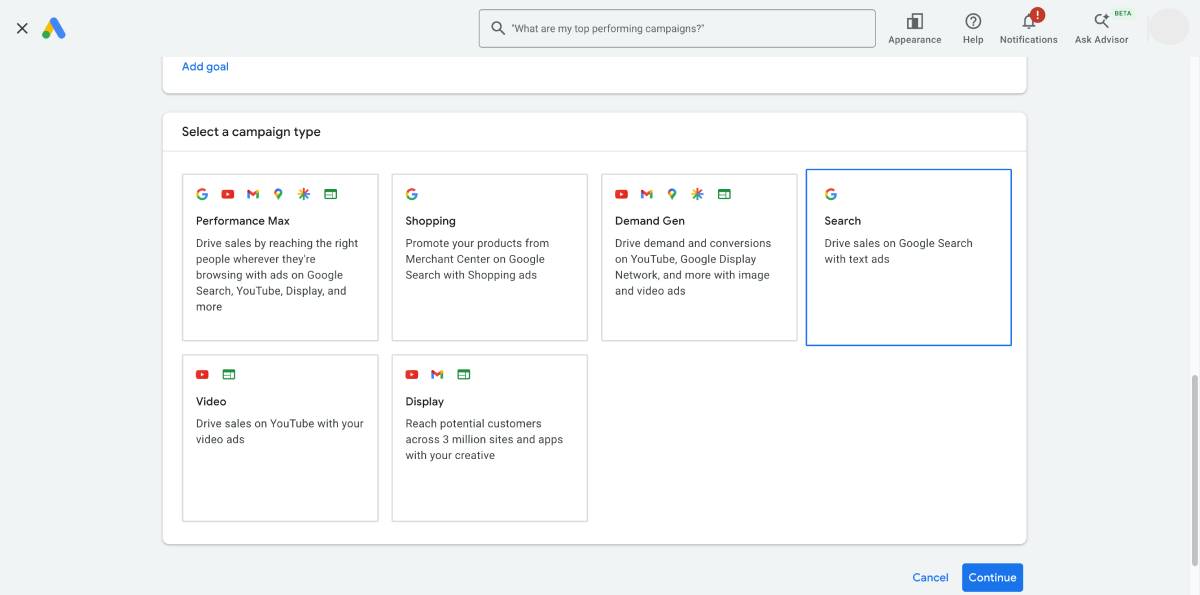
Don’t confuse it with:
- Performance Max: A campaign type that can serve advertisements across multiple Google channels and placements.
- Hotel Ads: A separate hotel metasearch advertising experience involving accommodation prices and booking links.
- Search campaigns for Travel: A specialized Search campaign feature using connected travel feeds and additional requirements.
For this practice, we’re building an ordinary keyword-based Search campaign that sends visitors directly to your accommodation website.
Step 4. Review the conversion goals.
During campaign setup, Google Ads asks which conversion goals should be used for campaign optimization.
Select the completed booking conversion you configured in the previous practice.
For example:
Confirmed direct booking / Purchase
Check that availability searches, page views, and other intermediate actions aren’t included as the main booking goal.
If necessary, review your conversion actions under:
Goals > Conversions > Summary
Make sure your confirmed booking action is configured as a primary conversion.
Step 5. Name your campaign.
Use a name that makes it easy to recognize its purpose.
For example:
Search | Zakopane Cottage | UK | Non-brand
This helps you distinguish the campaign from other future campaigns for different properties, locations, or target markets.
Click Continue to proceed.
Google saves campaign changes as a draft while you work through the setup.
See Google’s Search campaign creation guide.
4. Configure campaign settings
Now you’ll define where your advertisements can appear, whom they target, and how your budget is spent.
Step 1. Choose your bidding strategy
Bidding determines how Google decides how much to bid for an advertising opportunity.
For a small first campaign, your choice depends on whether you already have reliable booking conversion history.
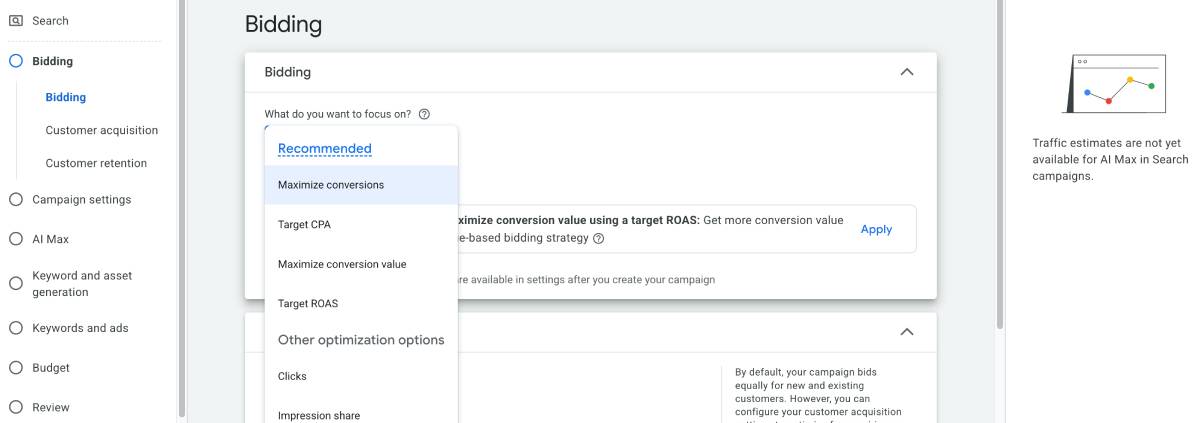
Option A: Maximize clicks
For our initial controlled test, use Maximize clicks if you have little or no historical Google Ads conversion data.
This strategy aims to generate as many clicks as possible within your budget.
If the option is available, set a maximum CPC bid limit. Use the maximum affordable CPC you calculated in the previous practice as your starting reference.
For example, if you established that you can afford to pay up to €2.40 per click, use that figure as the initial bid limit.
This helps prevent Google from bidding above the amount you consider financially acceptable for each click.
Remember that Maximize clicks optimizes for traffic, not completed bookings. The high-intent keywords and your conversion tracking will help you evaluate the quality of the traffic afterwards.
Option B: Maximize conversions
Choose Maximize conversions when you have correctly implemented booking conversion tracking and sufficient reliable conversion information to give automated bidding a useful starting point.
This strategy uses Google’s automated bidding to seek as many conversions as possible within your campaign budget.
You don’t necessarily need to set a target CPA immediately. First observe the actual cost per booking and build a realistic performance baseline.
Be aware that Maximize conversions is designed to spend your average daily budget to pursue conversions. It doesn’t automatically guarantee that each booking will cost less than your target CPA.
Our recommendation: Start with Maximize clicks and a maximum CPC limit if this is your first campaign and you have no useful historical paid-search booking data. Consider Maximize conversions after you have reliable conversion results.
For more information, see Maximize clicks bidding and Maximize conversions bidding.
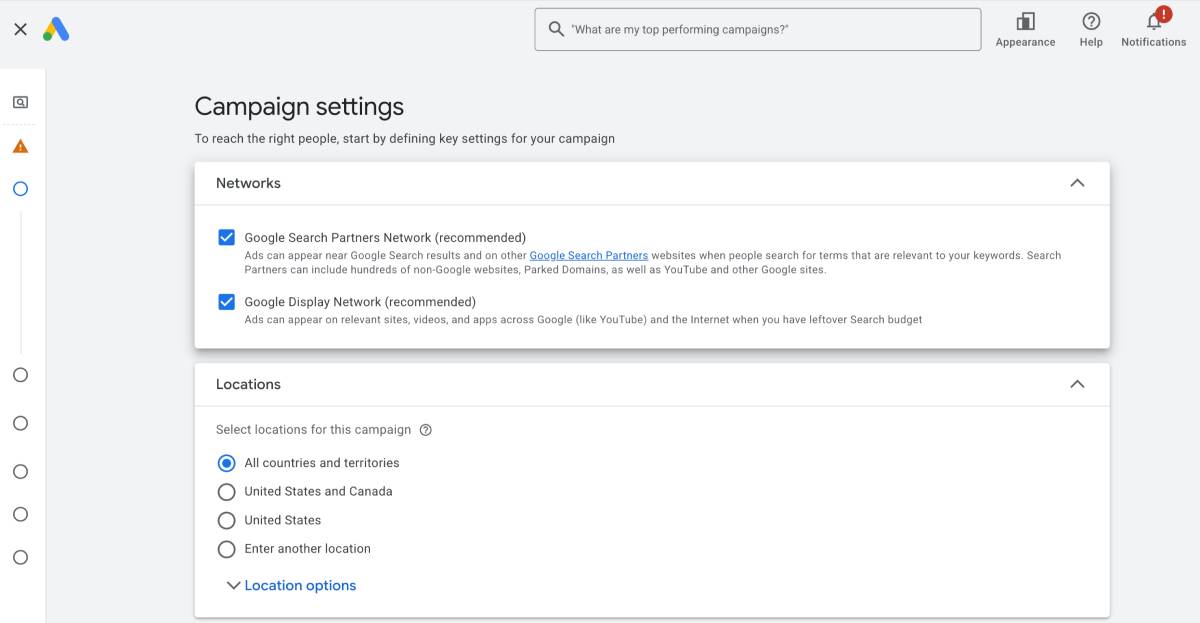
Step 2. Choose the advertising networks
Google may offer additional networks where your advertisements can appear.
For this first campaign, keep the reach focused:
- Google Search Network: Keep this enabled.
- Google Search Partners: Leave this unchecked initially.
- Google Display Network: Leave this unchecked.
Why?
You want to evaluate people actively searching for your accommodation on Google, rather than mixing standard Search traffic with visitors from additional search partners or Display placements.
You can test those additional placements later in a separate campaign or after establishing a reliable baseline.
Step 3. Choose your target locations
In the Locations section, select the countries or regions where your potential guests are based.
For our example:
United Kingdom
This means we’re trying to reach people in the UK searching for a cottage in Zakopane, rather than people physically located in Zakopane.
Open Location options or the advanced location targeting settings.
For this example, choose:
Presence: People in or regularly in your targeted locations.
This keeps the campaign focused on people physically located in your selected source market.
Google’s default targeting may also include people who have shown interest in your targeted locations. This is a broader approach and can be useful in other circumstances, but using presence is a more controlled starting point when you specifically want to target potential guests based in a particular country.
If your business mainly attracts visitors from several countries, add the most relevant ones based on your existing booking data. Avoid selecting every country simply to increase reach.
More info: Google’s geographic targeting guide.
Step 4. Set your campaign language
Choose the language that matches your advertisement and the landing page.
For our example:
English
If you want to advertise to German-speaking guests, prepare German-language keywords and advertisements and direct them to a German-language landing page.
Don’t assume that selecting a country automatically sets the appropriate language for your campaign.
Step 5. Review additional targeting options
Google Ads may offer audience segments, demographic settings, device adjustments, and other targeting controls.
For this initial Search campaign:
- Don’t restrict your campaign to a narrow audience segment unless you have a specific reason.
- Keep the default device availability rather than excluding mobile or desktop visitors.
- Don’t add multiple layers of targeting that could unnecessarily reduce the reach of your already specific keywords.
Your high-intent keyword selection is already doing much of the audience filtering.
Step 6. Review AI Max settings
This is important in the current Google Ads interface. Google states that AI Max is enabled by default for new Search campaigns.
AI Max is an optimization layer that can expand search-term matching, customize advertisement text, and use Final URL expansion to direct visitors to other relevant pages on your website.
These features can help advertisers discover additional opportunities, but they also introduce more automation into the campaign.
For this first, tightly controlled keyword test, we recommend turning off the Optimize your campaign with AI Max setting.
This keeps your initial experiment focused on the exact and phrase match keywords you selected and the landing page you specified.
You can test AI Max later, once you have a baseline for comparison and are comfortable reviewing its search terms, generated assets, and landing page selections.
To review or change this setting in an existing campaign:
- Go to Campaigns > Settings.
- Select your Search campaign.
- Open the AI Max section.
- Review the campaign-level AI Max toggle and opt out for this initial test.
- Save the settings.
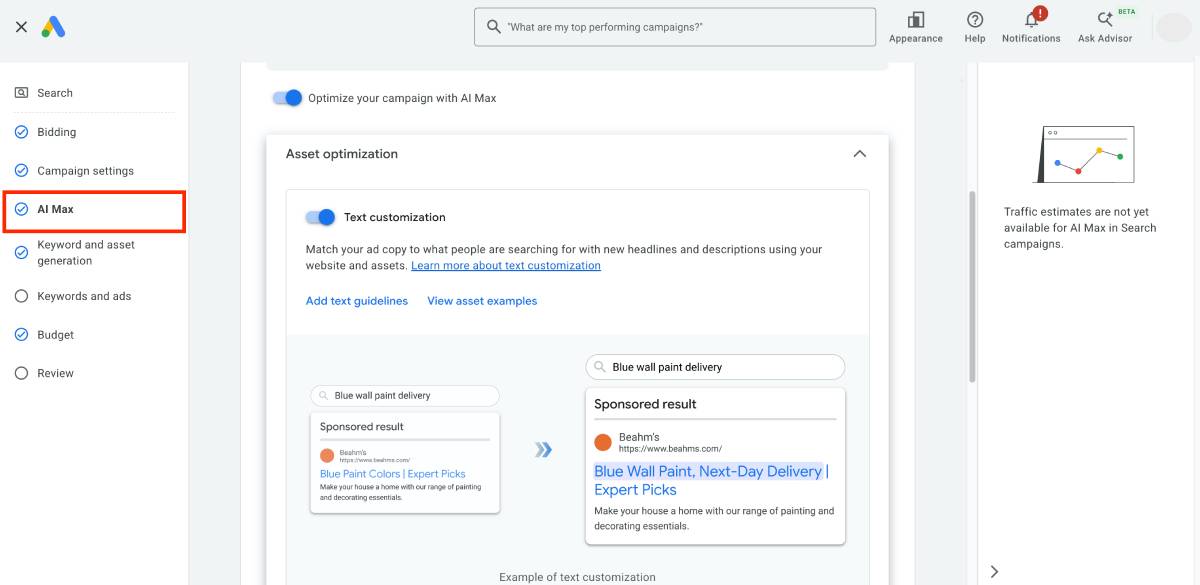
Google’s setup documentation also explains how AI Max affects search-term matching and asset optimization: Set up AI Max for Search campaigns.
Step 7. Set your campaign budget
Now decide how much you want to spend on the campaign test.
Use the budget you established in the previous practice, based on your affordable acquisition costs and estimated traffic.
For example, assume you have allocated:
€280 for a 14-day campaign test.
In the budget section, Google Ads may offer the option to choose between an average daily budget and a total campaign budget.
For a short, controlled test, select Campaign total budget, if this option is available for your campaign.
Enter:
- Total campaign budget: €280.
- Start date: Your chosen campaign start date.
- End date: 14 days after the start date.
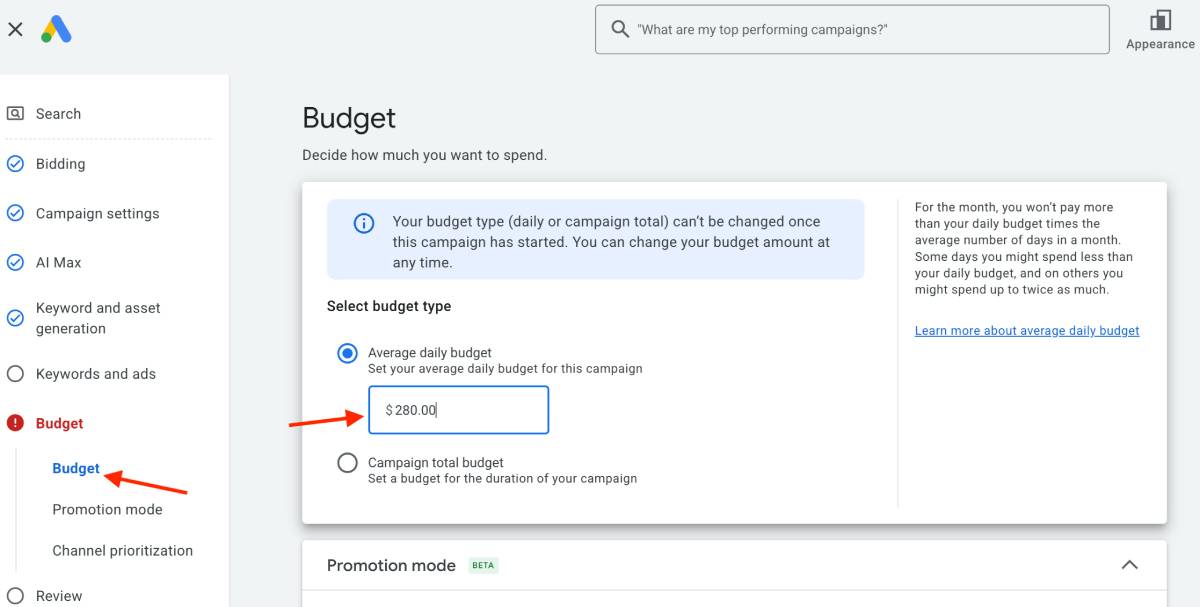
Google Ads will aim to distribute the campaign spend over the selected period without exceeding the total campaign budget.
This is particularly convenient for a small test because you can define an overall spending limit rather than relying only on an average daily amount.
If you use an average daily budget instead, remember that Google can spend up to twice the average daily budget on an individual day for most campaigns. The monthly charging limit is generally 30.4 times the average daily budget.
For example, a €10 average daily budget can result in a charge of up to €20 on a particular day, while the monthly charging limit is €304 if the budget remains unchanged throughout the month.
Don’t confuse an average daily budget with a strict daily spending cap.
For current details, see Google’s guide to managing campaign spend.
Step 8. Set campaign dates
Choose a period when your property has sufficient availability.
For example, if you’re promoting a winter cottage, don’t launch your test when most of the relevant dates are already fully booked.
You can also define an advertising schedule, but for a campaign that accepts online bookings around the clock, it generally makes sense to start with all days and times enabled.
If you also use a call asset, consider scheduling calls for the hours when someone can actually answer the phone.
5. Create an ad group and add your keywords
An ad group is a collection of related keywords and advertisements within a campaign.
For our example, we’ll create just one ad group:
Ad group name: Zakopane Family Cottage
This ad group focuses on the specific accommodation offer we’ve chosen.
Step 1. Select Standard ad group.
When Google asks you to choose the ad group type, use Standard.
You don’t need a Dynamic Search ad group for this small, keyword-focused campaign.
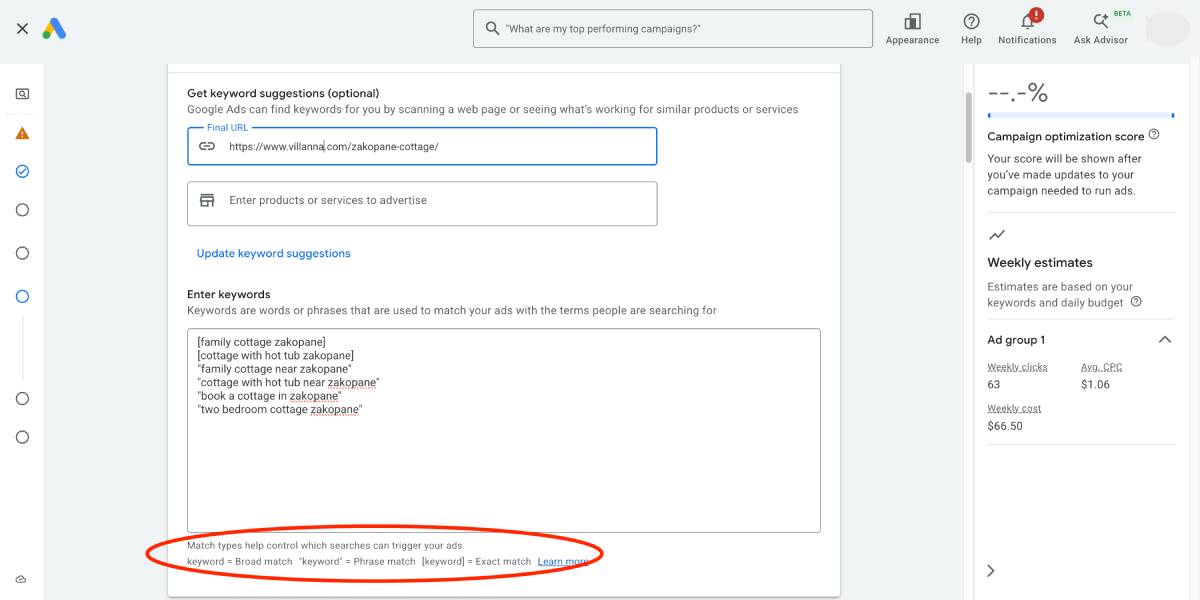
Step 2. Add your keywords.
Paste the following example keywords into the keyword field, one per line:
[family cottage zakopane]
[cottage with hot tub zakopane]
"family cottage near zakopane"
"cottage with hot tub near zakopane"
"book a cottage in zakopane"
"two bedroom cottage zakopane"
Use only terms that accurately describe the accommodation and have some relevant search demand in your selected market.
Step 3. Check your final keyword list.
Before continuing, make sure:
- Every keyword describes something the property genuinely offers.
- The keywords relate to the same accommodation type and booking intention.
- They are written in the language of your selected target audience.
- You aren’t adding broad destination-research terms just to increase the number of keywords.
Step 4. Add negative keywords.
If your campaign setup allows you to enter negative keywords at this stage, add your initial exclusions.
You can also add them later through:
Campaigns > Audiences, keywords, and content > Search keywords > Negative keywords
Add exclusions at campaign level when they should apply to all ad groups in that campaign.
6. Write your responsive search advertisement
Now you need to create the actual advertisement travelers will see.
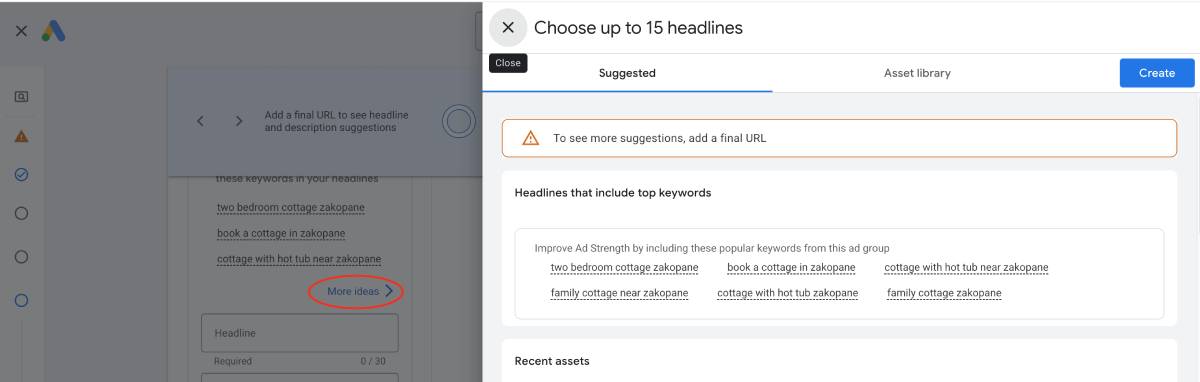
Google Ads uses Responsive Search Ads (RSAs). Rather than writing a single fixed advertisement, you provide several headlines and descriptions that Google can combine in different ways.
Google can test these combinations and select those predicted to be most relevant to individual searches.
Step 1. Create a Responsive Search Ad.
In the campaign setup or the Ads section:
- Open your ad group.
- Choose Ads.
- Click the + button.
- Select Responsive search ad.
Step 2. Enter the final URL.
This is the actual website page a traveler reaches after clicking your advertisement.
For our example, use the dedicated Pine Ridge Cottage page, not the general website homepage.
Example:
https://www.yourdomain.com/zakopane-cottage/
Replace this placeholder with your actual property URL.
The landing page should immediately show:
- What accommodation is offered.
- Where the property is located.
- Its main facilities and benefits.
- Photos and relevant guest information.
- Prices or a way to check prices.
- An obvious availability and booking option.
A traveler searching for a cottage with a hot tub should not need to browse several unrelated pages to discover whether your property has one.
Step 3. Add the display URL paths.
These are the optional descriptive sections that appear after your domain in the displayed advertisement address.
For example:
yourdomain.com/zakopane/cottage
You could enter:
- Path 1:
zakopane - Path 2:
cottage
The display paths are descriptive. They don’t change the actual landing page URL.
Step 4. Write your headlines
Google allows up to 15 headlines in a Responsive Search Ad. Each headline can contain up to 30 characters.
For this campaign, prepare several different messages:
| Headline example | Purpose |
|---|---|
| Family Cottage Near Zakopane | Matches the main search intent. |
| Private Hot Tub & Views | Highlights a distinctive facility. |
| Book Direct With The Owner | Promotes direct reservations. |
| Two Bedrooms, Sleeps Four | Clarifies accommodation capacity. |
| Check Dates & Availability | Encourages visitors to take action. |
| Mountain Break Near Zakopane | Connects the property with the destination. |
| Explore Our Family Cottage | Encourages property discovery. |
| See Photos & Cottage Details | Highlights useful website information. |
| Flexible Stay Options | Highlights booking flexibility, if offered. |
| Plan Your Zakopane Getaway | Provides an additional travel-oriented message. |
Only use claims that accurately describe your property. For example, don’t advertise flexible stay options unless your booking conditions actually allow them.
Step 5. Write your descriptions
Google allows up to four descriptions, with a maximum of 90 characters each.
Use them to explain the property and encourage visitors to check availability.
Example descriptions:
- Stay in a private two-bedroom cottage near Zakopane. Check dates and prices online.
- Enjoy a private hot tub, mountain views and space for up to four guests.
- View photos, facilities and stay details before booking directly on our website.
- Check availability for your dates and reserve your Zakopane mountain stay online.
Each description should communicate a useful part of the offer. Avoid repeating the same message in slightly different words.
Important: Google can display your headlines and descriptions in different combinations and orders. Make sure that each message makes sense on its own and that combinations don’t create misleading statements.
For a first campaign, provide at least eight distinct headlines and several descriptions rather than filling every available field with repetitive variations.
Google’s current specifications and instructions are available in About Responsive Search Ads.
Step 6. Review the Ad Strength indicator
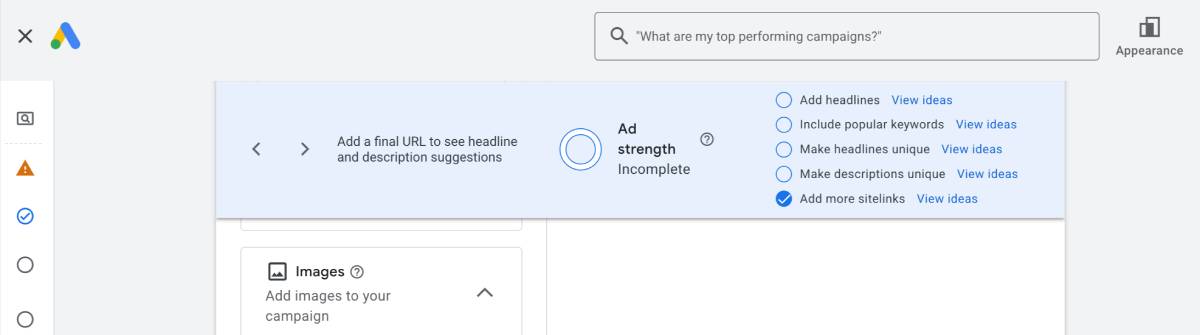
As you enter your headlines and descriptions, Google displays an Ad Strength assessment.
It helps you evaluate whether you have supplied enough relevant and distinct advertising messages.
Follow the suggestions where they make sense, particularly those encouraging you to:
- Use more unique headlines.
- Include relevant keywords in some headlines.
- Highlight different property benefits.
- Avoid redundant wording.
- Provide useful descriptions.
Google currently recommends aiming for Good or Excellent Ad Strength and recommends at least two responsive search ads per ad group. For a small first campaign, build one complete, strong advertisement and consider adding a second genuinely different version if you have another relevant landing page or offer.
Don’t add irrelevant or exaggerated headlines just to increase the Ad Strength score.
7. Add useful advertisement assets
Advertisement assets are additional information elements that can make your Search advertisement more informative and provide more ways for travelers to interact with it.
You can configure them during campaign creation or later under the Assets section of Google Ads.
For our cottage, useful assets might include:
Sitelinks
Sitelinks are additional clickable links that direct users to specific pages on your website.
Possible examples:
- View the Cottage: Link to the full property description.
- Photo Gallery: Link to the accommodation photos.
- Location & Directions: Link to the property’s location information.
- Prices & Availability: Link to the booking or availability page.
Make sure every link works and leads to the page described.
Callout assets
Callouts highlight short benefits without providing a separate clickable link.
Examples:
- Private Hot Tub
- Sleeps Up To Four
- Mountain Views
- Direct Online Booking
- Free Parking
Only use benefits that are genuinely available to your guests.
Structured snippets
Structured snippets let you present a predefined category and a list of relevant features.
For example:
Header: Amenities
Values:
- Private Hot Tub
- Mountain Views
- Fully Equipped Kitchen
- Free Parking
Use the available Google Ads header categories and only add values that comply with the asset requirements.
Location assets
If you have a Google Business Profile for your accommodation, you can consider linking it to Google Ads through the available location asset setup.
This may show your business location and additional information alongside eligible advertisements.
You don’t need this asset for a basic campaign, but it can be useful for accommodation businesses that also attract guests through local searches.
You can find the available asset types and configuration options in Google’s guide to ad assets.
8. Review your campaign before publishing
Before activating the campaign, go through each section of the setup again.
Use this checklist:
| Setting | What to verify |
|---|---|
| Campaign objective | Sales, with confirmed direct bookings as the primary conversion. |
| Campaign type | Standard Search. |
| Networks | Google Search only for the initial test. |
| AI Max | Off for this controlled keyword-based test. |
| Location | Correct guest source market. |
| Language | Matches your advertisement and landing page. |
| Bidding | Maximize clicks with an appropriate CPC limit, or Maximize conversions when supported by reliable conversion data. |
| Budget | Within the previously calculated test budget. |
| Dates | Campaign runs when the property has sufficient availability. |
| Keywords | Relevant exact and phrase match keywords. |
| Negative keywords | Irrelevant searches are excluded. |
| Advertisement | Headlines and descriptions accurately reflect the property. |
| Landing page | Directs travelers to the correct property and booking information. |
| Conversion tracking | Completed bookings are recorded correctly. |
| Assets | Sitelinks and additional information are accurate and functional. |
Step 1. Review Google’s campaign diagnostics.
Google Ads provides a campaign construction and review screen with alerts about potential issues.
Pay attention to:
- Missing or invalid advertisements.
- Missing keywords.
- Incorrect landing page URLs.
- Billing or payment issues.
- Campaign targeting problems.
Resolve any critical issues before publishing.
Step 2. Publish the campaign.
When everything is ready, click Publish or the equivalent final confirmation button in your account.
Your advertisements will be submitted for Google’s review. Approval commonly takes around one business day, although it can take longer. Campaigns may also need additional time before they start receiving meaningful traffic.
Step 3. Check the campaign status.
Go back to:
Campaigns > Campaigns
Verify that the campaign is enabled and check its status.
Look for:
- Campaign eligibility.
- Advertisement approval status.
- Budget status.
- Keyword eligibility.
- Any warnings or restrictions.
If the campaign is enabled but not receiving impressions, don’t immediately increase your budget. First investigate whether the keywords have sufficient search volume, your bids are competitive, your location targeting is too restrictive, and your advertisements are approved.
9. Monitor your campaign during the first days
Launching the campaign is not the end of the practice. You need to monitor the actual searches that trigger your advertisements and make sure the traffic is relevant.
For a small campaign, check the account regularly, especially during the first few days.
Check the Search terms report
This is one of the most useful places to start.
The Search terms report shows the actual queries that triggered your advertisements.
To access it:
- Open Campaigns in Google Ads.
- Go to Insights and reports > Search terms.
- Select your campaign and relevant date range.
- Review the queries that generated impressions and clicks.
For example, you might discover that your advertisement appeared for:
- Family cottage with hot tub Zakopane.
- Book holiday cottage near Zakopane.
- Zakopane accommodation for four people.
These are relevant.
But you might also discover searches such as:
- Jobs in Zakopane hotels.
- Long-term apartment rental in Zakopane.
- Free camping near Zakopane.
These are not relevant to our cottage campaign. Add appropriate negative keywords to prevent future unnecessary clicks.
Google explains how to use this report in its Search terms report guide.
Review your main performance metrics
During the first campaign period, track these indicators:
| Metric | What to look for |
|---|---|
| Impressions | Is the advertisement receiving visibility for relevant searches? |
| Clicks | Are people actually visiting your website? |
| CTR (click-through rate) | Are people clicking after seeing the advertisement? |
| Average CPC | Are you paying an acceptable amount per visitor? |
| Search terms | Are your advertisements appearing for relevant queries? |
| Booking conversions | Are the clicks resulting in confirmed reservations? |
| Cost per booking | Does the acquisition cost stay within your target? |
Don’t expect bookings to appear immediately. A traveler may click today, compare several properties, and complete a reservation later.
Also, don’t make major adjustments based on one or two clicks. Collect enough relevant traffic to understand the pattern before changing keywords, bidding, or campaign settings.
Common mistakes
- Targeting overly broad searches. Keywords such as “holiday in Poland” or “things to do in Zakopane” may attract visitors who are researching destinations rather than looking for accommodation. Start with searches that reflect your actual property and booking offer.
- Advertising multiple unrelated properties in one ad group. Your advertisement, keywords, and landing page should describe the same accommodation. Don’t promote a villa, city apartment, and campsite through one generic message.
- Sending visitors to your homepage. A person searching for a cottage with a hot tub should land on the page presenting that cottage, its facilities, and booking options.
- Using broad match too early. Broad match and automated expansion can reach additional searches, but they make it harder to keep your first small test tightly focused. Begin with exact and phrase match and expand after reviewing the results.
- Leaving AI Max settings unchecked. New Search campaigns have AI Max enabled by default in Google’s current setup. Review this setting intentionally rather than assuming your campaign uses only the keywords and landing page you entered.
- Targeting the destination instead of the guest’s source market. Your potential guests often search from their home countries before traveling. Choose locations according to where your intended customers are based, not just where your accommodation is located.
- Using an advertising message that doesn’t match the landing page. If you advertise a private hot tub, make sure the landing page clearly shows and describes it.
- Ignoring negative keywords. Irrelevant search terms can consume a small advertising budget quickly. Review the Search terms report regularly.
- Increasing the budget too quickly. More clicks don’t necessarily mean more reservations. First evaluate the actual booking conversion rate and acquisition cost.
- Optimizing for the wrong conversion. Availability searches and booking button clicks are useful indicators, but they aren’t confirmed reservations. Make sure your main campaign goal is configured around the actual business result you want.
- Changing too many settings at once. If you simultaneously change your keywords, budget, bidding, landing pages, and advertisements, it becomes difficult to understand what improved or worsened performance.
Next logical steps
After your first campaign has run long enough to collect useful data, move beyond the initial setup and start improving its performance.
1. Evaluate booking profitability.
Use the conversion data configured in the previous practice to calculate the actual cost per booking, booking contribution after advertising, and return on ad spend (ROAS). Compare the results with the maximum affordable acquisition cost you calculated before launching.
2. Refine your keyword list.
Keep keywords that attract relevant searches and generate useful results. Add negative keywords for irrelevant searches and consider introducing additional phrase match or exact match terms based on the Search terms report.
3. Test different advertisements and landing pages.
Experiment with different property benefits, headlines, booking messages, and relevant landing pages. For example, you might test whether emphasizing the private hot tub or the family accommodation setup attracts more qualified visitors.
4. Consider expanding to another guest market.
Once you understand how your first market performs, prepare a separate campaign for another country or language. Use localized keywords, advertisements, and landing pages rather than simply copying the original campaign into a different market.
5. Explore automated bidding and AI Max.
After establishing a reliable baseline and collecting booking conversion data, consider testing Maximize conversions or AI Max features. Evaluate them against your original campaign rather than assuming more automation will automatically improve profitability.
6. Compare paid search with other direct booking channels.
Finally, evaluate how your paid-search bookings compare with organic search, Google Hotel Ads, vacation rental metasearch placements, and OTA bookings. Your objective is not to generate as many advertising clicks as possible, but to acquire profitable direct bookings and identify the channels that contribute most effectively to your business.