
Table of Contents
What you will create: a keyword map connecting groups of related searches with existing or planned website pages.
In this practice, you will:
- Group your researched keywords into clusters.
- Choose primary and secondary keywords.
- Assign each cluster to a suitable page.
- Identify missing information and overlapping content.
- Decide which pages to improve, create, or keep.
- Choose your priorities.
What is a keyword map, and why create one?
A keyword map is a document showing which page should address each group of related searches.
For example, these searches might belong together:
- “hotel near Times Square”
- “hotels close to Times Square”
- “hotel near Times Square NYC”
The wording differs, but the underlying need is similar. A relevant hotel homepage could potentially address all three.
A search such as “how to get from JFK to Times Square” involves a different task. The traveler needs transport information, so it should not automatically belong to the same page.
Mapping helps you make these distinctions before writing content. It also prevents you from putting every keyword on the homepage or creating several pages that repeat the same information.
Your map should answer three practical questions:
- Which page should answer this search need?
- What should that page cover?
- What work is needed?
It is a planning document for you or your team. You do not submit it to Google.
Before you start
Have these items ready:
- Your shortlist from Find the search terms your potential guests actually use.
- Any research notes about search intent, search volume, competition, and the pages appearing in Google.
- A list of your main existing website pages.
- Accurate information about your location, accommodation, facilities, and policies.
If you have not researched keywords yet, complete the previous guide first. This tutorial begins with selecting and organizing the searches you have already found.
Copy the keyword map template
Use our template to record your decisions as you work through this guide. It includes a blank map and a completed accommodation example.
Make a copy of the keyword map template
We’ve included such fields in our keyword map template:
| Field | What to record |
|---|---|
| Page name/topic | The name of an existing page or the topic of a proposed page |
| Page type | Homepage, accommodation overview, room or property page, location page, or guide |
| Keyword cluster | The shared topic or guest need the page should address |
| Primary keyword | The main search phrase representing the cluster |
| Secondary keywords | Related searches the same page can answer |
| Search intent | What the traveler wants to do: find information, compare options, reach a specific website, or take action |
| Search volume | Estimated monthly searches for the primary keyword in your selected country |
| Keyword difficulty (KD) | Your SEO tool’s estimated organic ranking difficulty for the primary keyword |
| Traffic potential (TP) | The relevant estimate of traffic to a leading page across its ranking keywords |
| Target URL | The existing page address or a proposed URL clearly marked as new |
| Action | Keep, improve, create, differentiate, review consolidation, or investigate |
| Priority | High, medium, or low, based on relevance, business value, and effort |
| Status | Not started, in progress, or completed |
You can add owners and review dates if they help you manage the work. Leave unavailable metrics blank rather than entering zero.
For larger websites, an optional Parent page/related hub column can show how supporting pages connect to a broader overview.
1. Group related keywords into clusters
A keyword cluster is a group of searches with the same or closely related intent that one page could reasonably satisfy. Clustering allows you to plan around topics rather than treating every phrase as a separate content assignment.
Step 1.1. Compare what the traveler needs
Read through your shortlist and ask:
Would someone searching these phrases expect broadly the same information or accommodation options?
For example:
| Keywords | Initial decision | Why |
|---|---|---|
| “hotel near Times Square” and “hotels close to Times Square” | Group together | They express a similar location requirement |
| “hotel room for four Manhattan” and “hotel room for 4 people Manhattan” | Group together | They describe the same occupancy need |
| “hotel room for four Manhattan” and “connecting rooms Manhattan” | Review separately | Connecting rooms involve a different sleeping arrangement |
| “hotels near Broadway theaters” and “Broadway ticket discounts” | Keep separate | Choosing accommodation and buying tickets are different tasks |
Do not group keywords solely because they contain the same destination or the word “hotel.” Likewise, differences in wording do not necessarily justify separate pages.
Step 1.2. Check uncertain clusters against the search results
The search engine results page, or SERP, helps you assess how Google currently interprets a search.
To compare two keywords:
- Search both using the same location and language settings.
- Review the leading organic results.
- Note the page types: hotel homepages, accommodation collections, room pages, or guides.
- Look for the same individual URLs appearing in both sets of results.
If several of the same pages appear, that supports grouping the keywords. Substantially different results may indicate separate needs. Compare individual pages, not just website names.
Search results are a useful check, rather than an absolute rule. Your final question remains: could one useful page on your website satisfy both searches?
Step 1.3. Use a clustering tool if your list is large
For a short list, manual grouping may be enough. If you already use Ahrefs, its clustering feature can help organize a larger shortlist:
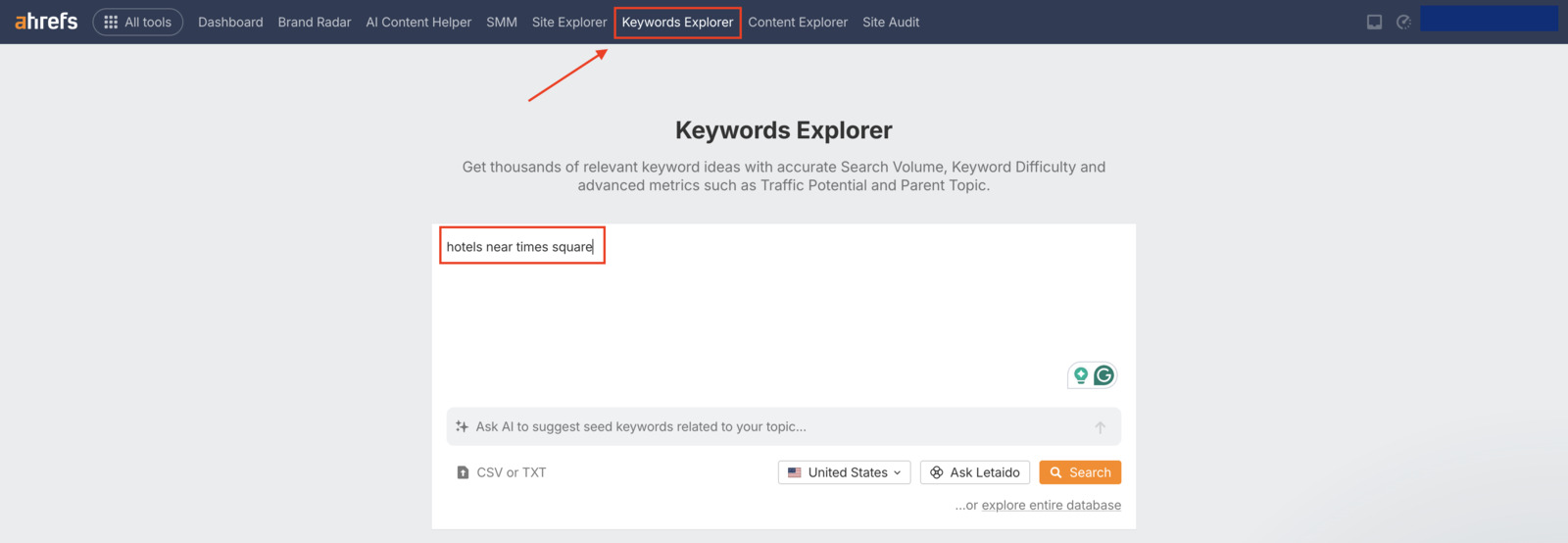
- Enter your researched keywords in Keywords Explorer.
- Choose the relevant country.
- Go to Keyword Ideas > Terms match/Questions/Also rank for/Also talk about > Clusters by Parent Topic.
- Expand a cluster to inspect the keywords.
- Check whether the grouping fits your property and the search intent.
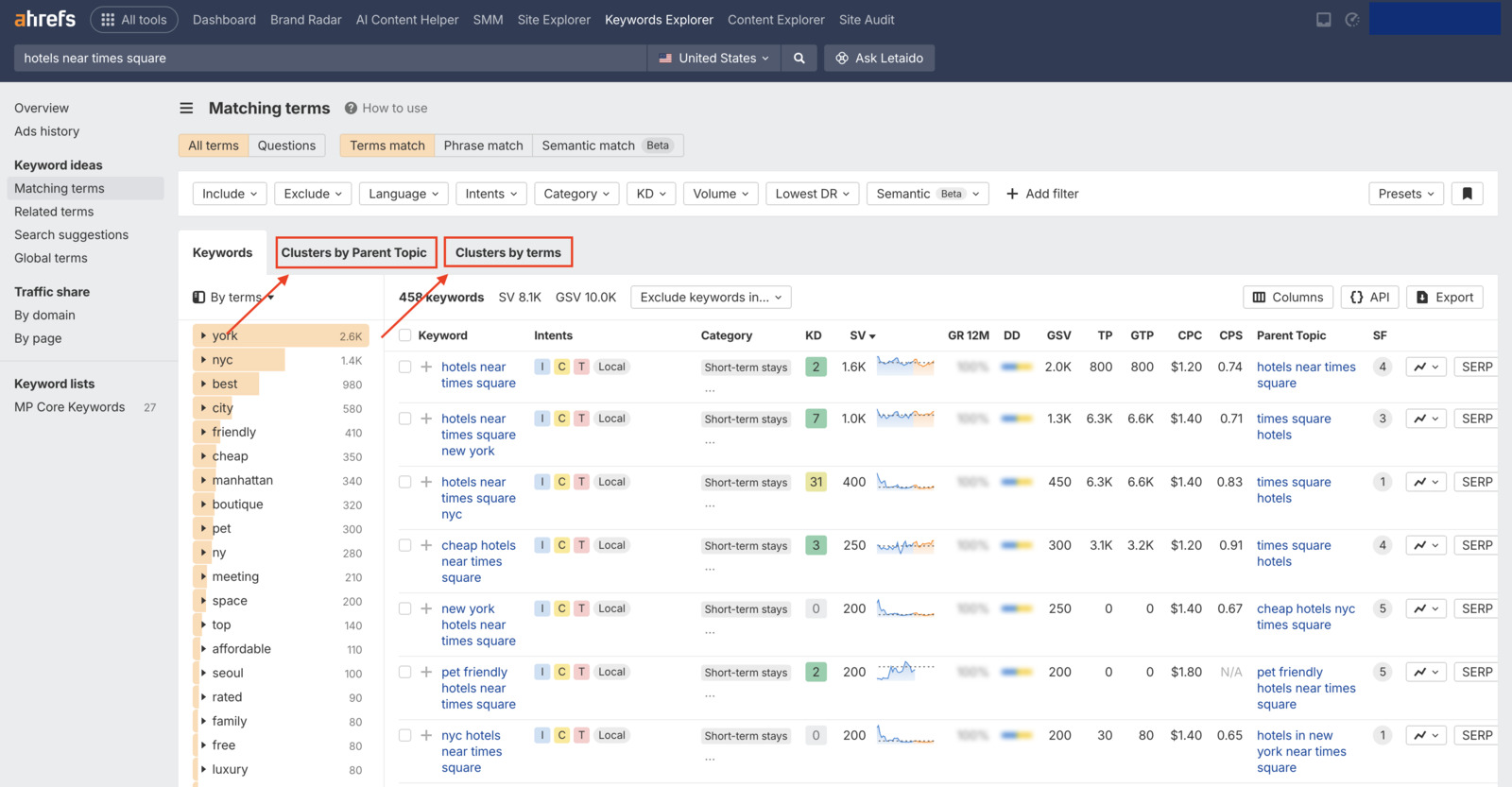
Ahrefs’ Parent Topic is a tool-generated grouping aid. It is based on the query estimated to send the most traffic to the top-ranking page for a keyword. It can suggest when a broader topic might cover a more specific search.
Review the suggestions yourself. A cluster based on a large hotel directory may include requirements your individual property cannot satisfy.
Also distinguish grouping by intent from grouping by shared terms. A group containing every keyword with “parking” could mix hotel parking, airport parking, and local parking restrictions.
Your task: Give each cluster a simple name describing its shared need, such as “accommodation near Times Square” or “rooms for four guests.” Leave uncertain searches separate for now.
Optional: Use AI to suggest keyword clusters and page assignments
If you already have a researched keyword shortlist, you can use ChatGPT, Gemini, or another AI assistant to organize it into provisional clusters.
Provide three things:
- Your keyword shortlist: the actual phrases collected during research.
- Property facts: location, accommodation types, facilities, and relevant limitations.
- Existing pages: their URLs and a short description of what each covers.
You can use this prompt:
| Help me create a keyword map for an accommodation website. Property facts: Existing pages: Researched keywords: Group keywords by the guest’s underlying need and search intent. Put them together only when one useful page could reasonably answer them. For each cluster, suggest:
Use only the keywords and property facts provided. Do not invent search volumes, rankings, search results, or facilities. Keep different accommodation requirements separate. Prefer improving a suitable existing page. Suggest a new page only when the topic has a distinct purpose that the existing pages cannot adequately serve. Return the proposed map as a table. List unsuitable or unresolved keywords separately, with reasons. |
Your task: Use the AI output as a draft, then confirm or revise its assignments using the checks in the following steps.
2. Choose primary and secondary keywords
Once you have a cluster, choose the main phrase representing its topic and the related searches the page should address.
Step 2.1. Select a primary keyword
The primary keyword is the main reference phrase for the page.
Choose one that:
- Accurately describes the page’s focus.
- Matches the search intent you observed.
- Fits your accommodation.
- Uses language potential guests recognize.
Search volume helps you understand demand. It should not override the match between the search, the property, and the page.
The primary keyword is an editorial choice. It is not a setting that tells Google which searches the page must appear for.
Step 2.2. Select secondary keywords
Secondary keywords are related searches that the same page can answer. They may be wording variations or closely connected aspects of the main topic.
For example:
| Role | Illustrative keyword |
|---|---|
| Primary keyword | hotel room for four Manhattan |
| Secondary keyword | hotel room for 4 people Manhattan |
| Secondary keyword to validate | hotel room with two double beds Manhattan |
The third phrase is suitable only if the room actually has two double beds and your search-result review supports the grouping.
Secondary keywords should help you identify useful information. A search mentioning two double beds tells you that bed configuration matters. It does not mean you need to repeat that exact phrase throughout the page.
Step 2.3. Separate requirements that need a different answer
Some related searches introduce a distinct requirement. For example, a room for four people might contain two double beds, a double bed and a sofa bed, or another arrangement. Connecting rooms are a different option.
Do not merge these needs merely because all of them concern a group stay.
A separate page may be appropriate when a requirement has a distinct search intent, and you have enough useful information to cover it. Otherwise, it may belong in a section of an existing page, or be excluded because your property cannot meet it.
Your task: Choose a primary keyword and a focused set of secondary keywords for each cluster. There is no required number of secondary keywords.
3. Assign each cluster to the most suitable page
Now connect each keyword cluster to the page that can best answer it. Record the page name, page type, search intent, and target URL. Use one row for each existing or planned page and its main keyword cluster.
Step 3.1. Match the page type to the search intent
Start with what the traveler wants to accomplish.
| Search intent | What the traveler wants | Page type to consider |
|---|---|---|
| Informational | Understand an area, plan a journey, or answer a question | Local guide, location page, or relevant FAQ section |
| Commercial | Compare accommodation and assess suitability | Homepage, accommodation overview, room or property page |
| Navigational | Find your property’s website or specific information about it | Homepage, contact page, location page, or policy page |
| Transactional | Check dates, see prices, or make a reservation | Accommodation page with booking access or booking entry page |
Intent can overlap. A room page may help guests compare an option and then check availability. Record the dominant intent, or use Mixed when both are central to the page.
Check the actual search results before deciding. If a search mainly returns collections comparing many hotels, a single room page may not meet the same expectation.
Related Lesson:
- Search intent: what guests are really looking for
Step 3.2. Find a suitable existing page
Review your homepage, accommodation pages, location information, and guides.
For each cluster, ask:
- Do we already have a page answering this need?
- Is that page’s purpose clear?
- Could it become a suitable destination with improvements?
If yes, record its name, page type, and current URL.
Keep existing URLs unless there is a separate reason to change them. Keyword mapping does not require adding keywords to every page address.
Step 3.3. Give each cluster a main destination
Choose one preferred destination for each cluster. Other pages can still mention the subject and link to the main page.
For example, the homepage can introduce a room for four guests. The room page then provides the full bed configuration, occupancy, photos, and booking information.
If no suitable page exists, record a proposed page name and mark its URL as Proposed. Confirm whether it needs a separate page in the next step.
Your task: Complete the page name, page type, intent, and target URL for each priority cluster. Leave uncertain assignments marked for investigation.
4. Decide whether a content gap needs a section or a new page
A content gap is a relevant guest need your website does not adequately answer. It does not automatically mean you need another page.
Step 4.1. Identify gaps within existing pages
Suppose guests search for information about your hotel’s parking arrangements, but your location page only provides the street address. The solution may be a clear parking section on that page.
Other examples include:
- Adding bed sizes and occupancy to a room page.
- Explaining pet charges in the relevant policy.
- Clarifying late-arrival arrangements.
- Adding transport details to a location page.
These are content improvements, even though they do not increase the number of pages.
Step 4.2. Create a page when it has a distinct purpose
A new page is more justified when:
- It answers a separate question or supports a different decision.
- Existing pages cannot cover the subject clearly without losing focus.
- You can provide substantial, accurate information.
- The topic has a meaningful connection to your accommodation.
- You can keep the information current.
For example, a guide to staying in New York for Broadway shows could explain neighborhoods, theater locations, evening transport, and accommodation considerations. That is a different job from providing directions to your hotel.
Step 4.3. Use search metrics to assess opportunities
The template includes Search volume, Keyword difficulty, and Traffic potential. Bring these figures across from your keyword research rather than repeating the research process.
| Metric | What to enter | How to use it |
|---|---|---|
| Search volume | Estimated average monthly searches for the primary keyword in your selected country | Compare demand for different topics |
| Keyword difficulty (KD) | Your chosen SEO tool’s organic difficulty score for the primary keyword | Compare estimated ranking difficulty within the same tool |
| Traffic potential (TP) | The relevant Ahrefs estimate for the keyword or topic being evaluated | Consider traffic across related searches, rather than one phrase alone |
Traffic potential is an estimate based on a leading page’s traffic. It is not a prediction of how many visitors your hotel website will receive. Compare these metrics with business potential: how closely the topic connects to your accommodation and a guest’s decision to stay.
For example, a room-related search with modest demand may deserve attention before a popular destination topic if the room search closely matches what guests can book.
Your task: Add the available metrics and decide whether each gap calls for an existing-page improvement, a new page, or further investigation.
5. Check for overlapping pages
Before finalizing the map, look for pages assigned to substantially the same need. This is where you may encounter keyword cannibalization: overlapping pages that compete for the same search intent in a way that undermines your intended performance.
Step 5.1. Compare page purposes
Imagine a hotel has:
- Its homepage.
- A page called “Hotel near Times Square.”
- Another called “Times Square accommodation.”
If all three repeat the same description, photos, and booking information, their roles may be unclear.
By contrast, these pages can serve distinct purposes:
| Page | Main purpose |
|---|---|
| Homepage | Introduce the hotel and help guests assess the stay |
| Location page | Explain arrival, transport, and surroundings |
| Room page | Explain a particular accommodation option |
Step 5.2. Investigate before making changes
Review:
- What each page helps the guest do.
- Whether the information is substantially duplicated.
- Which cluster each page should serve.
- Existing search visibility, if available.
- Internal links pointing to each page.
If the Search Console is already set up, you can review which pages receive impressions for a relevant query. Multiple pages appearing is a reason to investigate, not automatic proof of cannibalization.
Choose an appropriate action:
- Clarify the pages’ different roles.
- Improve the most suitable destination.
- Update internal links.
- Review whether substantially overlapping pages should be consolidated.
Do not delete pages or redirect URLs during mapping without assessing their content, traffic, and links.
Your task: Make sure you can explain each priority page’s main purpose in one sentence.
Related Guide:
- Set up Google Search Console
6. Plan useful links between related pages
Once your keyword assignments are clear, consider how guests will move between those pages.
This is a supporting exercise. You can record the links in a separate editing brief rather than adding more columns to your main keyword map.
| From | To | To |
|---|---|---|
| Rooms overview | Individual room page | Lets guests assess a suitable option |
| Room page | Location page | Helps them check transport and surroundings |
| Local guide | Relevant accommodation page | Connects trip planning with a possible stay |
| Accommodation page | Availability or booking entry | Lets guests check dates and rates |
The link should make sense in context. So, choose links that answer a likely next question. You don’t need to connect every page to every other page.
Optional: Record a parent page or related hub
A keyword cluster group searches one page and can answer. A topic cluster connects several pages covering different aspects of a broader subject. For a larger website, you can add an optional Parent page/related hub column. For example, individual room pages may sit beneath a room’s overview.
Record the broader page only where that relationship helps organize the website. A small property does not need a pillar-page structure to complete its keyword map.
Your task: Identify useful links for your first priority pages and include them in the relevant editing briefs.
7. Choose an action, priority, and status
Complete the final three fields so your map becomes a practical work plan. If you have detailed editing instructions, you can add them as a comment or separate brief.
Step 7.1. Set an action for each page
| Action | When to use it |
|---|---|
| Keep | The page already serves its purpose well |
| Improve | A suitable page exists but needs clearer or more complete information |
| Create | A distinct, relevant need justifies a new page |
| Differentiate | Useful pages need clearer, separate roles |
| Review consolidation | Pages substantially overlap and may be better combined |
| Investigate | The correct assignment or property fit is still uncertain |
Step 7.2. Set a priority
In this column, use High, Medium, or Low options. You should start with changes where:
- Your accommodation strongly matches the search needs.
- Missing information affects a guest’s decision.
- An existing page can be improved without a major rebuild.
- The page supports accommodation comparison or booking.
Use search metrics as supporting evidence. Do not prioritize a broad topic purely because it has the largest search volume. If you work with a team, assign an owner.
Step 7.3. Track progress
Use the same status options throughout the map:
- Not started: The planned action has not begun.
- In progress: The page is being reviewed, written, or updated.
- Completed: The planned action is finished, and any required changes are live.
For a Keep action, Completed means the review is finished. It does not mean the page will never need attention again.
Your task: Choose your first three priorities and give each mapped page an action and status.
Example: A completed keyword map for an independent hotel
Consider a hypothetical hotel in Midtown Manhattan near Times Square and Broadway theaters. It offers a room with two double beds for a maximum of four guests. It has no connecting rooms, swimming pool, or on-site parking.
For this example, assume the owner’s research supports the assignments below. The owner also has enough useful local information to create a Broadway stay guide with a distinct purpose.
You can view the completed example by the link below to see how the page assignments, keywords, metrics, and planned actions fit together.
These are illustrative assignments, not verified search findings. Enter your own research figures, source, country, and date.
The map leads to clear decisions:
- The homepage handles the Times Square wording variations.
- The room page answers relevant searches about accommodating four guests.
- The Broadway guide gets a separate page because it addresses a distinct planning need.
- The location page answers branded arrival questions and explains parking arrangements.
Searches for connecting rooms, a pool, or on-site parking remain excluded because the hotel cannot meet those requirements.
8. When is your first keyword map complete?
Your map is ready to use when:
- Each priority cluster has a suitable existing or proposed page.
- Primary and secondary keywords match the page’s purpose.
- Every assignment fits your actual accommodation.
- Overlapping page roles have been reviewed.
- Proposed new pages have a distinct reason to exist.
- Each priority page has a clear action.
- You know which changes to make first.
You do not need to assign every keyword. Unsuitable searches can be excluded, and uncertain ones can remain under review with a reason recorded. You also don’t need a keyword for every functional page on your website.
9. What to measure afterwards
Completing the map does not change your search visibility. Review performance after you implement the planned improvements.
| What to assess | What to review |
|---|---|
| Search relevance | Whether the intended pages receive impressions and clicks for relevant queries in Search Console |
| Accommodation consideration | Whether visitors explore accommodation or check availability, using your configured analytics |
| Business outcomes | Enquiries and reservations associated with those visits, where tracking allows |
Record when changes go live. Consider seasonality, changes in demand, and the amount of data available before concluding. Review it when you change facilities, add pages, or discover new guest needs. A quarterly review is a practical starting routine for a small website.
If an unexpected page performs well for a mapped search, investigate why. The map should adapt to evidence.
Related Guides:
- Set up Google Search Console
- Audit your website’s current traffic [GA4]
10. Common mistakes to avoid
- Creating one page per keyword. Related searches can often be addressed together.
- Grouping by shared words alone. Similar wording can hide different accommodation requirements.
- Accepting automated clusters without checking them. A tool does not know all your property’s limitations.
- Assigning everything to the homepage. Detailed accommodation and planning needs may require other destinations.
- Treating every gap as a new-page opportunity. A useful section on an existing page may be enough.
- Building topic clusters just to publish more content. Each supporting page needs its own purpose.
- Assuming shared keywords prove cannibalization. Check page roles and performance first.
- Leaving the map without actions. A useful assignment should lead to a clear decision.
11. The next logical step
Use your completed map to choose one existing page to improve first. Start with a page that closely matches your accommodation and helps guests decide whether to book.
Open the page alongside its keyword-map entry. Check whether it clearly answers the main search need, provides the details guests require, and offers a useful next action. Turn any gaps into specific editing tasks. If your priority is a new page, prepare a short outline first. Define its purpose, the information it will provide, and how visitors will reach it from related pages.
Record your planned changes in the map and update their status as you complete them. This turns your keyword research into a manageable website improvement plan.