
Table of Contents
What you will create: An updated homepage that clearly identifies your accommodation, explains its location, and helps potential guests explore rooms or properties and check availability.
In this practice, you will:
- Confirm the main search topic for your homepage.
- Update its SEO title and meta description.
- Write a clear main heading and introduction.
- Add useful location and accommodation information.
- Make your business recognizable and trustworthy.
- Improve links and booking actions.
- Check the finished page and decide what to measure.
Your homepage helps guests decide whether they have found a suitable place to stay. Some visitors will discover your accommodation for the first time. Others will arrive after seeing it on an OTA, in Google Maps, or through a recommendation.
Start by making the essentials easy to understand: what you offer, where it is, and how someone can explore or book a stay. You can follow this guide independently, using the related tutorials whenever you need help with a particular task.
The problem
Your homepage looks attractive, but its message could describe almost any accommodation business.
A heading such as “Your perfect escape awaits” creates a mood without explaining whether you offer hotel rooms, apartments, or an entire vacation home. The location might appear only in the footer, while accommodation details are hidden behind a button labeled “Discover.”
Guests have to search for basic information before deciding whether to continue.
Related Lessons:
- How hotel and vacation rental search works today
- Organic search vs. paid search vs. Google Maps
Why it happens
Homepages are often built around photographs, branding, and broad promises before anyone decides what visitors need to know.
They may also try to cover too much: every amenity, nearby attraction, guest type, and special offer. The main purpose becomes difficult to recognize.
A useful homepage introduces the business, explains its main location and accommodation type, and connects visitors with more detailed pages. It should help both guests who already know your property name and those still comparing places to stay.
What to check before you start
Make sure you have:
- Access to your homepage editor and SEO settings.
- Your correct property name, location, and accommodation type.
- Current photographs and a list of your main facilities.
- Links to your accommodation details and booking options.
You also need a clear idea of the main search topic your homepage should address.
Not sure which words potential guests use? Follow our guide:
- Find the search terms your potential guests actually use.
Have a keyword list but do not know which terms belong on your homepage? Use another guide:
- Build a keyword map for your website
If you already have a suitable homepage topic, continue below. You do not need to repeat the research.
Save your current homepage text and take a screenshot before editing. Use your website’s draft or preview feature to review changes before publishing.
What to do
Work through the steps below with your homepage open in the editor. Start by confirming its main topic, then update the text, location details, and links guests use to explore your accommodation. If an element already works well, keep it and focus on what is missing or unclear.
Step 1. Confirm the main topic of your homepage
Decide what your homepage should help potential guests find. For a single accommodation business, its focus will often combine:
Property type + main location
If you already have a keyword map, review the homepage’s assigned topic. A keyword map is a plan that shows which related searches each page should address.
If you do not have one, write down your accommodation type and actual location as a starting point.
| Accommodation business | Possible homepage focus |
|---|---|
| Independent hotel | Hotel in its city or neighborhood |
| Apartment operator in one destination | Vacation apartments in that destination |
| Single vacation home | Vacation rental in its actual town or area |
| Beachfront resort | Beachfront resort in its destination |
These are starting ideas, not verified keyword recommendations. If you are unsure which wording guests use, complete:
- Find the search terms your potential guests actually use
Then check:
- Does this phrase accurately describe what guests can book?
- Is the location correct?
- Can the homepage provide useful information for this search?
- Is another page already intended to cover the same main topic?
Choose a specific property type only when it fits. Do not call an ordinary city hotel a “boutique hotel” simply because you found an appealing keyword.
Likewise, a property outside a destination should describe its actual location and explain its proximity to that destination.
For businesses covering several destinations: The homepage may introduce the brand and portfolio, while separate location pages cover each destination. Avoid forcing every city into one homepage heading.
For help deciding which topic belongs on which page, see:
- Build a keyword map for your website.
Your result: One clear homepage topic that guides the edits below.
Step 2. Update the homepage’s SEO title
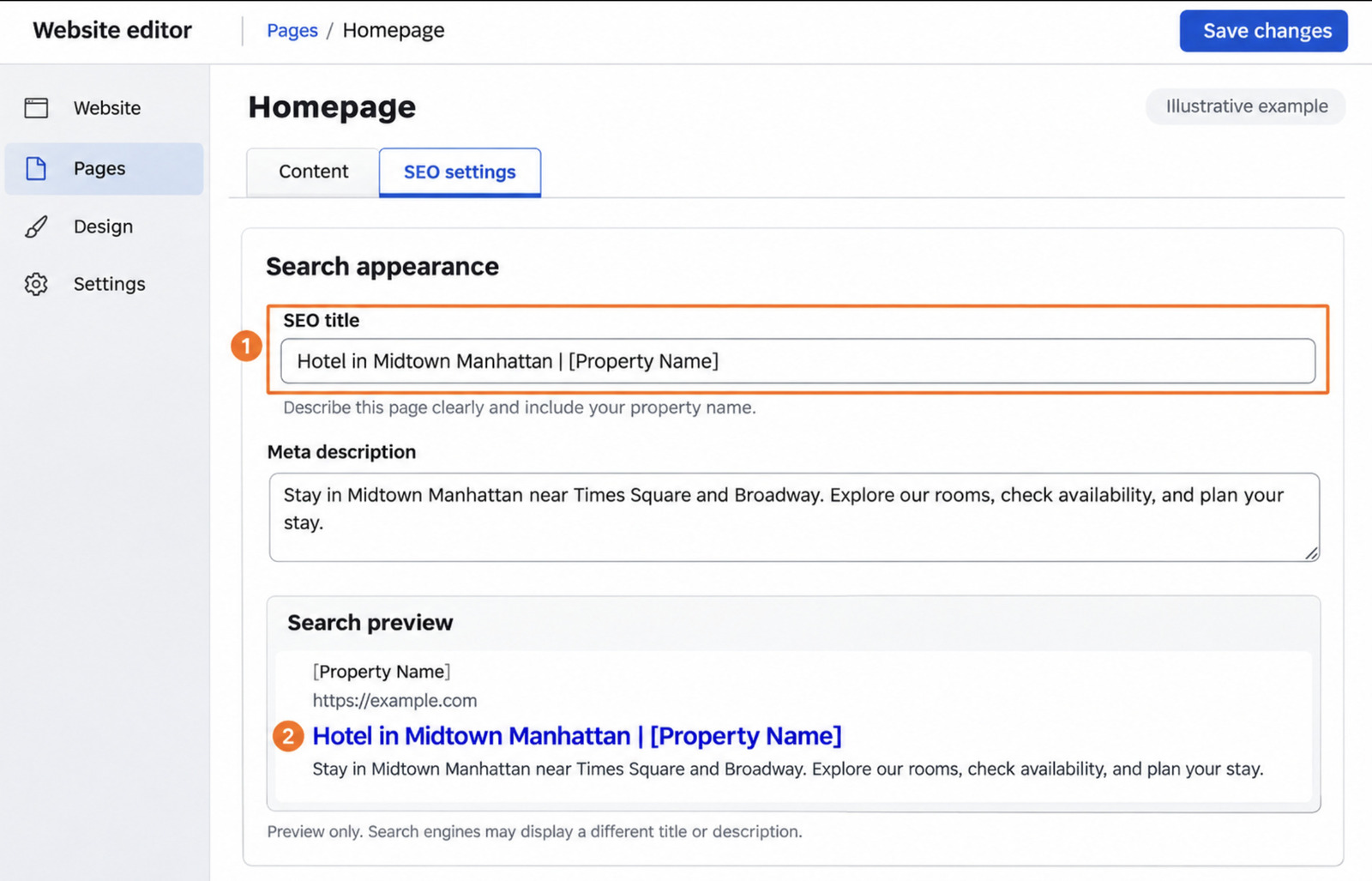
The SEO title, also called a title tag, describes the page and can appear in the browser tab. Google also considers it when creating the clickable title in search results.
Open the homepage’s SEO settings. Depending on your website platform, look for SEO, Search appearance, or Page settings.
Find the field labeled SEO title or Title tag. It may be separate from the heading displayed on the page.
A useful starting format is:
- Property type in main location | Property name
Choose the wording that best matches your homepage’s topic and actual location. Include your property name so people looking for your business can recognize it.
Avoid titles such as:
- Home Or NYC Hotel | Manhattan Hotel | Times Square Hotel | Best New York Accommodation
Google recommends descriptive, concise titles. It may also use headings and other content to generate a different title in search results. Your SEO title influences the result but does not control its exact appearance.
Step 3. Write a useful meta description
The meta description is a short page summary entered in your SEO settings. Google may display it beneath your search title.
Write one or two sentences that explain:
- What accommodation you offer.
- Where it is.
- One or two relevant features.
- What visitors can do on your website.
For example:
| Stay in Midtown Manhattan near Times Square. Explore double rooms and rooms sleeping up to four, check availability, and book your New York stay directly. |
Only include features and booking options that are available.
The description should help someone decide whether your page is relevant. Avoid filling it with variations of the same keyword or unsupported claims such as “the best hotel in New York.”
Use the preview to check readability, but do not treat a particular character count as a ranking requirement. Google can shorten the displayed snippet or choose text from the page instead.
Step 4. Rewrite the main heading and opening text
Open the homepage content editor and find the main heading near the top of the page. This heading should help visitors recognize what the business offers.
| Broad heading | More informative heading |
|---|---|
| Experience the city | A hotel in Midtown Manhattan |
| Stay somewhere special | Vacation apartments in downtown Chicago |
| Your coastal escape | A vacation home near Newport, Oregon |
You can keep a slogan as supporting text. The main heading should still explain the page’s subject.
In your editor, check the heading’s format. Use a clear main heading, typically Heading 1 / H1. Some website templates already generate it from the page title, so check before adding another.
Then write a short opening paragraph that introduces the stay. Give visitors useful facts rather than repeating the title in several different ways.
Keep this information as readable page text. Do not place the only mention of your location or accommodation type inside an image.
Related Lesson:
- Search intent: what guests are really looking for
Step 5. Explain your location in practical terms
Here are some tips about this section:
- Add or revise a short location section. A city name establishes the destination. More specific information helps guests understand whether the location works for their plans.
- Include the most relevant details:
- Your actual neighborhood, town, or area.
- Important nearby attractions or venues.
- Useful transport connections.
- Parking arrangements, where relevant.
- A link to full directions and arrival information.
- Choose a descriptive heading.
- Then explain the location using verified details. Identify a nearby station or the public garage guests can use, rather than saying only “excellent transport” or “convenient parking.”
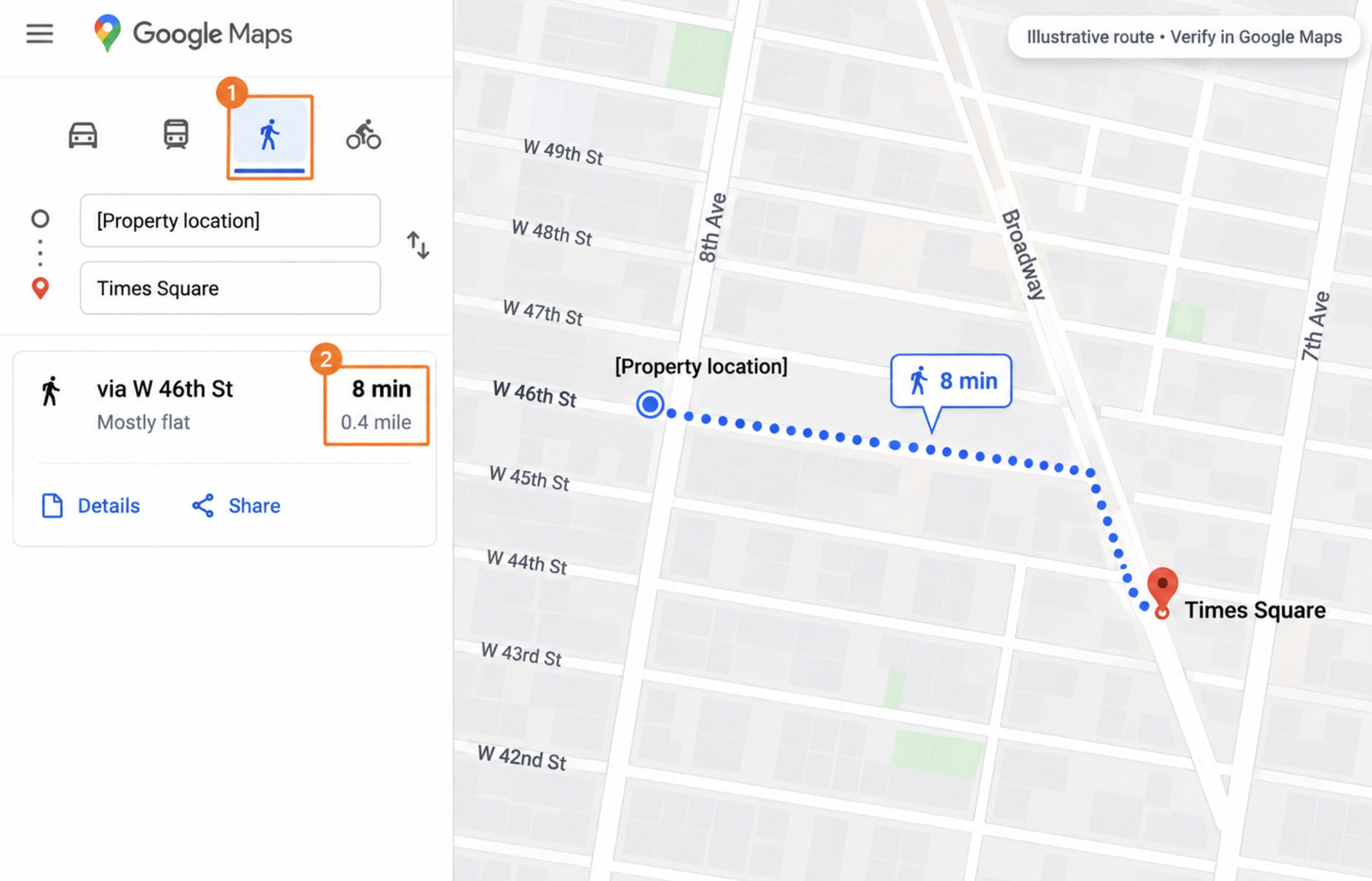
- If you mention walking times, check the route and identify the destination. Make clear whether a journey is on foot, by car, or by public transport.
- Avoid a long list of nearby places added purely to include their names. Choose those that help guests assess the stay.
- A map can support this section, but written information should explain the location too.
- Link to your full location or directions page for detailed arrival instructions. If you do not have one, provide the essential arrival information on the homepage and make your contact details easy to find.
Useful tool: Google Maps
You can use Google Maps to check the location details you plan to include. Also, it’s possible to copy the location’s share link for a Get directions button or add a map through your website editor.
Step 6. Introduce your accommodation and its main strengths
Give visitors a concise overview of what they can book.
For a hotel, this might be a selection of room types. For a rental operator, it might be the main property. For a single vacation home, it may be one clear overview linked to fuller accommodation details.
Useful previews include:
- A room or property name.
- A representative photograph.
- Capacity or bed information.
- One or two distinguishing features.
- A link to the full details.
Make this information available before guests enter travel dates. A booking search can show date-specific availability and rates, while ordinary page links let visitors explore the accommodation first.
Next, highlight a few property-wide strengths. Replace broad claims with information guests can evaluate.
Keep the descriptions short. Detailed room layouts, equipment lists, and policies belong on the relevant accommodation pages.
Your result: Visitors can identify a suitable option and open the page that explains it fully.
Related Lesson:
- SEO for hotels and vacation rentals: what actually matters
Step 7. Help guests recognize and trust the business
Someone arriving after seeing your accommodation elsewhere should be able to recognize the same property.
Check that your homepage includes or clearly links to:
- Your property name.
- Your location and contact information.
- Current photographs of the actual accommodation.
- Important stay and booking information.
Review any trust elements already on the page.
If you display guest reviews, identify their source and reproduce them accurately. If you show a rating, make its source and review count clear and keep it updated.
If you mention a direct-booking benefit, explain what guests receive and any relevant conditions. For example, “Breakfast included with this direct-booking rate” is more informative than “Exclusive benefits.”
Do not add a “best price” promise unless your business can support it.
Step 8. Improve links and the route to availability
Review the menu, text links, accommodation previews, and buttons.
Visitors should be able to reach:
- Room or property details.
- Location and directions.
- Important policies.
- Contact information.
- Availability and booking.
Internal links help readers navigate and help Google discover other pages on your website. Use link labels that explain their destination.
| Unclear label | Clearer alternative |
|---|---|
| Discover | Explore our rooms |
| Learn more | View directions |
| Click here | Check availability |
| Explore | View apartment |
Choose a clear main booking action, such as Check Availability or Book Now. Make it easy to find near the top of the page and repeat it where useful after the accommodation information.
Test the route:
- Open the homepage.
- Select the availability button or use the search form.
- Enter dates and guest numbers.
- Check that the results or next booking step work as expected.
Match the button wording to the action. If it opens an enquiry form, use wording such as Enquire about a stay rather than implying that guests will immediately see availability.
Give homepage visitors a clear route to a reservation
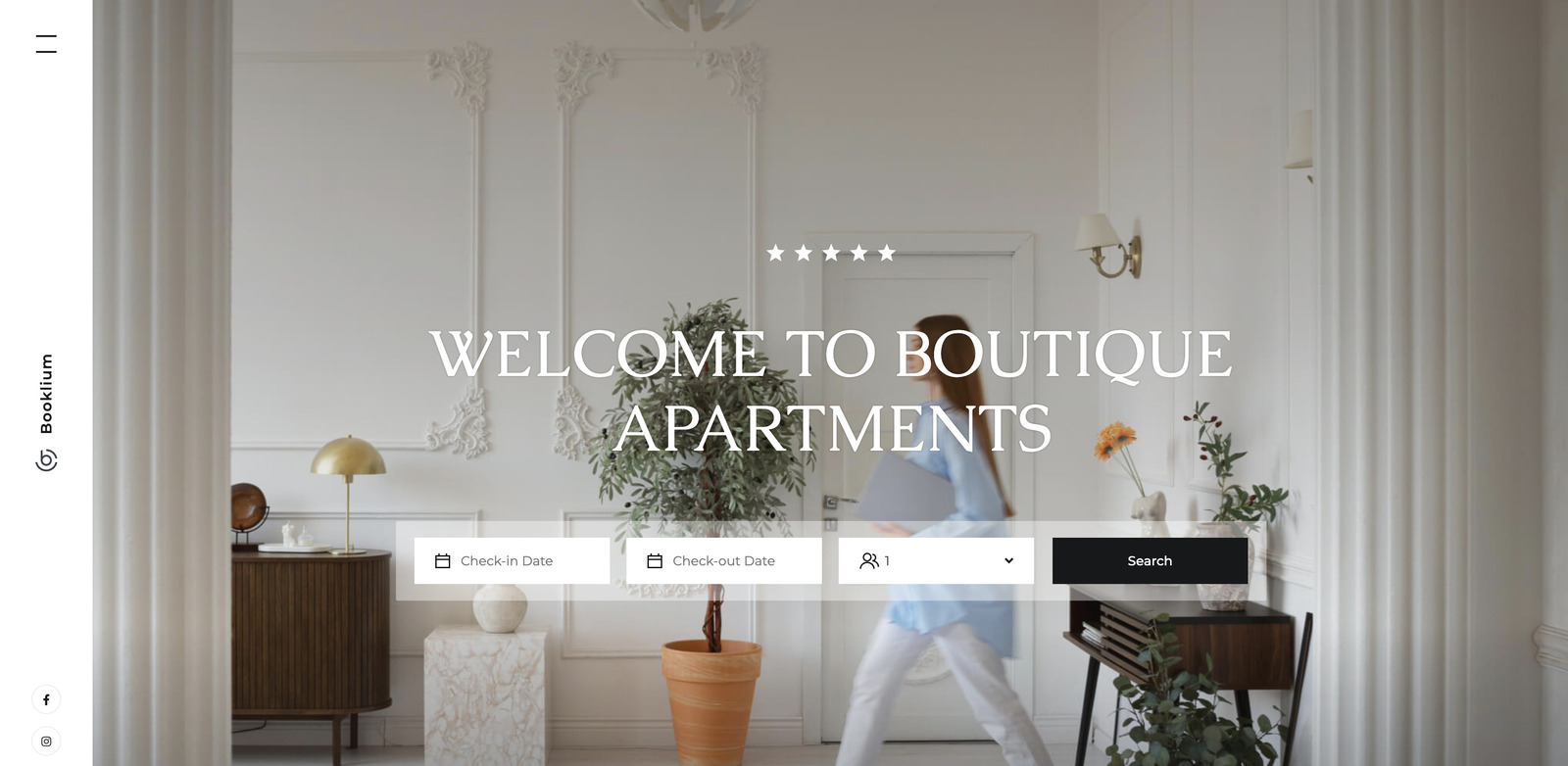
MotoPress Hotel Booking lets guests search available accommodation, view rates, and book directly on your website. Introduce your rooms or properties on the homepage and give interested visitors a practical next step.
Step 9. Review images and the mobile layout
Check that the photographs support the information on the page. Show the actual accommodation, including relevant room, exterior, or shared-space views.
Destination photographs can provide context, but visitors should not have to guess what the property itself looks like.
In your image settings:
- Replace outdated photographs.
- Use appropriately sized, compressed files.
- Add descriptive alternative text to informative images.
- Avoid repeating keywords in every image description.
Alternative text, often labeled alt text, describes meaningful image content for people who cannot see it.
Then open the homepage on your phone to check that:
- The main heading and introduction are readable.
- Essential information available on desktop is also available on mobile.
- Text over photographs has enough contrast.
- Links and buttons are easy to tap.
- Banners do not cover accommodation or booking information.
- The menu, room links, and availability search work.
If the page loads slowly, shifts unexpectedly, or has other technical problems, record what happens.
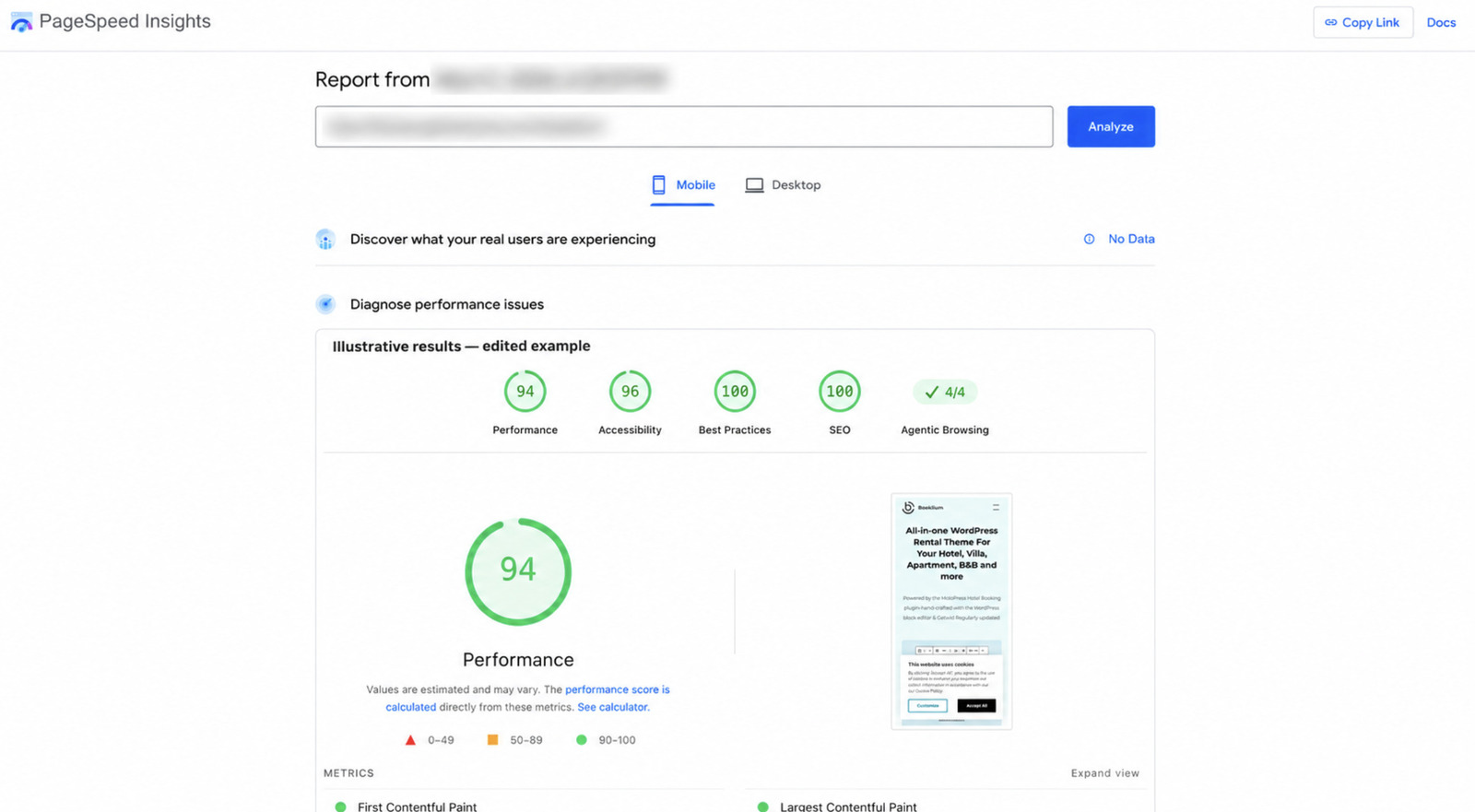
Useful Tool: PageSpeed Insights
Enter your homepage URL into Google’s PageSpeed Insights to identify possible loading and usability issues. Review the mobile results alongside your own experience on a phone.
Related Guide:
- Fix the most important basic SEO issues on your website
Step 10. Publish and check the live page
Review the page before publishing:
| Homepage check | Done |
|---|---|
| The page has a clear main location and accommodation focus. |  |
| The SEO title identifies the accommodation and location. | |
| The meta description accurately summarizes the page. | |
| The main heading and introduction explain the stay. | |
| Location claims are accurate and useful. | |
| Accommodation previews link to detailed pages. | |
| Property identity and contact information are easy to find. | |
| The availability or booking action works. | |
| The page is readable and usable on mobile. | |
Publish the changes and open the live homepage in a separate browser window. Confirm that the updated content appears and test the links again.
Keep the existing homepage URL. Adding keywords does not require changing your domain or moving the homepage to a new address.
Record the publication date in your keyword map or a simple website change log.
Example: The finished homepage
Consider a hypothetical independent hotel in Midtown Manhattan near Times Square. Its original homepage has a large photograph, the heading “Experience New York,” and a paragraph about unforgettable stays. Visitors need to open several pages to find room options or parking information.
After the updates, the homepage has a clearer structure:
| Homepage element | Completed example |
|---|---|
| Main topic | Hotel in Midtown Manhattan |
| SEO title | Hotel in Midtown Manhattan | [Property Name] |
| Meta description | Stay in Midtown Manhattan near Times Square. Explore double rooms and rooms sleeping up to four, check availability, and book your stay directly. |
| Main heading | A hotel in Midtown Manhattan |
| Introduction | A short explanation of the location and available room options |
| Accommodation previews | Double room and room with two double beds, each linked to its details |
| Location section | Relevant neighborhood information, verified transport details, and a link to directions |
| Parking information | A clear explanation that parking is provided by a nearby public garage |
| Trust information | Recognizable property name, current photographs, and accessible contact details |
| Main action | Check availability |
The immediate result is a more useful homepage. Guests can understand the accommodation, assess its location, and find their next step. Whether these changes improve search traffic or bookings needs to be measured after publication.
What to measure afterwards
You can improve your homepage before setting up measurement tools. However, collecting a baseline before publishing will make later comparisons more useful.
If you do not have Google Search Console, follow:
- Set up Google Search Console
If you do not have Google Analytics 4, follow:
- Audit your website’s current traffic [GA4].
If the tools are already connected, use these checks:
| Question | Where to look | What to review |
|---|---|---|
| Does the homepage appear for relevant searches? | Google Search Console > Performance, filtered to the homepage | Queries and impressions |
| Are people reaching it from Google? | The same Search Console report | Clicks and click-through rate |
| How many visits start on the homepage? | GA4 > Landing page | Homepage sessions and traffic sources |
| Are people viewing accommodation details? | GA4 > Pages and screens | Room and property page views |
| Are visitors checking dates or booking? | Verified GA4 events | Availability activity and completed reservations, where configured |
Review searches containing your property name separately from broader location and accommodation searches. They represent different ways of finding your business.
Use complete periods and allow enough time to collect meaningful data. Consider seasonality, advertising, local events, and other changes before attributing an increase or decrease to your homepage edits.
Newly connected tools may not provide earlier data for a before-and-after comparison. In that case, record your starting point and monitor future results.
Common mistakes
- Keeping the location only in the footer. Make the main location clear in the heading or opening text, then explain it in more practical detail elsewhere on the page.
- Targeting every keyword on the homepage. Give the homepage one clear focus. Use room, property, location, and guide pages for more specific topics.
- Repeating the same phrase in every section. Use natural wording and descriptive headings.
- Hiding all accommodation details behind a date search. Let guests explore room types, photographs, capacity, and facilities before checking availability.
- Using a popular destination inaccurately. Be clear about the property’s actual location. Explain a nearby destination through accurate distances or transport information.
- Adding claims that guests cannot verify. Replace vague promises with specific facts. Check statements about parking, accessibility, included services, and direct-booking benefits.
- Making the page longer without making it more useful. Add information because it helps guests make a decision. Avoid filling the homepage with long destination descriptions or every policy in full.
- Expecting immediate ranking changes. Publishing an update does not guarantee a new position or an immediate change to the displayed search result. Review performance over time.
The next logical step
Follow your homepage’s accommodation links as a potential guest would. Open one important room or property page. Can you understand the sleeping arrangements, see representative photographs, identify the main facilities, and check availability without searching elsewhere?
If you have not started measuring website activity, set up your baseline. That will help you assess whether visitors are reaching the accommodation you have made easier to find.
Choose a page that already receives visitors or represents accommodation you particularly want to sell. If it is missing essential information, improve that page next using the tutorial: Optimize your accommodation/property pages for search.