
Table of Contents
What you’ll create: A dedicated landing page for a Google Ads campaign, designed around one specific traveler need and one clear booking offer.
In this practice, you will:
- Choose a marketing angle that matches your paid campaign and target audience.
- Decide whether to use an existing property page or create a separate landing page.
- Build a simple landing page using WordPress and AI tools.
- Prepare the essential content and trust elements that help travelers make a booking decision.
- Connect your landing page to the correct Google Ads campaign and test the visitor journey.
Before you start: You should already have a property website, a basic Google Ads campaign structure, and conversion tracking configured. This practice builds on Build a small Google Ads campaign around high-intent searches. Your landing page will become the destination for the advertisements you create there.
1. Choose one marketing angle for your landing page
A landing page should be built around a specific reason why someone would choose your accommodation. Rather than simply presenting everything your property offers, focus on the needs behind the search that brought the visitor to your website.
We’ll continue with our example:
Property: Pine Ridge Cottage, a two-bedroom holiday cottage near Zakopane, Poland, with a private hot tub and mountain views.
Target audience: Families from the UK looking for a cottage near Zakopane.
Campaign keywords:
- Family cottage Zakopane
- Cottage with hot tub Zakopane
- Family cottage near Zakopane
Landing page marketing angle: A private mountain getaway for families.
This angle combines the property’s accommodation type, location, and distinctive facilities into one appealing offer.
Suggested landing page headline:
A Private Mountain Getaway for Your Family Near Zakopane
Supporting message:
Enjoy a comfortable two-bedroom cottage with a private hot tub, mountain views, and everything your family needs for a relaxing stay.
Main call to action: Check Availability
Other marketing angles you can use
Your angle should depend on the property, its competitive advantages, and the search intention behind your campaign.
| Marketing angle | Example search intent | Possible headline |
|---|---|---|
| Romantic getaway | Couples looking for a romantic cabin with a hot tub. | A Romantic Cabin Escape for Two |
| Family holidays | Families looking for spacious holiday accommodation. | Room for the Whole Family to Relax |
| Pet-friendly stays | Travelers searching for dog-friendly holiday rentals. | Bring Your Dog Along on Your Next Holiday |
| Beach holidays | People searching for apartments near the beach. | Stay Just Minutes from the Beach |
| Remote work retreats | Guests looking for accommodation with Wi-Fi and workspace. | Work Remotely with a Mountain View |
| Luxury accommodation | Travelers searching for luxury villas with private pools. | Your Private Villa with a Pool |
| Group accommodation | Friends searching for a large holiday house. | A Spacious Holiday House for Your Group |
| Seasonal stays | Travelers searching for winter or summer accommodation. | Your Winter Escape in the Mountains |
Choose an angle that reflects something real about your property. Don’t create a campaign around a feature simply because it sounds attractive.
2. Decide whether you need a separate landing page
You don’t necessarily need a new page for every Google Ads campaign. Sometimes your existing property page is already a suitable landing page.
The difference is mainly in the purpose and presentation.
| Standard property page | Paid campaign landing page |
|---|---|
| Presents the accommodation comprehensively. | Focuses on one specific traveler need or offer. |
| May target several types of guests. | Addresses a clearly defined audience. |
| Usually includes general property information and multiple sections. | Prioritizes information relevant to the advertisement. |
| May encourage visitors to explore other pages. | Guides visitors towards one main action: checking availability or booking. |
| Designed to serve organic visitors, referrals, and different audiences. | Designed to match a particular paid campaign and its search intention. |
When can you use your existing property page?
If your campaign promotes one property and your existing page already explains its facilities, location, prices, booking conditions, and availability, you can use it directly.
When is a separate landing page worth creating?
Consider one when:
- You want to promote a specific offer, such as a romantic weekend or a family holiday.
- Your standard property page is too general and doesn’t immediately address the search intention.
- You want to highlight a seasonal package or a particular booking period.
- You want to compare different marketing messages and see which one generates more bookings.
For our example, we’ll create a separate page focused on the family mountain getaway. It will still describe the same cottage, but the information will be arranged around what a family traveler wants to know.
3. Create your landing page using WordPress and AI tools
You don’t need to hire a developer or build a complicated website to create a campaign landing page.
Here are three practical approaches.
Option A. Use your existing WordPress page builder.
If your website uses Elementor, Gutenberg, or another WordPress page builder, create a new page and assemble it from existing sections and blocks.
This is often the easiest approach because:
- Your page uses the existing website design and branding.
- You can reuse property photos, booking widgets, and other elements.
- You don’t need to manage a separate website or hosting service.
- You can update prices, facilities, and booking information in the same WordPress dashboard.
If you use Elementor, you can also explore its AI page-building capabilities to generate editable page layouts and content from a prompt.
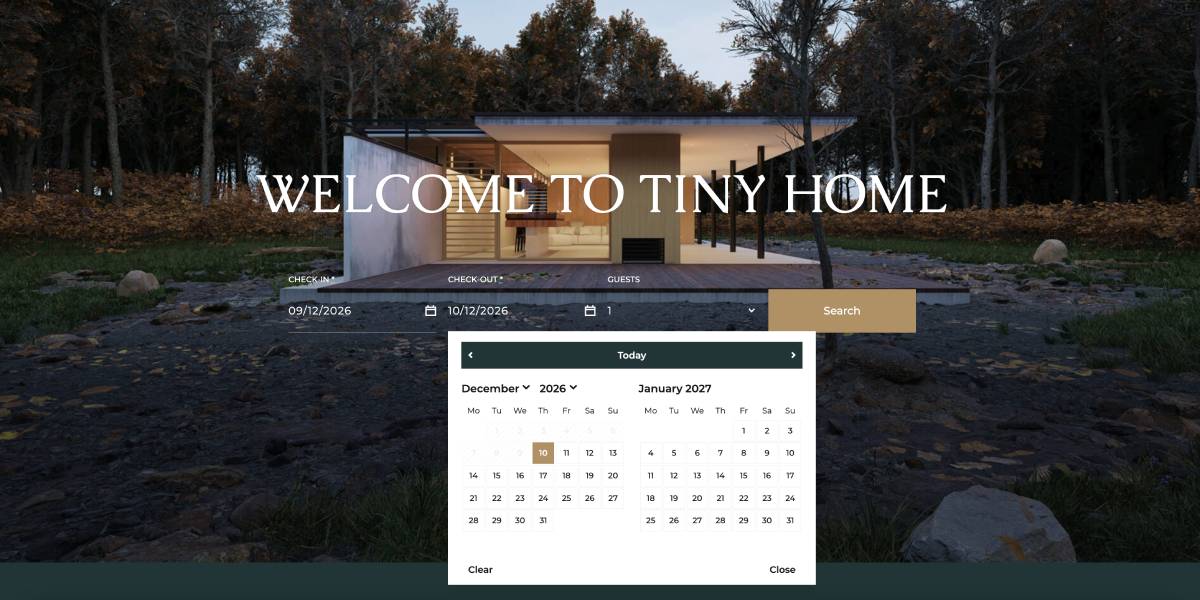
If you use MotoPress themes, designs like Booklium comes with many pre-made content blocks you can use to build a landing page for a specific accommodation:
Option B. Use ChatGPT to prepare the page structure and content.
You can ask an AI assistant to generate a landing page outline, headlines, descriptions, FAQs, and calls to action.
For example, use this prompt:
Create a conversion-focused landing page for a two-bedroom holiday cottage near Zakopane, Poland. The target audience is families from the UK searching for a private cottage with a hot tub and mountain views. The main marketing angle is a private mountain getaway for families. Create a page structure with a headline, supporting message, property benefits, facilities, authentic guest testimonials, location information, booking conditions, FAQs, and prominent availability and booking buttons. Use clear, natural English. Don’t invent property features, prices, reviews, or policies. Mark any missing information that requires confirmation.
Provide the AI tool with your actual property information and photographs. Review the generated content before publishing. After that, you still need to transfer this data to your direct booking channel (your website).
Option C. Use an AI website or page builder.
Some website building tools can generate a complete page from a text description. They can be useful if you don’t have a page builder or want to create a quick design prototype.
For a WordPress website, consider AI-assisted builders that produce editable WordPress pages rather than a separate website you need to maintain.
Our recommended approach: Keep the landing page on your existing WordPress website. Use AI to prepare the structure and first content draft, then assemble and customize the page using your existing page builder.
4. Build the landing page section by section
Now let’s create the actual page for Pine Ridge Cottage.
You don’t need a complicated layout. The goal is to answer the most important questions a traveler has before making a reservation.
Section 1. Headline, main benefit, and booking button
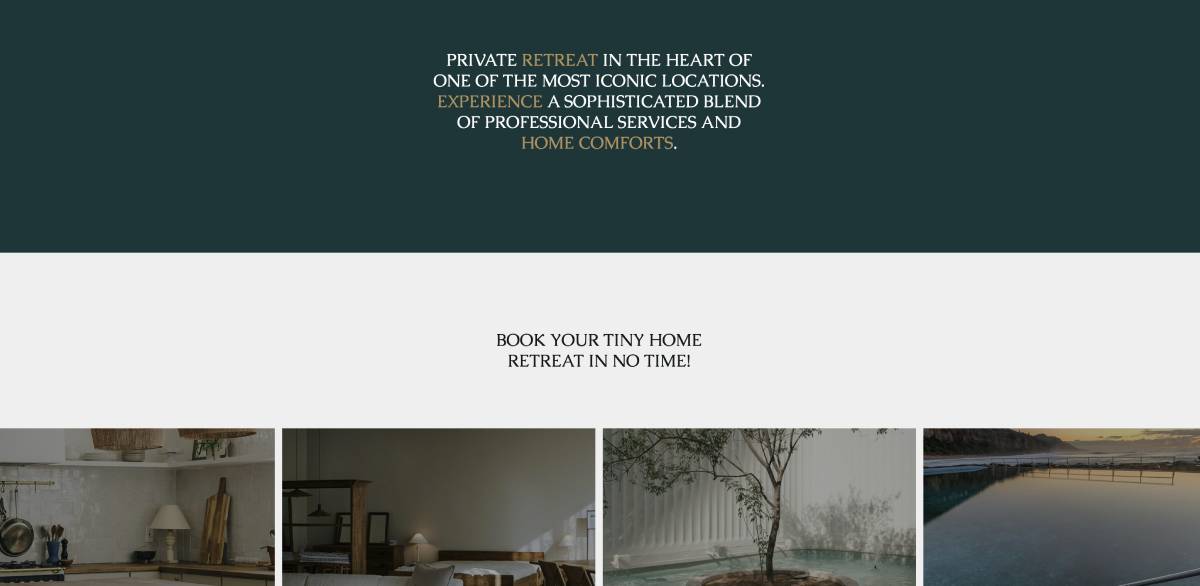
Example headline: A Private Mountain Getaway for Your Family Near Zakopane
Add a short description explaining the main advantages of the cottage.
Place a prominent Check Availability button near the top of the page.
Use a high-quality photograph of the actual cottage, preferably showing its most attractive feature or setting.
Section 2. Show why this property suits the target audience
Present three to five benefits relevant to families.
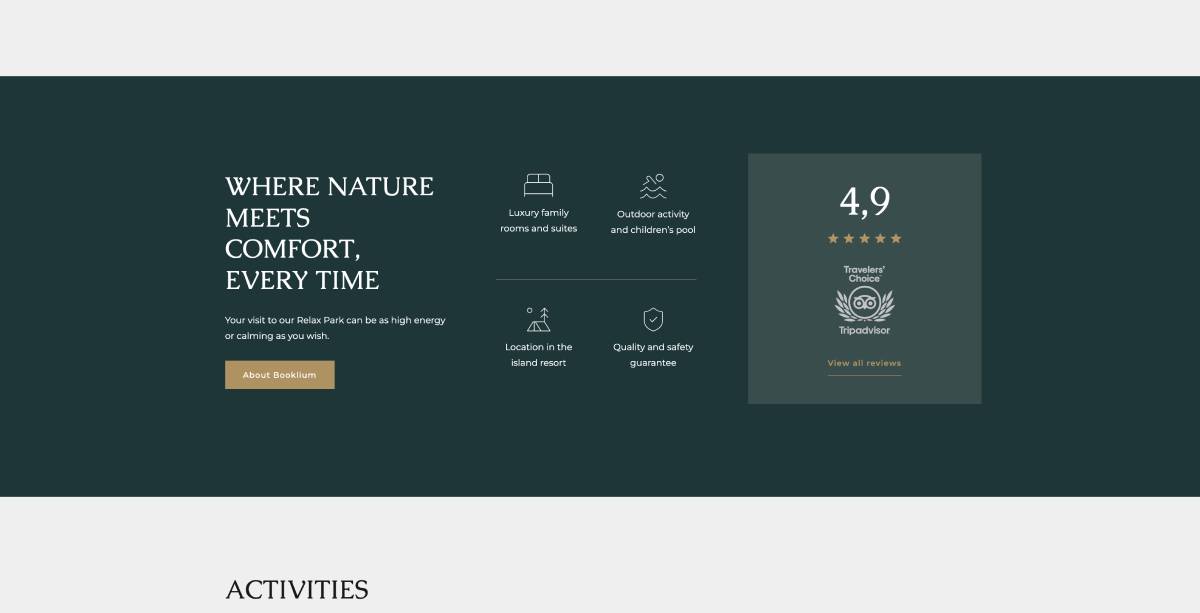
For example:
- Two comfortable bedrooms for family accommodation.
- Space for up to four guests.
- Private hot tub for relaxing after a day outdoors.
- Mountain views and access to the Zakopane area.
- Fully equipped kitchen for convenient family stays.
Use real photographs wherever possible. Don’t rely entirely on generic stock images or AI-generated pictures that might misrepresent the accommodation.
Section 3. Present the property and its facilities
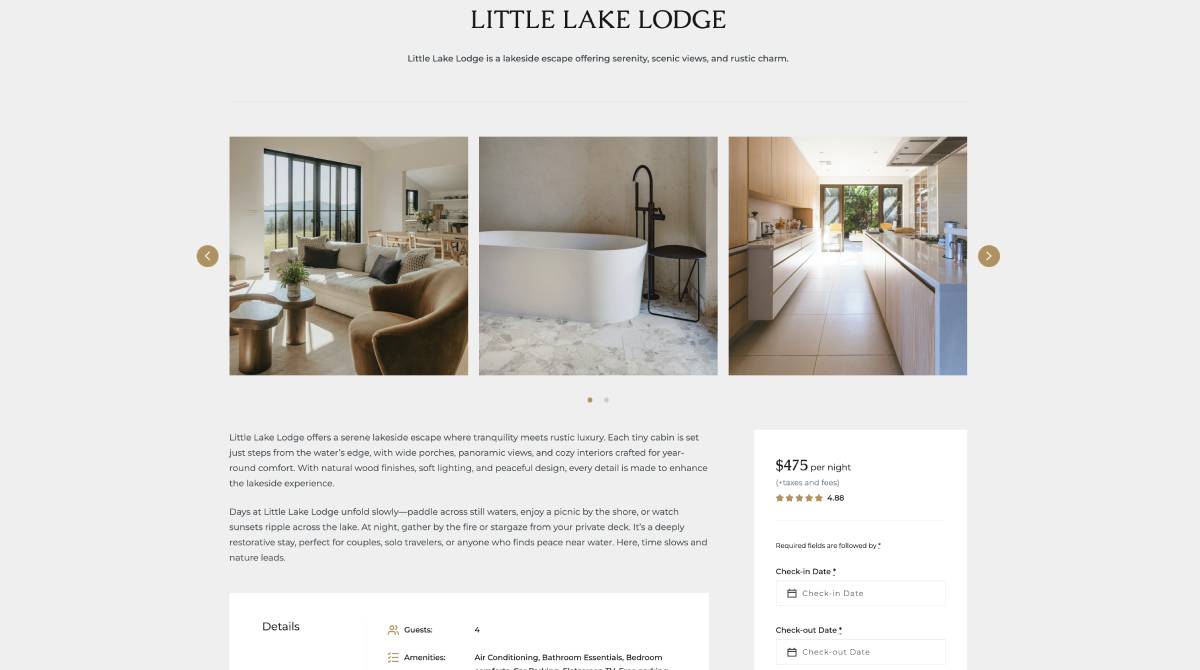
Include the essential information travelers need to evaluate the offer:
- Number of bedrooms and maximum occupancy.
- Bathrooms and sleeping arrangements.
- Kitchen and other facilities.
- Parking and Wi-Fi availability.
- Distance from important attractions or transport connections.
- Actual property photographs.
You can keep this section shorter than on your standard property page. Link to the full property description if visitors need more details.
Section 4. Add trust-building information
A landing page should not look like an advertisement with a booking button attached. Travelers need enough evidence to feel comfortable booking directly with an accommodation provider they may not know.
Include:
- Real guest reviews: Add genuine testimonials from previous guests, with their permission and appropriate attribution.
- Clear booking conditions: Explain cancellation policies, payment requirements, deposits, and any additional fees.
- Transparent pricing: Show indicative prices or let visitors check the actual price for their dates. Explain any additional charges.
- Contact information: Provide a real email address, phone number, or other convenient contact method.
- Business information: Identify the property owner or accommodation business and provide relevant details.
- Secure booking: Use a functioning booking process with clear payment information and appropriate security.
Don’t invent ratings, testimonials, awards, or guarantees to make the page look more convincing.
Section 5. Make direct booking easy
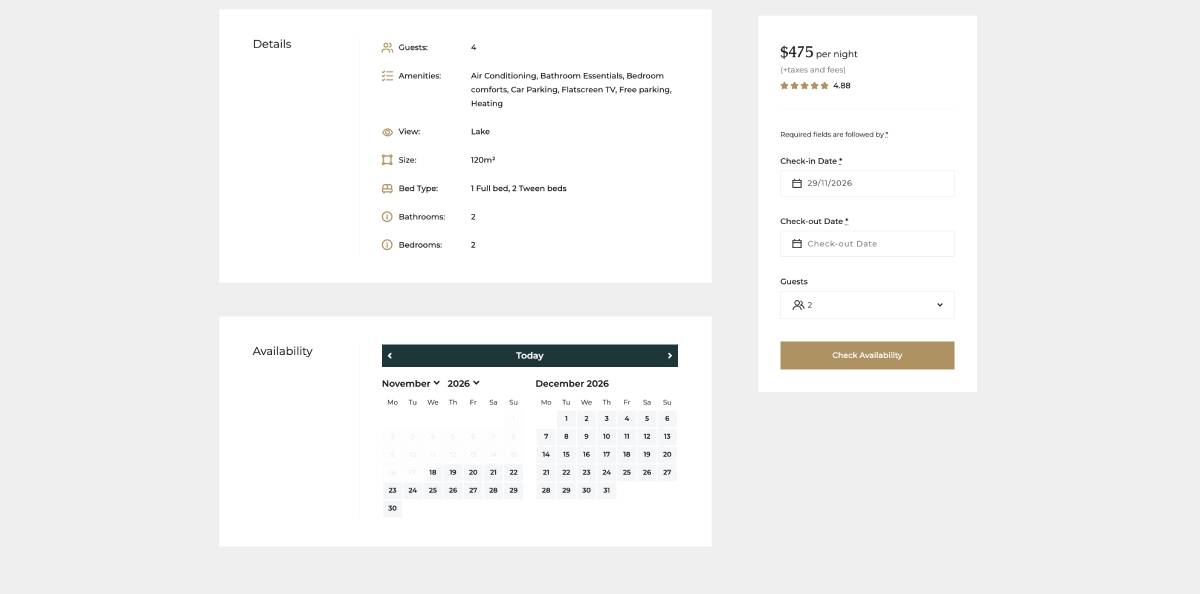
This is the most important functional part of the page.
Add your direct booking widget or booking form so visitors can check availability and prices without searching for another page.
For Pine Ridge Cottage, the main action should remain:
Check Availability & Book Direct
Make sure the booking button leads to the correct accommodation and preserves the relevant dates and guest information where supported.
Repeat the main call to action near the bottom of the page so visitors who read the entire offer don’t have to scroll back to the top.
Section 6. Answer common questions
Add a short FAQ section addressing questions that might prevent a booking.
For example:
- How many guests can stay in the cottage?
- Is the hot tub private?
- Is parking available?
- How far is the cottage from Zakopane town center?
- What is the cancellation policy?
- How can I check availability and book directly?
Use actual property information to answer these questions. You can link to more comprehensive policies and information on your main website.
5. Connect your landing page to your Google Ads campaign
Creating the page is only half the job. You must tell Google Ads to send visitors from the relevant advertisement to this particular URL.
In Google Ads, this is done through the Final URL field.
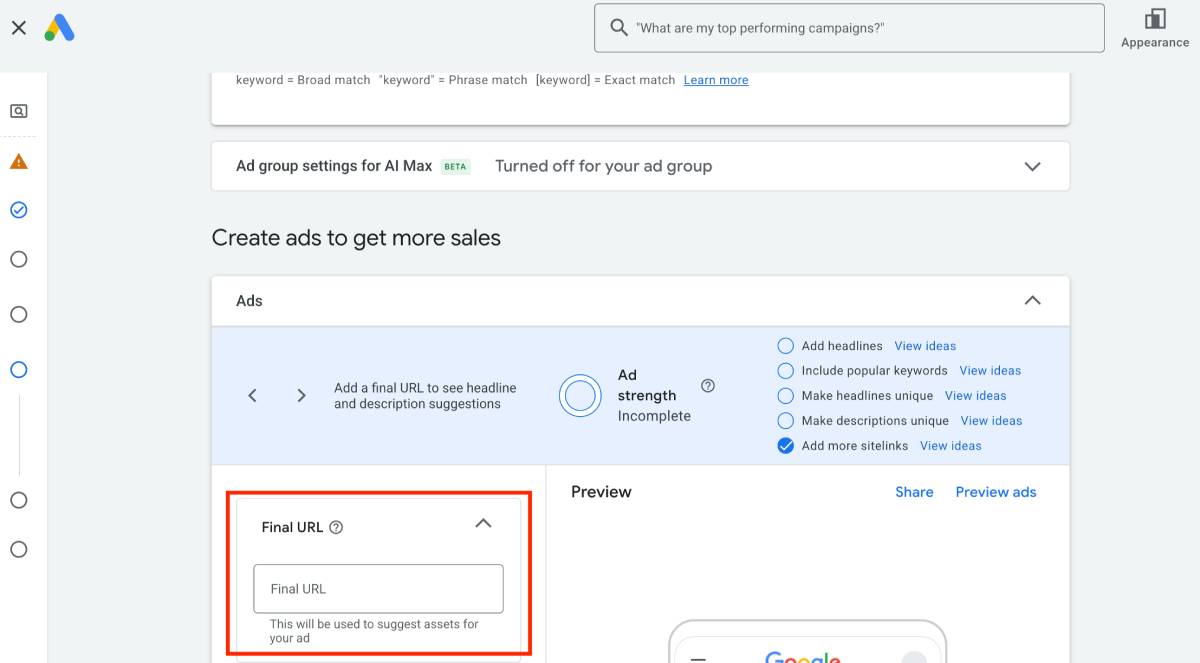
For our example, assume you’ve published the landing page at:
https://www.yourdomain.com/family-mountain-getaway/
Follow these steps:
- Open your Google Ads account.
- Go to Campaigns > Campaigns.
- Open your Search | Zakopane Cottage | UK | Non-brand campaign.
- Open the relevant ad group, Zakopane Family Cottage.
- Go to Ads.
- Find your Responsive Search Ad and click the edit icon.
- Locate the Final URL field.
- Replace the standard property page URL with your new landing page URL.
- Save your advertisement.
Now visitors who click this advertisement will be directed to your new landing page.
Important: You don’t assign a landing page to a campaign through a separate campaign setting. You specify the destination URL in the advertisement itself. Different advertisements within the same campaign can therefore lead to different relevant pages.
For example:
- Family cottage advertisement > Family getaway landing page.
- Romantic getaway advertisement > Couples’ retreat landing page.
- Pet-friendly accommodation advertisement > Pet-friendly property page.
For this initial campaign, keep the AI Max Final URL expansion setting disabled, as in the previous practice. Otherwise, when enabled, Google may select another relevant page on your domain instead of always using the exact Final URL you specified.
Google also requires the landing page and displayed ad URL to use the same domain.
Read Google’s Final URL documentation.
6. Test the landing page before sending paid traffic
Before activating the advertisement or sending visitors to the new page, check the entire experience.
Use this checklist:
- The headline immediately explains what the property offers and who it suits.
- The landing page matches the keywords and promises in the advertisement.
- All photographs show the actual accommodation and its facilities.
- Prices, fees, occupancy, and booking conditions are accurate.
- Real reviews and contact details are available.
- The availability and booking buttons work correctly.
- The booking widget displays the correct property.
- The page works on mobile devices, including its images, buttons, and booking form.
- The page loads quickly without unnecessary pop-ups or distractions.
- The page is accessible without requiring visitors to log in.
- The conversion tracking still records completed bookings correctly.
Test the page on an actual mobile phone, not just in the desktop page editor.
You can also use Google PageSpeed Insights to identify performance issues.
Finally, click your booking button, complete a test booking using your booking system’s test mode where available, and verify that the conversion is recorded correctly.
Common mistakes
- Creating a landing page without a clear marketing angle. A page that tries to appeal to families, couples, business travelers, and large groups simultaneously may not answer any particular audience’s needs particularly well.
- Duplicating the property page without improving it. A separate URL alone doesn’t make a page more effective. Reorganize the content around the campaign’s search intention and booking decision.
- Removing important information to make the page shorter. Simplicity is useful, but hiding prices, cancellation conditions, property details, or contact information can undermine trust.
- Using AI-generated content without checking it. AI can invent facilities, distances, guest reviews, and other details. Verify every factual claim.
- Using generic photographs. Travelers want to see the accommodation they’re actually booking, not an idealized version of it.
- Sending visitors to the wrong URL. Check the Final URL in every relevant advertisement and test the complete booking journey.
- Forgetting mobile visitors. A complicated booking widget, tiny buttons, or oversized images can make the page difficult to use on a phone.
- Measuring only button clicks. A visitor clicking Check Availability isn’t necessarily a confirmed booking. Continue tracking completed reservations.
Next logical steps
1. Compare landing page and standard property page performance.
If you have enough traffic, test sending comparable paid traffic to your dedicated landing page and your standard property page. Compare booking conversion rates and cost per confirmed booking, not just page views or button clicks.
2. Create another landing page for a different audience or offer.
For example, develop a separate romantic getaway page or a seasonal winter accommodation offer. Match each page with relevant advertisements and keywords.
3. Improve your landing page using actual visitor behavior.
Use GA4 and Google Ads conversion data to identify where visitors leave the booking journey. Improve unclear information, calls to action, mobile usability, and booking steps.
4. Keep your landing page information consistent with the rest of your online presence.
Your prices, facilities, property descriptions, and booking conditions should agree with your standard website pages and other accommodation profiles. A campaign-specific page can emphasize a particular offer, but it shouldn’t present a different or misleading version of the property.