
Table of Contents
The Appointment Booking plugin allows multiple customers to reserve the same time slot until the service capacity is reached.
This feature is useful for events, workshops, classes, group tours, retreats, excursions, equipment rentals, and similar services.
How It Works
Each service has a Capacity setting that defines how many people can book the same time slot.
For example, if the capacity is set to 10, up to 10 customers can independently book the same time slot. Once the capacity is reached, the time slot becomes unavailable.
How to Enable Group Bookings
- Go to Appointment Booking > Services.
- Edit the required service.
- Set the Capacity value.
- Save the changes.
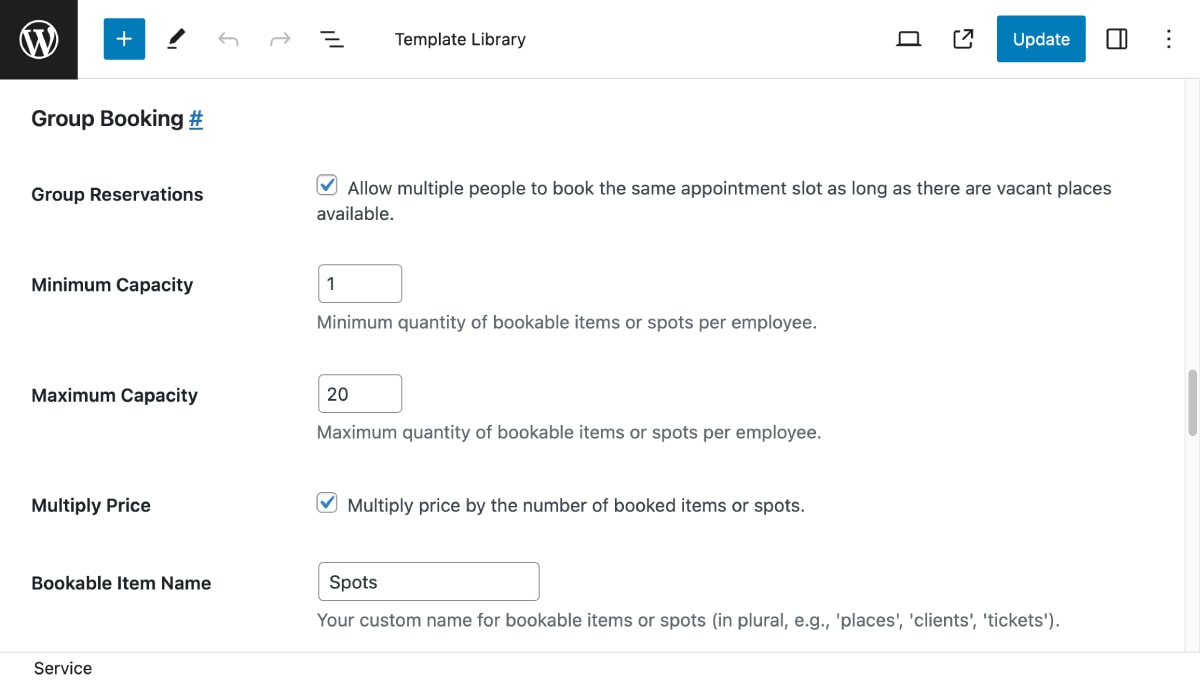
After that, customers will be able to book the same time slot until all available places are reserved.
Employee Assignment
If several employees are assigned to the same service, the plugin automatically distributes bookings between them.
The plugin fills the capacity of one employee first and then assigns new bookings to the next available employee.
For example, if Employee A has capacity 5 and Employee B has capacity 5, the first 5 bookings will be assigned to Employee A, and the next 5 bookings will be assigned to Employee B.
Booking Flow
- The customer selects a service.
- The customer chooses an available date and time.
- The booking is submitted.
- The remaining capacity for this time slot is reduced.
- The time slot remains available until the capacity limit is reached.
- Once the capacity is full, the time slot becomes unavailable.
Common Use Cases
- Yoga and fitness classes
- Workshops
- Language lessons
- Guided tours
- Boat trips
- Museum visits
- Wine tastings
- Public events
- Equipment rentals
Watch Video Tutorial
Watch how to create group events and enable anyone to book the same time slot in your calendar, as long as there’s availability for tickets or spots you sell.