
B2BKing Review for WooCommerce Wholesale Stores: Hands-On with Pricing Rules, B2B Features & Use Cases
Table of Contents
It’s hard to argue that the ecosystem of WooCommerce add-ons is one of the best, and WooCommerce itself can do a lot out of the box. However, the number of plugins specifically built for wholesale businesses is still relatively limited. Yet, the plugins that do exist are true experts in their niche. When you compare them, you’re really comparing the nuances.
In this article, I want to take a closer look at one of the most established solutions on the market: the B2BKing WooCommerce wholesale plugin. Developed by King’s Plugins from WebWizards, a trusted name in the WooCommerce ecosystem, it has become one of the dominant choices among WooCommerce wholesale plugins. I want to understand why and whether we can confidently recommend it to our WooCommerce theme users.
So, if you’ve been searching for a B2BKing review, I’ve tested the waters with this plugin and will break down whose needs it can meet.
As I see, B2BKing has built an outstanding reputation among WooCommerce wholesale store owners:
| Launched in | Active stores | Rating |
|---|---|---|
| 2020 | 15,000+ | 4.9-star review average across 130+ version releases |
First up, this is a type of super plugin, which means it includes such a wide range of functionality that it’s ready to serve businesses of any size, including enterprise-grade operations:
- You can run both B2B and B2C on the same WooCommerce store with it – for sure.
- You can create a tailor-made wholesale registration process with customer groups that vary based on different conditions – no doubt.
- You can use a simpler wholesale order form in WooCommerce – yes.
It’s simply impossible to cover every option unless you’re writing the plugin’s documentation! So, before reviewing the main features wholesale businesses need, I did two things…
First, I looked at the B2BKing changelog – it shows active development focused on functionality and UX improvements. For example, one of the latest cool additions is the “CRM Hub” feature: a mini CRM panel where you can add customer notes, review and upload files related to the customer, and view the customer’s data, orders, and subaccounts at a glance. So, you’re dealing with an actively developed product that has a powerful, stable version.
The next big thing to pay attention to is customer reviews (found just a few complaints and tons of positive feedback). Across review platforms, you’ll mostly see people mentioning two things: that it’s the “most feature-packed” solution (which, in reality, means it can handle just about any tax inclusion or exemption case you need, customer-level pricing, currency conversion, easy order forms, and more), and that it has a proactive, professional support team.
And I have to say, these are two key ingredients of a successful product. First, the rich feature set helps you achieve your goals faster and adapt the plugin to your store. Second, having a knowledgeable person by your side helps keep you sane when technical issues don’t go smoothly.
I loved that foundation, and now I’m ready to get my hands really dirty.
Getting Started with the Wholesale WooCommerce Plugin
I tested the plugin in both the official demo account (which is obviously a great way to experience the advanced features) and on my own live test domain, where I installed the premium version.
That was super easy. You just need to:
- Install and activate WooCommerce.
- Install and activate the premium B2BKing plugin you’ve purchased (it works after you activate your license).
- Install and activate the free companion B2BKing plugin.

Wholesale Pricing & Customer Groups in B2BKing
Let’s start with the fundamentals.
You might need something simple, like hiding wholesale prices from guest users, or something more complex, like customer groups, tiered wholesale pricing, and different tax rules for different buyer types.
Almost every wholesale store needs groups because that’s how you separate retail customers from wholesale customers and apply different pricing, discounts, tax rules, or payment terms.
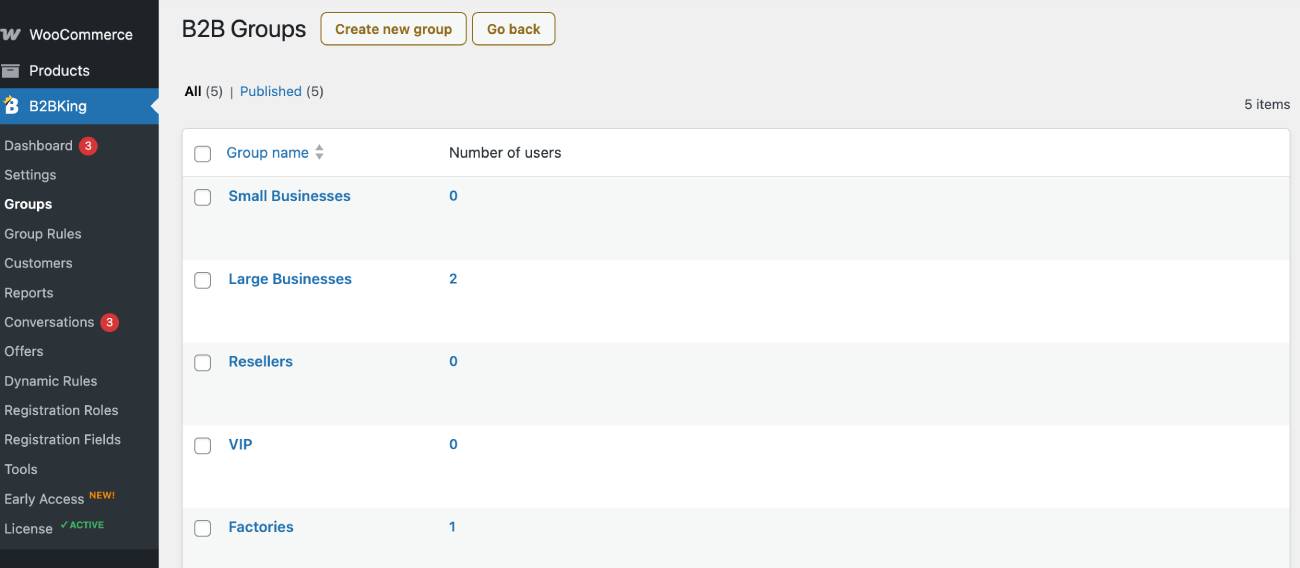
And yes, the B2BKing plugin helps you easily differentiate wholesale prices for distributors, dealers, retailers, and VIP customers by using different product pricing for each group (they are all private, meaning they are visible only to you as the admin). You can do that by adding custom groups with B2BKing Groups:
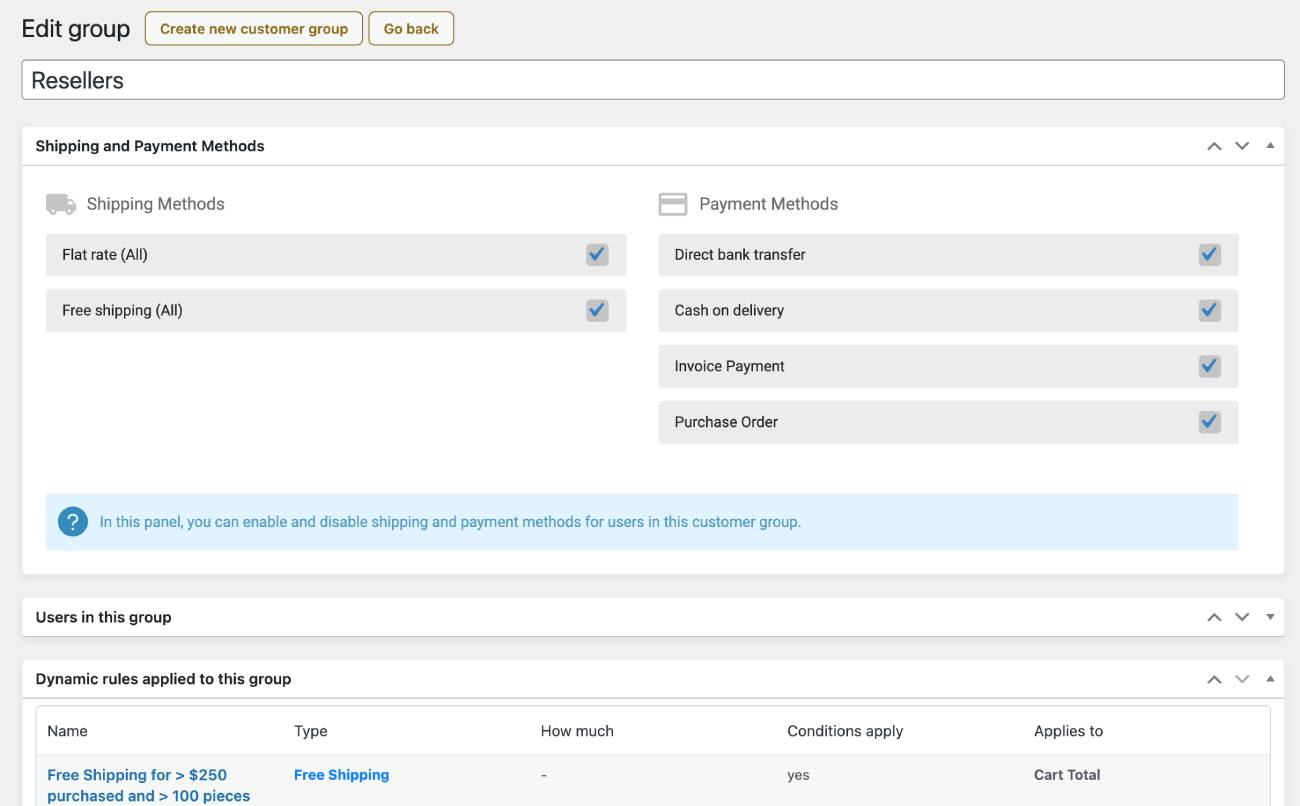
Each group can have its own payment and shipping methods, so you can create smart customer segmentation:
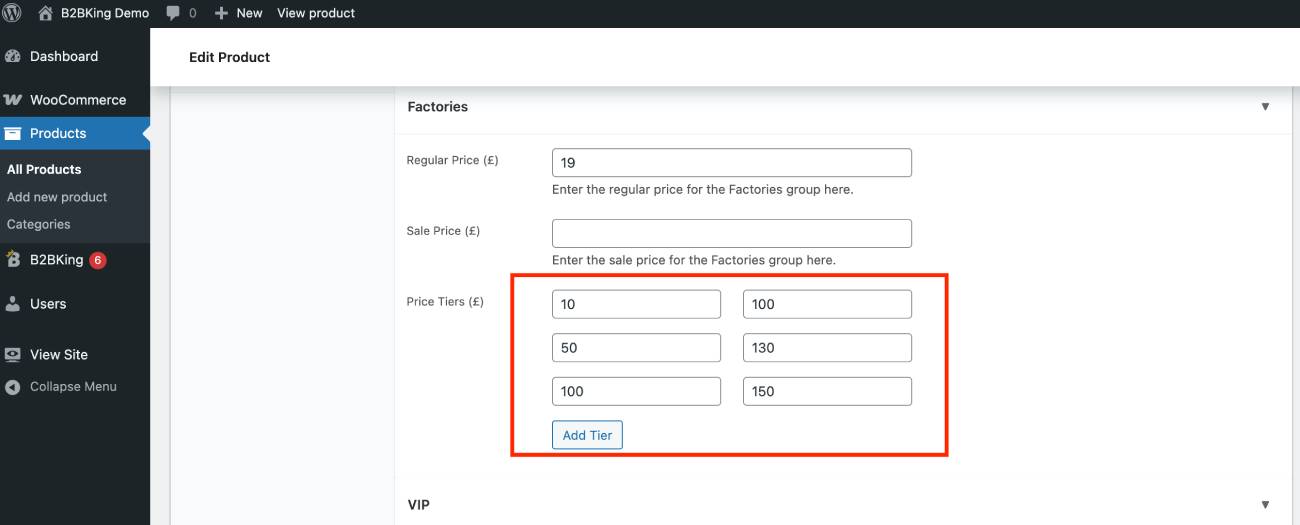
Moreover, B2BKing supports tiered pricing based on the quantity purchased, which is easy to set directly in the chosen product settings under All Products:
To go even deeper, you can jump into the settings and configure tiered prices as percentage discounts instead of fixed amounts. Cool!
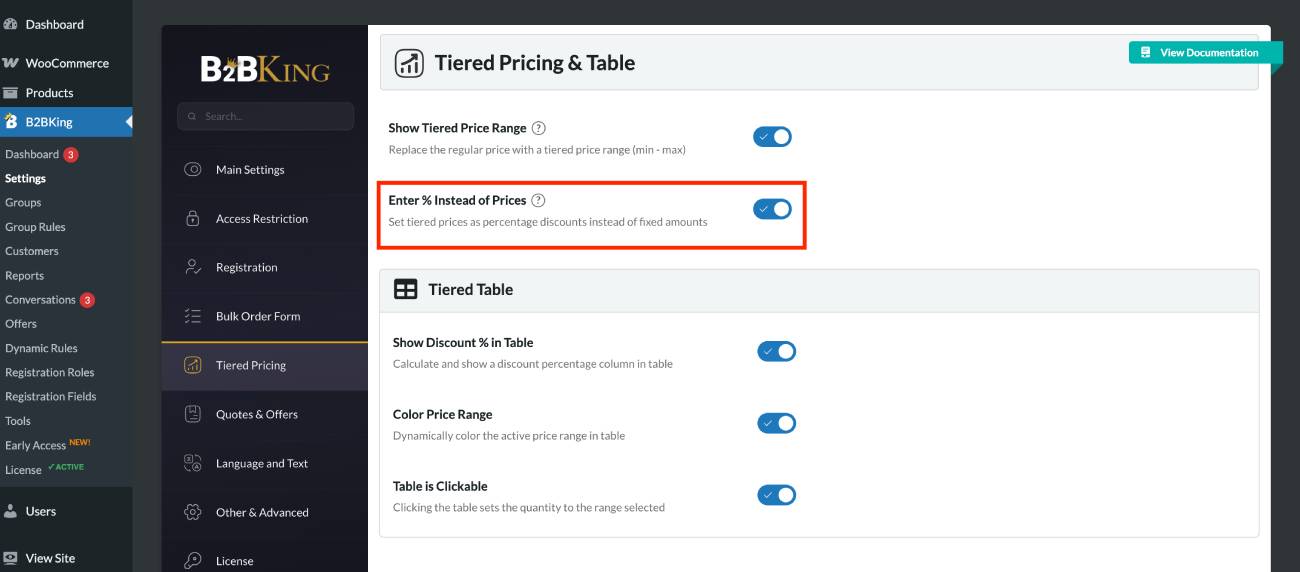
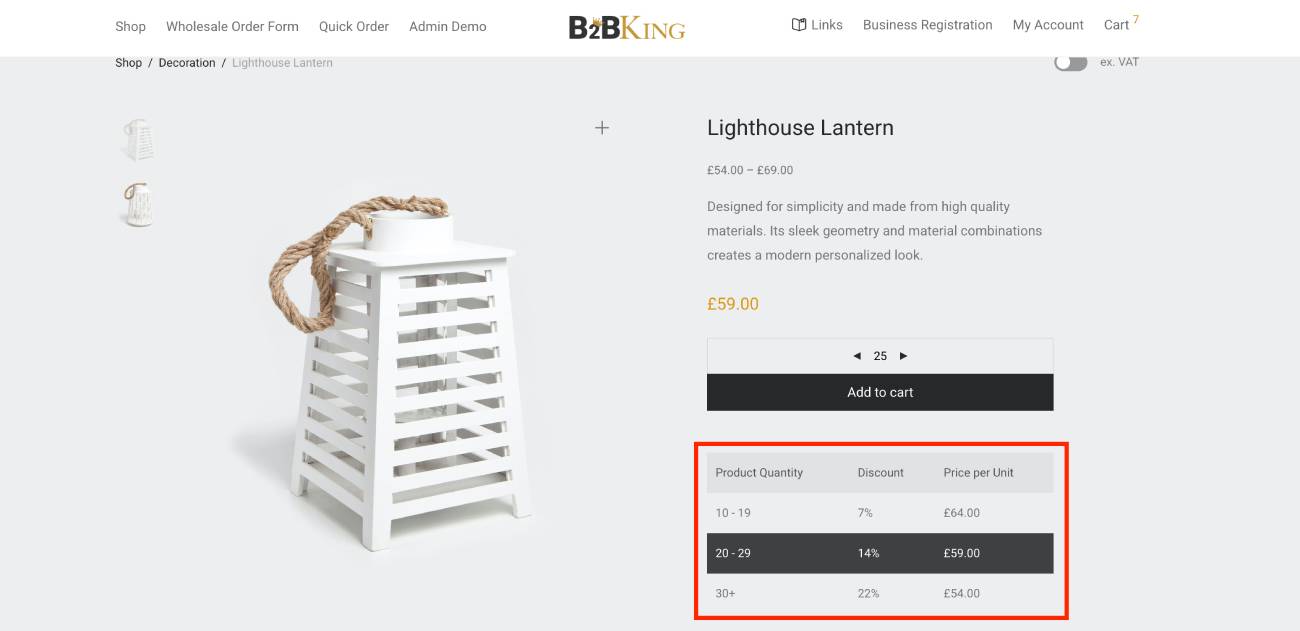
This means you can offer bulk discounts without creating duplicate products in WooCommerce.
So, you can easily set up volume discounts for wholesale orders:
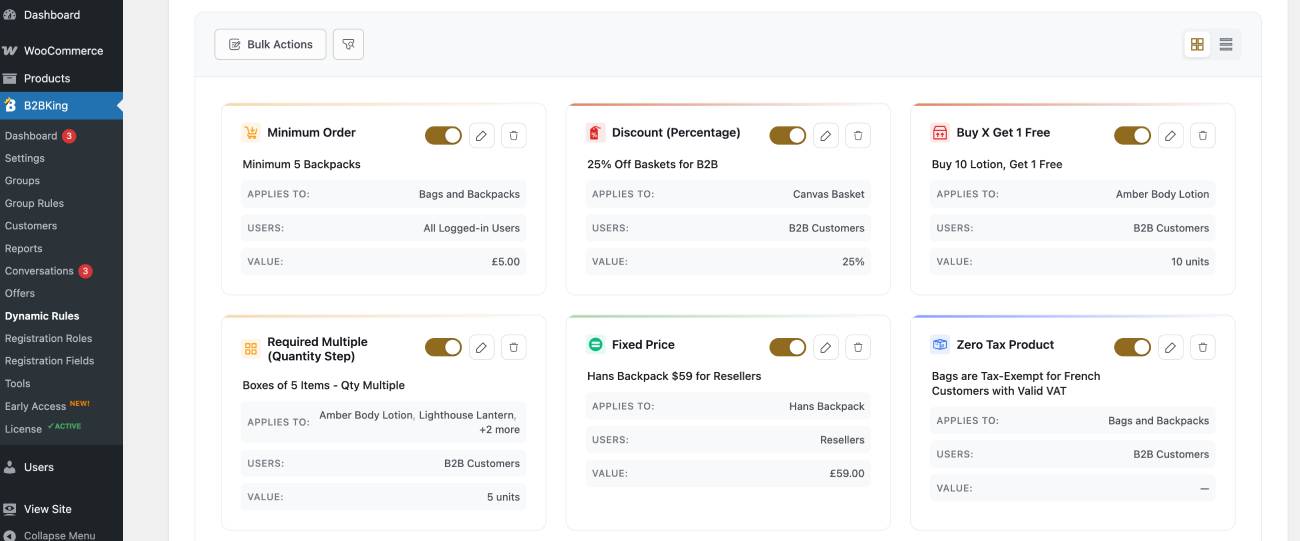
We’ll touch on pricing more later in this review when discussing the various dynamic rules for wholesale orders. But just to assure you that virtually every discount or pricing rule is possible, I encourage you to open the B2BKing live demo and play around with the pricing and rules. You’ll be impressed!
You can also display different product catalogs to different customer groups by using WooCommerce categories and B2BKing’s group visibility options:
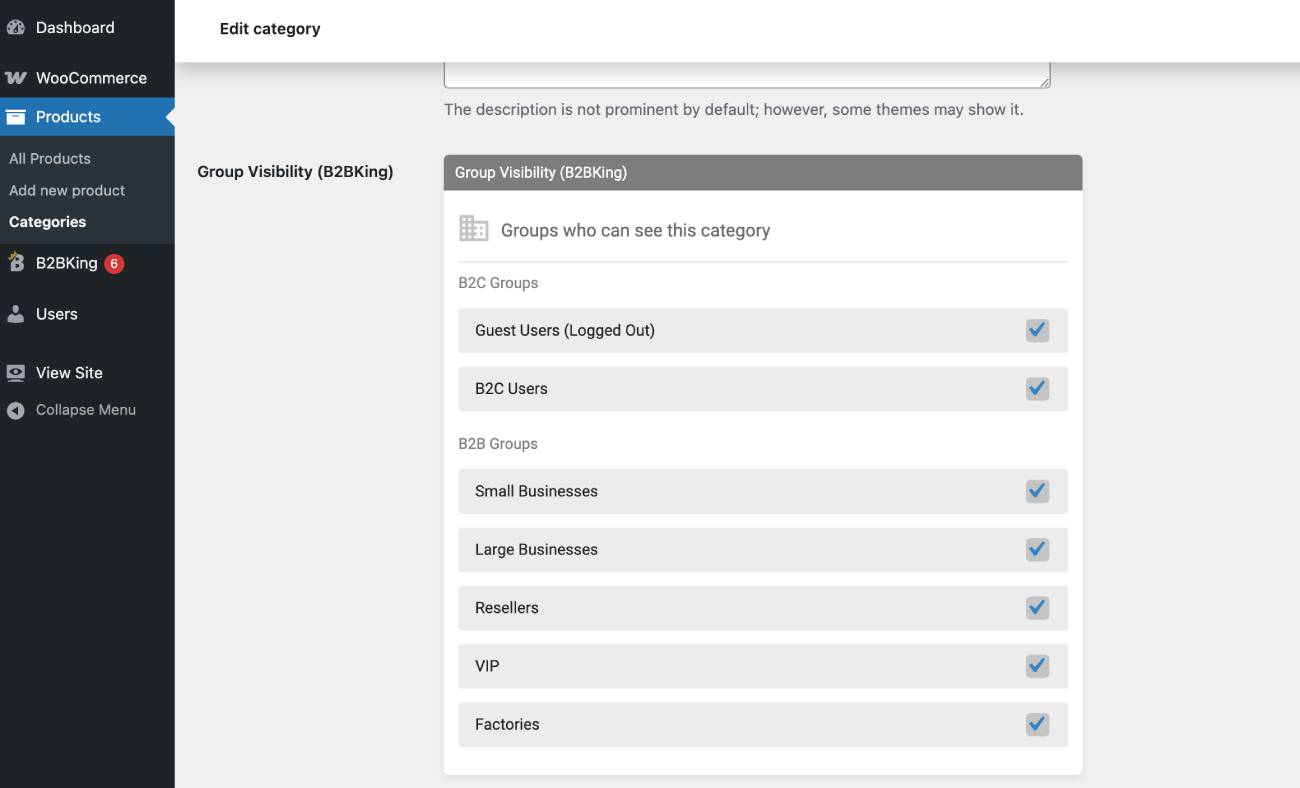
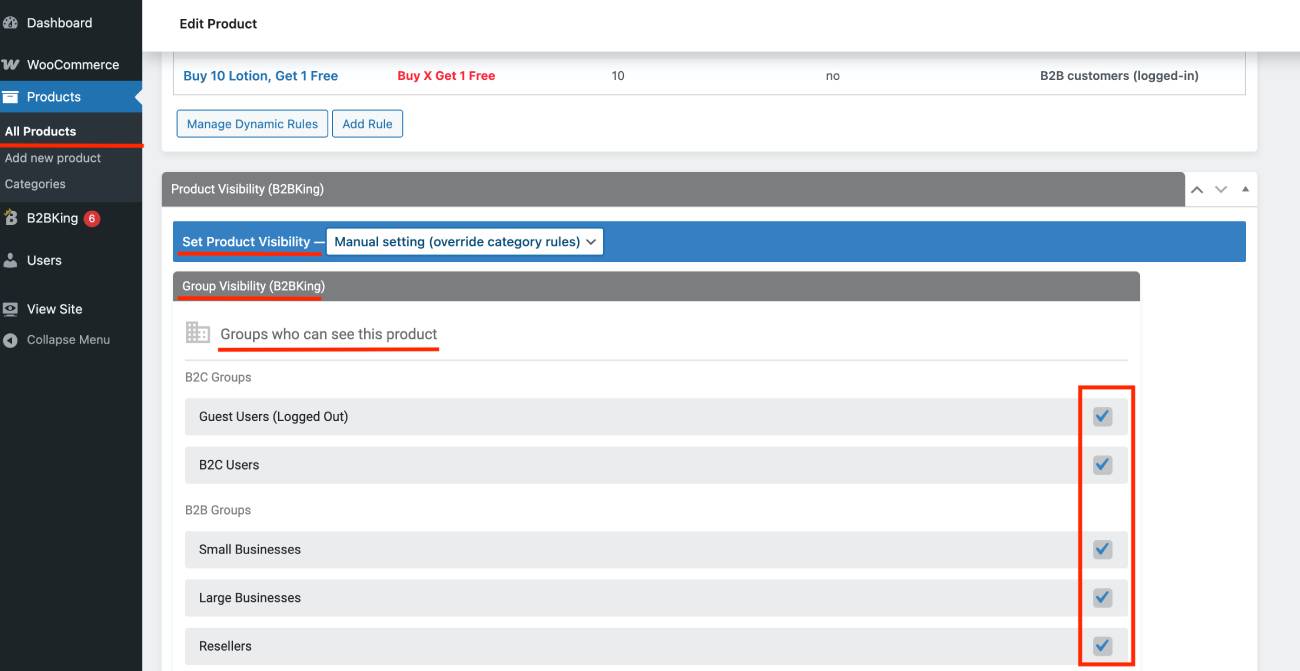
If you want to do that on a per-product basis, simply switch to the Products menu and find the same visibility settings for each product:
Can you hide retail prices from wholesale customers and vice versa? With B2BKing, you can configure exactly what guest visitors can see before they even register or log in.
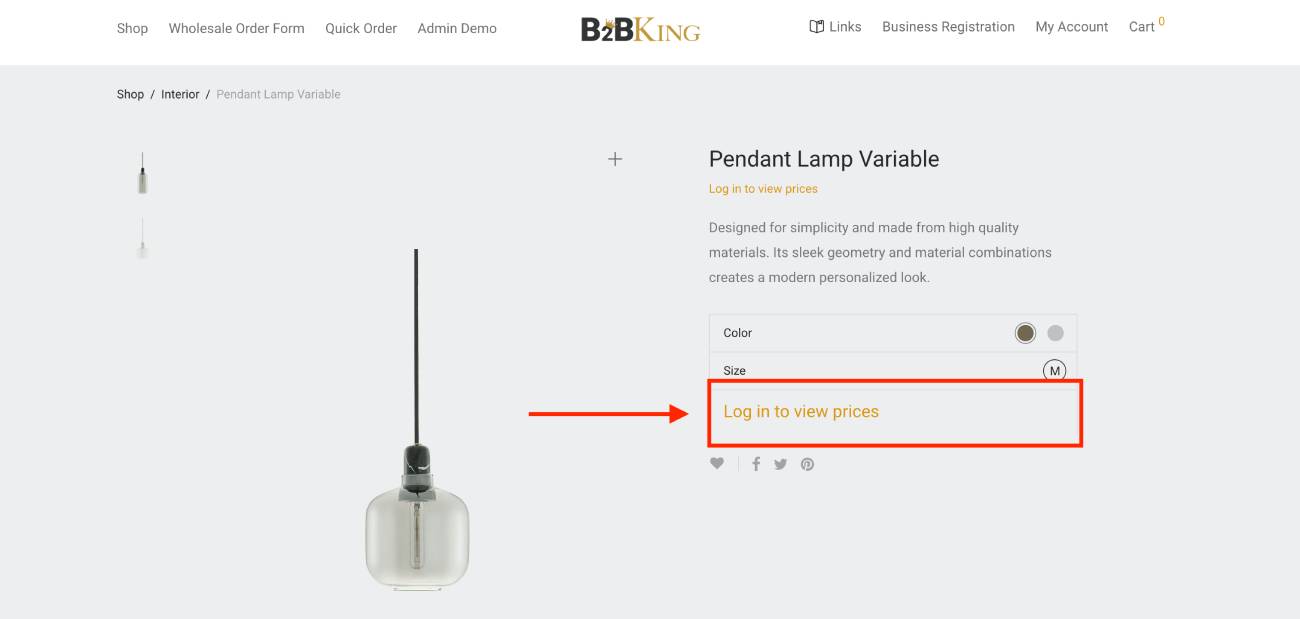
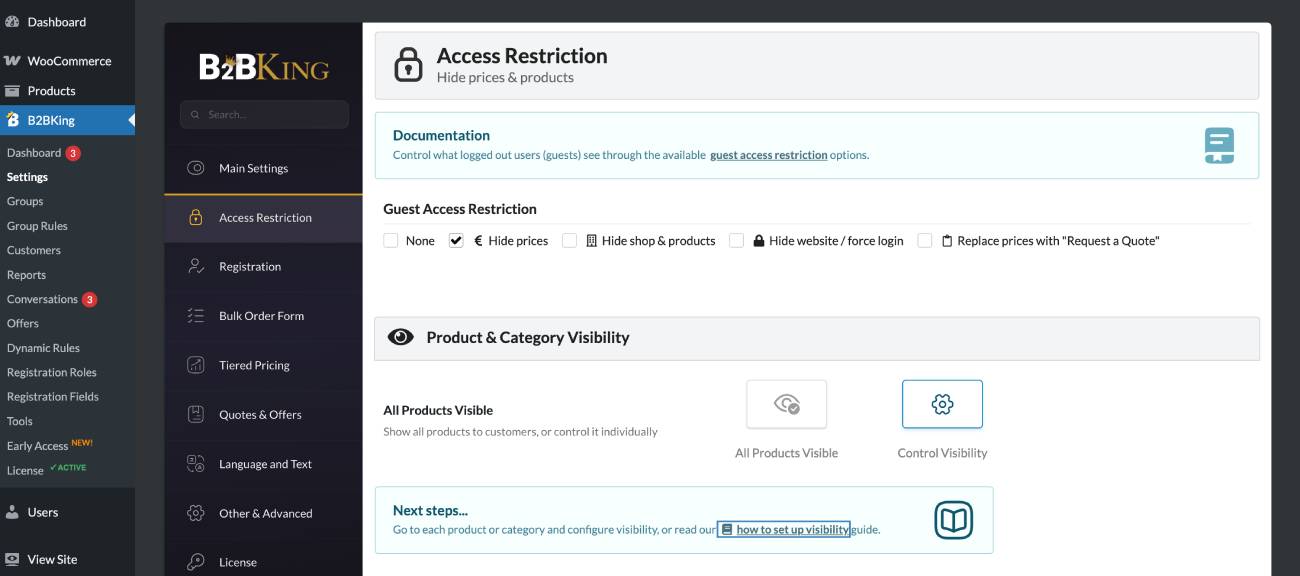
For example, it’s easy to hide prices, restrict access to products or the entire store, or replace purchasing with a quote request system to capture wholesale leads.
I could easily do that via the Access Restriction menu in the main settings:
As for stock levels, you can also configure different stock quantities for each product for B2B and B2C users. For hybrid stores, hiding stock information from B2C customers while showing exact quantities only to B2B users is also possible.
Trade Accounts & Customer Registration
Can your customers apply for a wholesale account through a registration form? Easily. You can control registration via Settings, too.
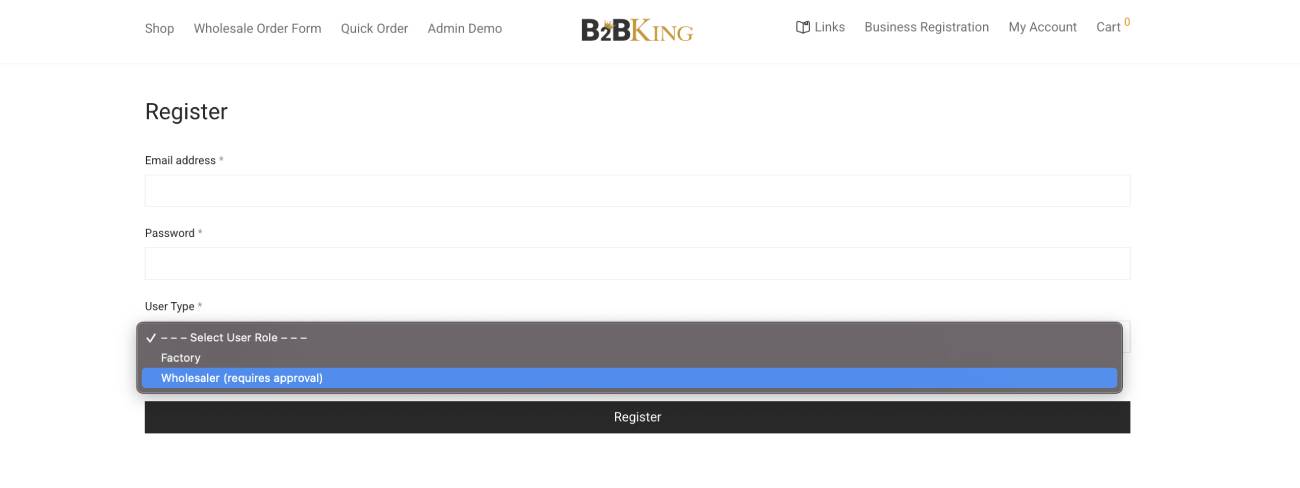
You can fully separate B2B and B2C registration in WooCommerce, so that a customer can see the drop-down menu with options and can select a wholesale account. You can also choose to manually approve wholesale customers before they access trade pricing.
Through the Registration fields menu, you can add the needed fields to collect VAT numbers, resale certificates, or business license details during registration. A nice bonus is that you can see the registration form preview result right in the admin area (super handy).
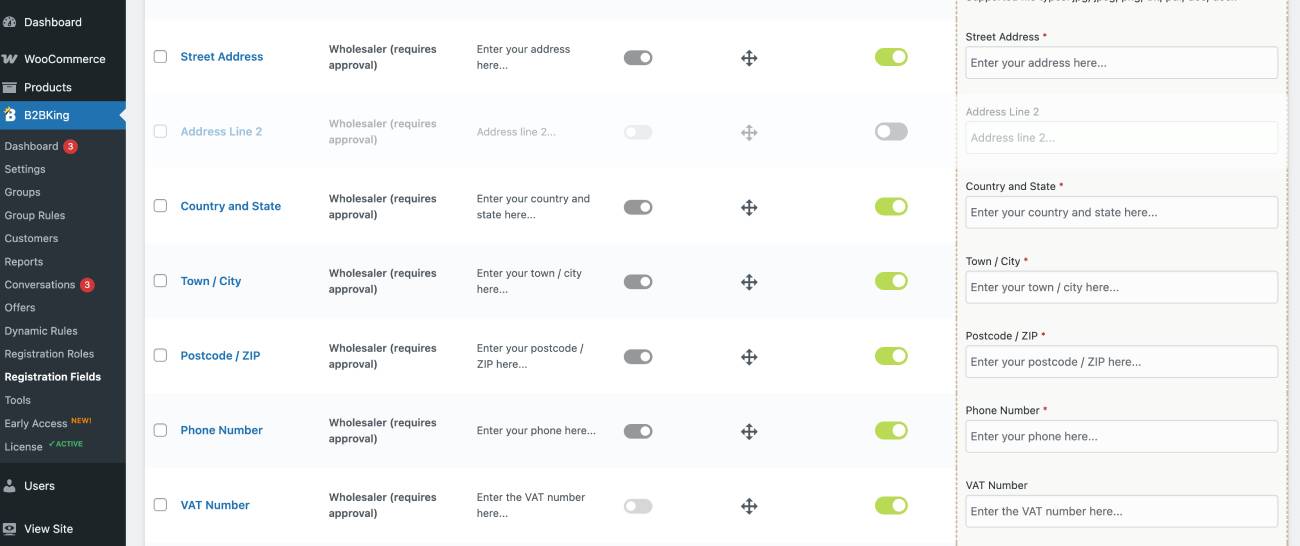
For each field, you’ll find even more settings, where you can even define which type of customer sees which field.
You’re secured here – the plugin uses a robust registration and approval system that places users into dedicated pricing and visibility groups based on the role they select during sign-up.
Some of you might need to provide different access levels when your B2B customers are companies with multiple employees who need access to the same account.
I’ve checked that in B2BKing and it covers this scenario too with ‘subaccounts’. These subaccounts let multiple people from the same company use the same wholesale account but being restricted to only specific actions (e.g. employee subaccounts create orders, but the main subaccount pays for them, etc.).
So, let’s make a quick conclusion on what you can do with the product visibility and catalog control using the B2BKing plugin for WooCommerce wholesale:
- Hide specific products or categories from guest visitors.
- Create a private wholesale catalog that only approved buyers can access.
- Show certain WooCommerce products only to distributors or specific customer groups you’ve defined.
- Hide all prices until a customer logs in.
- Fully customize customer registration forms.
- Restrict purchasing while still allowing customers to browse products (e.g. use a quote request feature).
- Customize payment and shipping methods per customer groups.
Ordering & Procurement with B2BKing
Now, let’s get down to the true routine of your clients – filling out order forms and placing bulk orders.
Is there a quick order form for entering SKUs and quantities in B2BKing? Can your customers reorder previous purchases easily? Does the plugin support minimum order quantities (MOQ)? And I got three “yeses”!
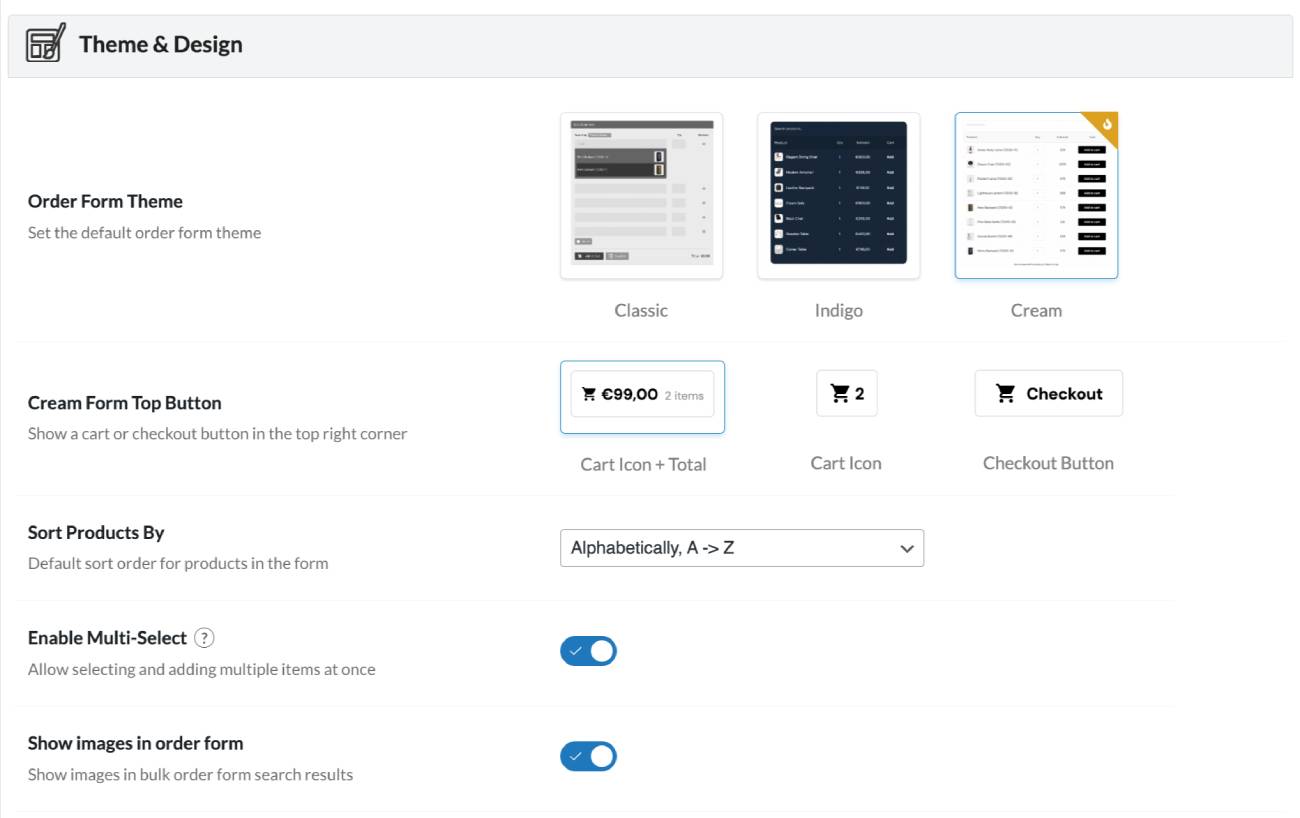
Your customers will find order forms inside the WooCommerce My Account page, while on the B2BKing side, you can customize those order form templates via Settings > Bulk Order Form. From there, you can:
- Pick a design (white, dark, or grey)
- Enable search by SKU
- Show or hide images
- Enable search by product name and description.
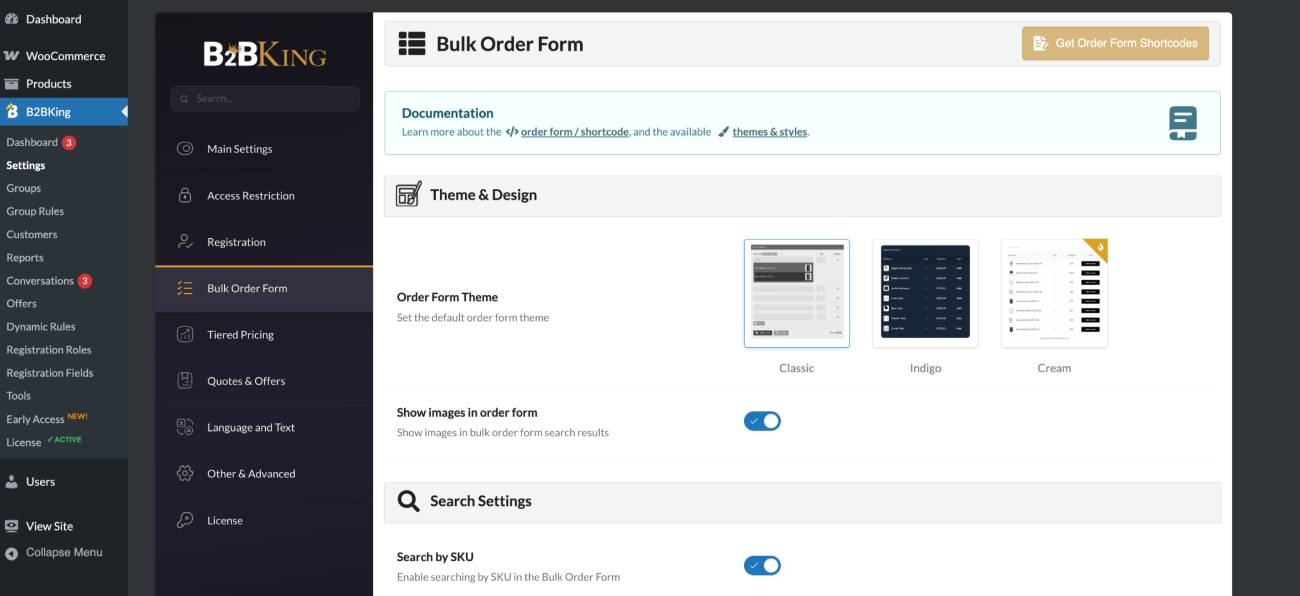
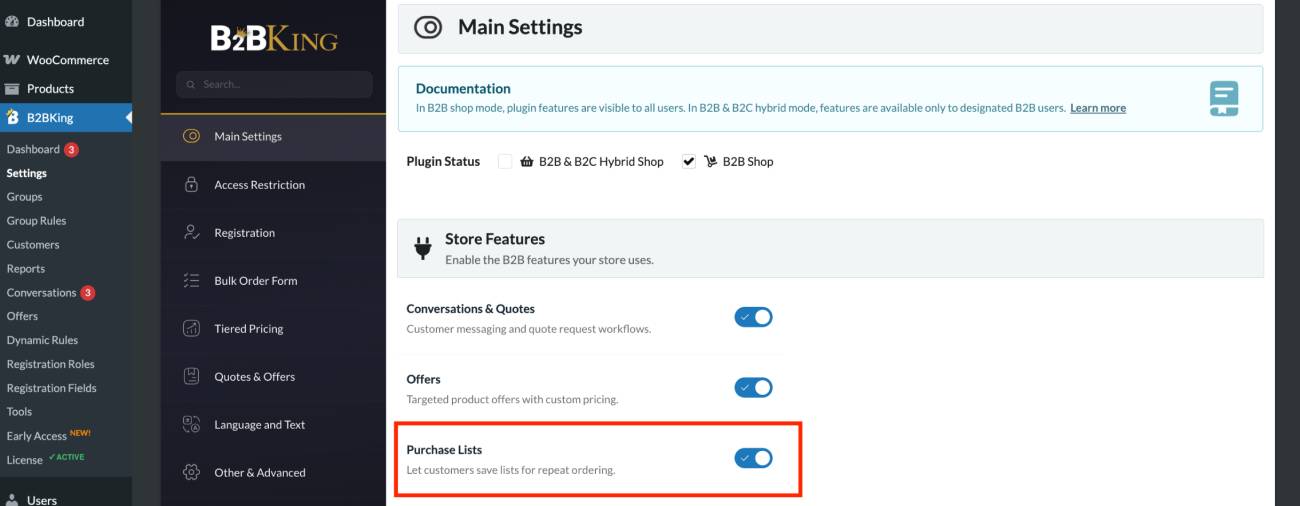
For repeat orders, B2BKing also adds a dedicated Purchase Lists section to the customer’s WooCommerce My Account panel.
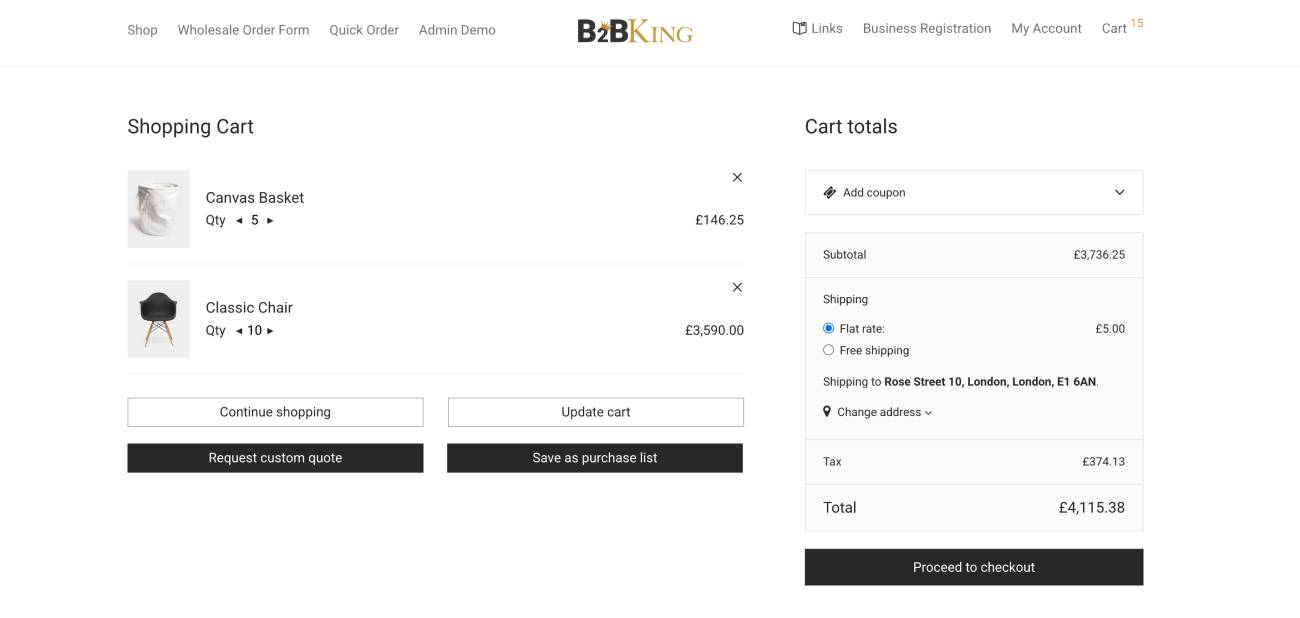
At checkout, customers can save their cart as a purchase list for quick reordering later (you can also enable this from the main Settings).
It’s actually more than that – the bulk order form is pretty flexible and provides many organizational and operational tools. For example, you can group products by brand and then sort them alphabetically within each brand. This works best when your catalog is small enough to fit on a single page.
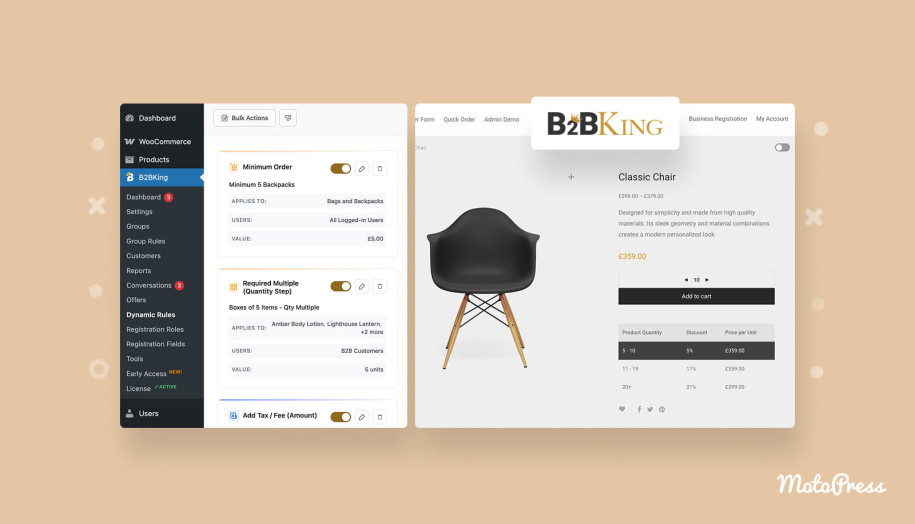
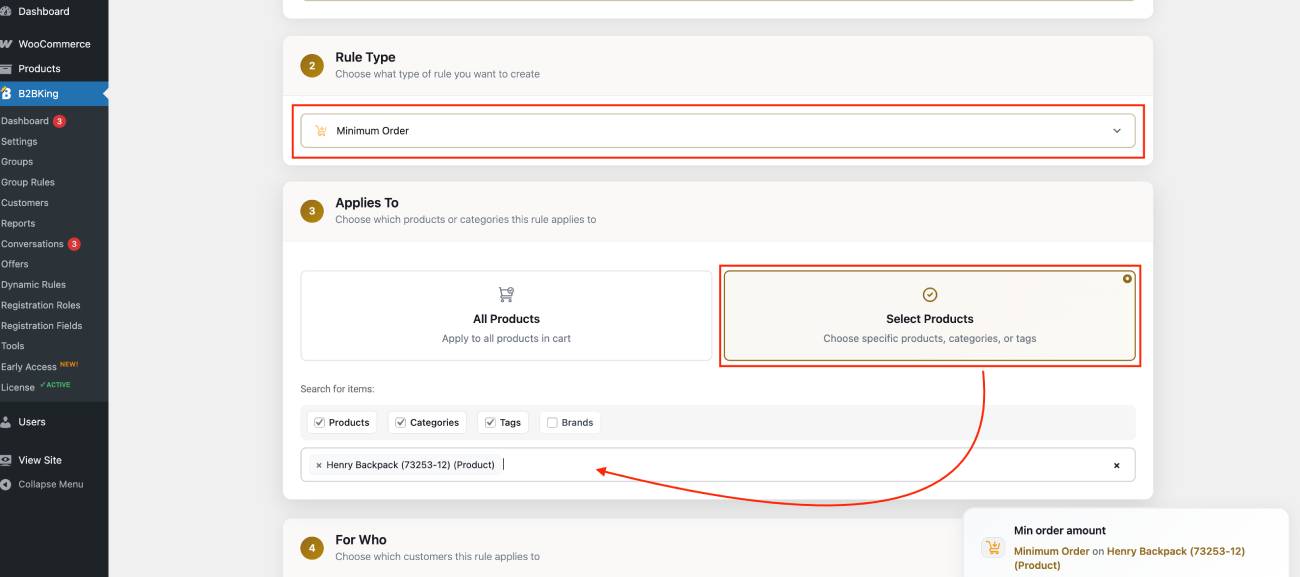
There are also rules you can apply to orders, which are pretty common in the wholesale world. For example, you can require minimum or maximum order values before checkout (I could configure this through the Dynamic Rules per product).
Moreover, you can sell products in case packs, cartons, or pallets – B2BKing has a separate Step option for this in the product quantity settings.
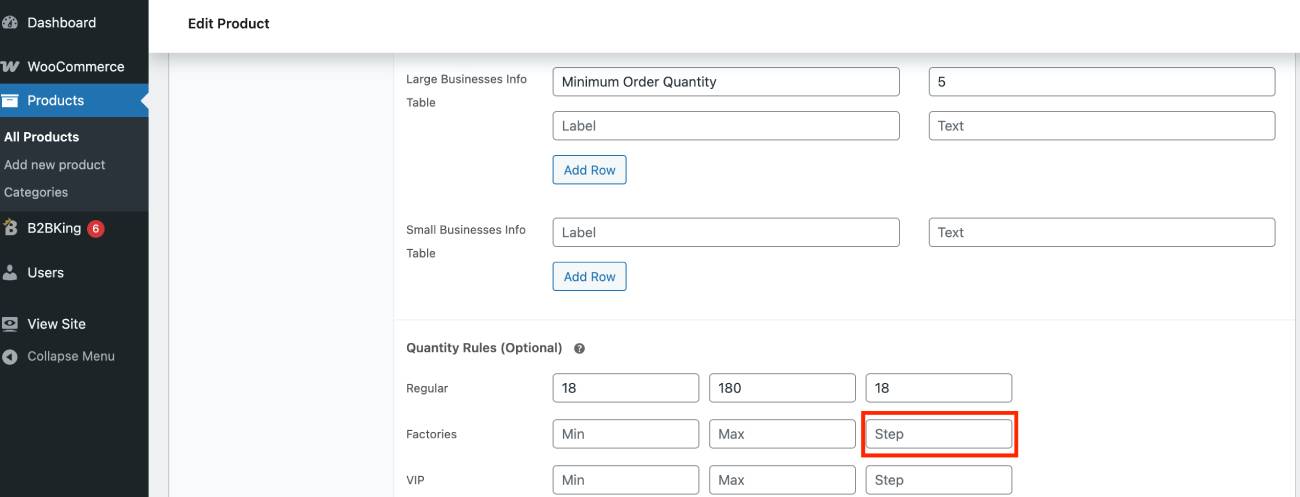
Think of the step quantity as the pack size customers must buy in. For example, if you set it to 6, they can order 6, 12, 18, 24, and so on, but not 7 or 13.
For variable products, the same step value is used for all variations by default. If some variations need different pack sizes, you can easily set that up with dynamic rules.
Needless to say, some alternative WooCommerce wholesale plugins don’t provide bulk order forms at all or charge extra for them. So it’s nice to see it’s all included in one package with B2BKing.
As we’ve already seen in the Groups menu, you can customize payment and shipping methods based on the customer segment, letting you match your checkout process to different business relationships, contracts, and order types, which is a common requirement in B2B commerce.
Quote Requests & Negotiated Sales
As I’ve already explained, your buyers can request a quote instead of purchasing immediately, with the ability to add an invoice payment gateway to your store, built-in directly with B2BKing.
And the coolest thing is that B2BKing allows you to enable quote requests even for specific products or categories.
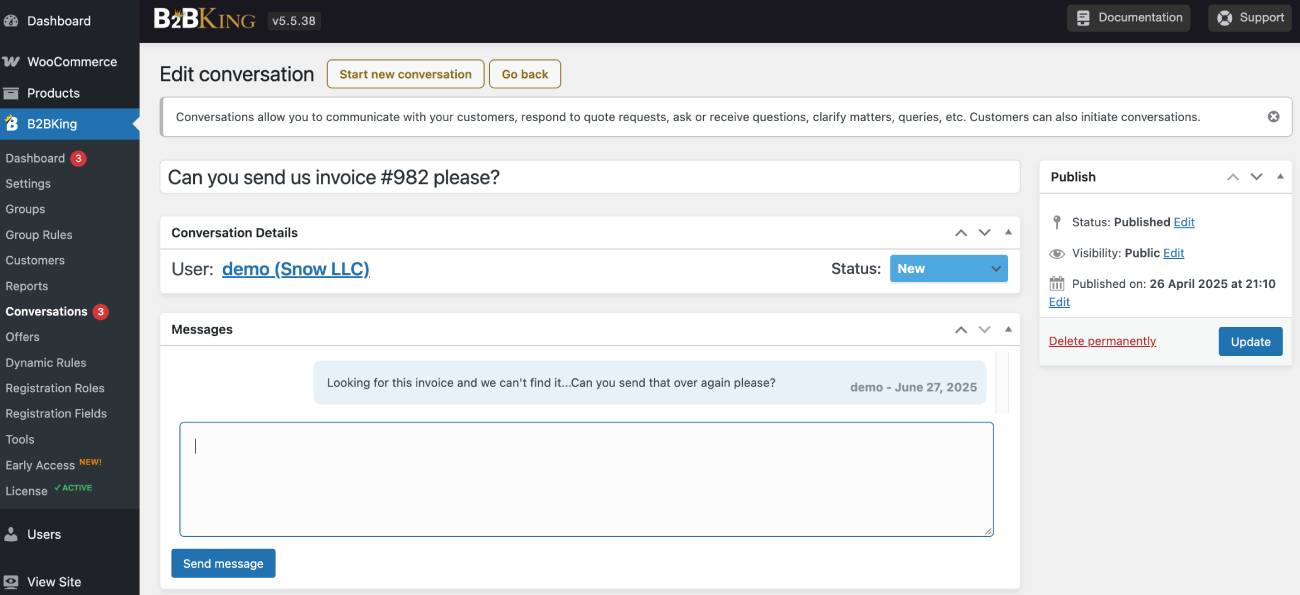
They can add products to a quote request, submit their requirements, and negotiate with you through built-in messaging. Once you’re ready, you can send a custom offer that customers can view, download as a PDF, or add directly to their cart and purchase.
You can easily have:
- Quote requests for logged-in or guest users
- Quotes for specific products or categories
- Customizable quote forms (e.g., allow customers to attach files or specifications when requesting a quote)
- Email notifications
- Direct checkout and quote requests available at the same time
- Hidden pricing (customers see a Request a Quote button and must contact you to receive pricing).
Once again, in B2BKing it’s easy to find the Quotes & Offers settings to customize your “Request a Quote” purchase workflow.
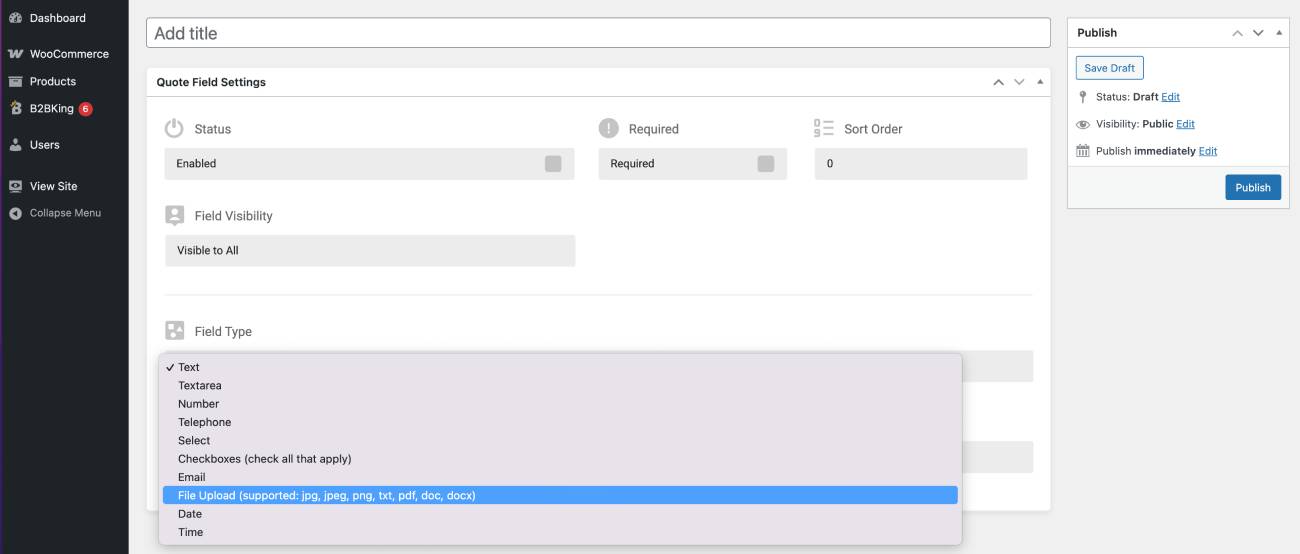
You can negotiate prices through the built-in quote conversation. A customer sends a quote request, you reply, adjust the terms or pricing, and go back and forth just like in a chat until you reach an agreement.
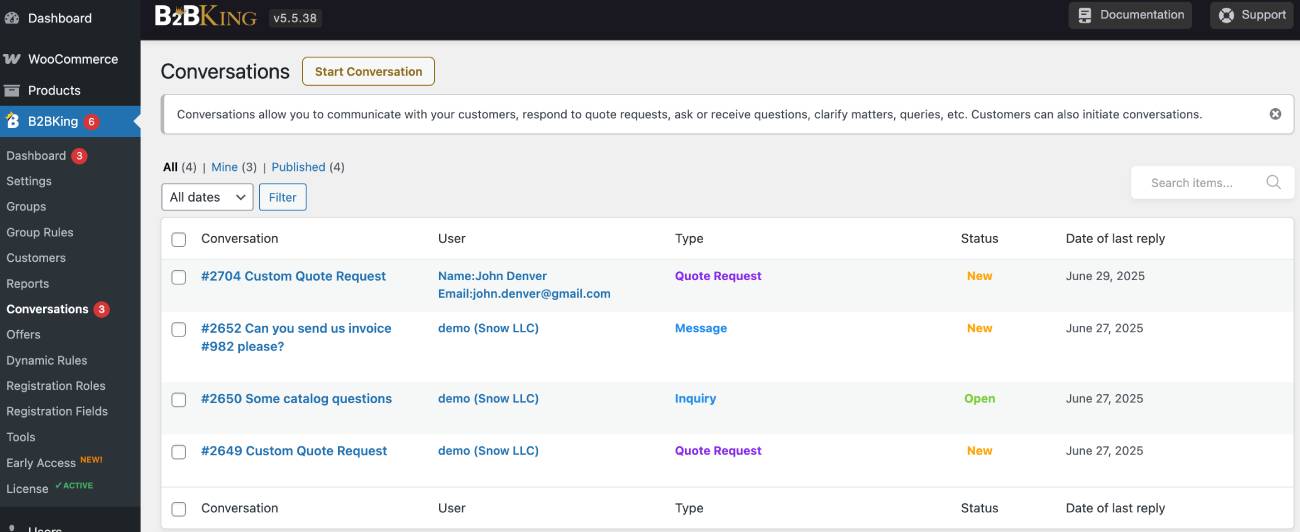
Well, you can fully negotiate and then turn the result into a custom offer that the customer can purchase using the built-in system in your B2BKing-powered WordPress store. It’s such a great level of automation for negotiation-based offers – you don’t need to handle everything over email and then manually create an offer. Basically, your approved quotes are converted into orders automatically.
To sum up the B2B user experience provided by B2BKing, you can require visitors to log in before viewing products or prices, create a wholesale portal that’s completely hidden from the public, fully customize the login and registration experience for trade customers, and ensure wholesale customers see only the products relevant to their business.
Tax & Compliance
The plugin also offers excellent tax exemption and tax management options. For example, in Europe, businesses usually pay VAT on purchases (plugin allows that). In many countries with sales tax (e.g., the United States), a retailer buying inventory from a wholesaler often does not pay sales tax on that purchase because the goods are being bought for resale, not for final use (this is also included with B2BKing).
However, no matter which regions you serve, you can create a tailor-made tax setup. For example, you can:
- Show prices excluding tax for specific user groups / Remove tax for specific user groups
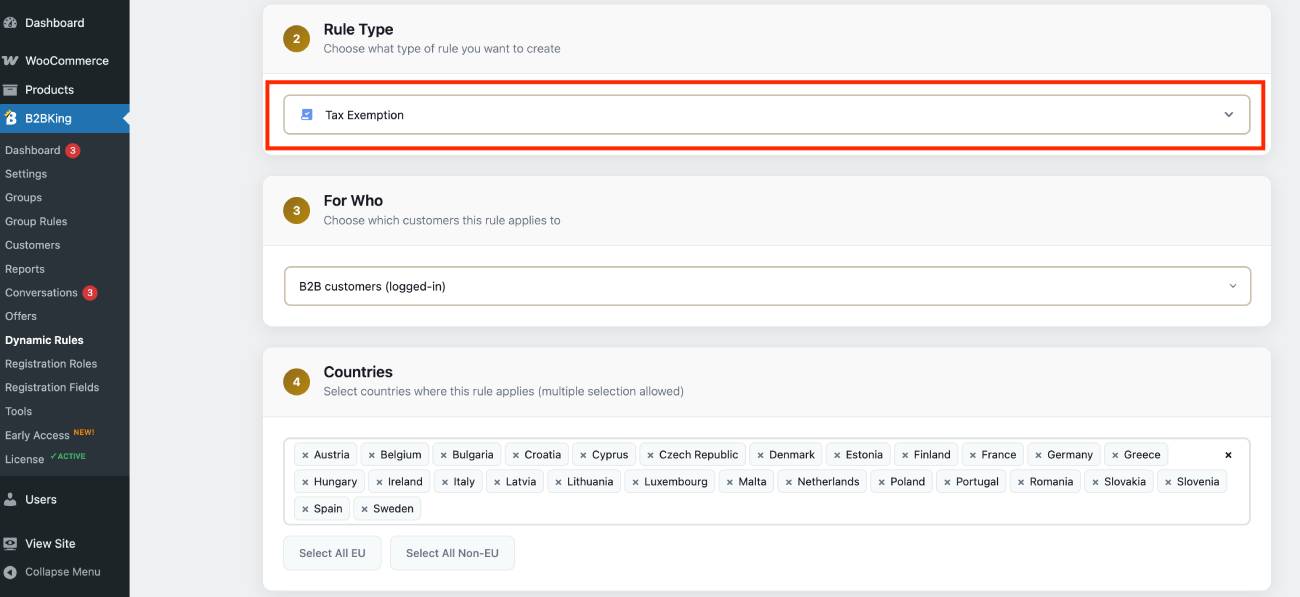
- Exempt specific countries from tax
- Validate VAT numbers through VIES before applying tax exemption.
I could easily set up diverse tax rules through the dynamic rules settings in B2BKing.
Buyers can also use credit limits to pay for an order (however, this option is not available in the Startup plan but can be accessed with upgrade to more expensive plans).
For the wholesale order invoice generation, B2BKing seamlessly works with WooCommerce invoicing plugins (like the popular WooCommerce PDF Invoices & Packing Slips) to automate invoice generation and emailing.
Scalability & Integrations
If you’re curious whether the B2BKing plugin will work with your accounting software or warehouse management system, the answer is most likely yes – because B2BKing works on top of WooCommerce.
For example, many ERP systems like NetSuite and others can be connected to your WooCommerce store. This means any WooCommerce-ERP integration will also work with B2BKing.
It also worked pretty well with our WooCommerce themes out of the box – you don’t need to make any custom tweaks.
The plugin can also handle hundreds or thousands of wholesale accounts thanks to its built-in dynamic caching system.
If you’re a developer, you’ll be glad to know it supports WordPress multisite and can also be used for multi-vendor stores with the PRO and Developer licenses.
I’m also sure that multilingual and multi-currency stores won’t have any issues:
– This WooCommerce wholesale plugin is fully translatable with Loco Translate or WPML.
– You can implement multi-currency support with the FOX plugin since B2BKing has a dedicated integration with it.
WooCommerce B2B Plugin Cost
One thing I like about B2BKing’s pricing is that it gives you a choice between an annual subscription and a lifetime license. If you’re launching a new wholesale store and aren’t yet sure about your long-term plans, the annual plan keeps the upfront cost lower.
On the other hand, if you’re running an established B2B business or know you’ll be using the plugin for years, the lifetime license can pay for itself (not many are fans of recurring renewal fees!).
B2BKing pricing basically comes down to how many sites you need to put the plugin on. Most stores just need the single site license (around $200 per year). But if you’re managing a bunch of different WooCommerce stores or running an agency, there are bigger plans for that ($300-$450 per year).
Is it worth the price? Considering the sheer number of built-in B2B features, I’d say yes, especially if you would otherwise need to buy and maintain several separate plugins for pricing, user roles, quote requests, tax handling, and wholesale ordering.
Final Thoughts: Should You Use the WooCommerce Wholesale Plugin from King’s Plugins?
No doubt, the B2BKing WooCommerce wholesale plugin covers almost every B2B and B2B+B2C scenario you might need: wholesale products, bulk pricing, quote-based sales, trade-only catalogs, stores with thousands of products, and more. You can tailor the experience for guests while still having full control over product visibility, pricing, and ordering permissions.
It can do much more than competitors within one standalone wholesale plugin.
I don’t think I need to list all its capabilities once more; instead, I want to reflect on a few things!
Is it for your store?
If this wholesale for WooCommerce plugin is more geared toward layered, scalable, and complex wholesale needs, does it make sense to use it for a simpler case? Generally, it’s not recommended to overload your site with such functionality (and overpay, obviously). However, I would disagree when it comes to a WooCommerce wholesale plugin specifically.
First, even a simple store with basic wholesale needs might require a more nuanced feature down the line (which is most likely already included with B2BKing). Looking ahead, your business may grow and scale, or regulations may change, requiring you to adapt quickly. All of this is easier when you already have a stable powerhouse installed on your WordPress site. You won’t need to switch or pay for add-ons.
Is the pricing worth it?
Another thing. As for the B2BKing cost, if you’re still unsure how long your store will be around, go with an annual license (it’s cheaper for the same set of features) rather than a lifetime license.
The UX
The plugin is huge but not mentally overwhelming. For almost every use case I wanted to learn or workflow I wanted to re-create, I was able to quickly find what I needed, with helpful documentation links placed contextually in the right menus. On the frontend, it also played nicely with our WooCommerce themes.
Finally, while most people call B2BKing ‘feature-packed’, I’d say its real strength is how flexible and reliable it feels in use. It has a surprisingly low learning curve, and it easily adapts to pretty much any wholesale scenario you throw at it. Worth a try.
FAQ
How to set up wholesale pricing in WooCommerce?
Can I hide retail prices from wholesale customers?
Where do I get a wholesale order form for WooCommerce?
Can I manually approve wholesale customers before they access trade pricing?
Can buyers request a quote instead of purchasing right away?